mirror of
https://github.com/wavetermdev/wails.git
synced 2026-04-22 15:26:15 -07:00
Compare commits
1 Commits
| Author | SHA1 | Date | |
|---|---|---|---|
 Lea Anthony Lea Anthony
|
7caf7854a6 |
@@ -1,120 +0,0 @@
|
||||
name: Build + Test v3 alpha
|
||||
|
||||
on:
|
||||
push:
|
||||
branches: [v3-alpha]
|
||||
paths-ignore:
|
||||
- 'mkdocs-website/**/*'
|
||||
workflow_dispatch:
|
||||
|
||||
jobs:
|
||||
test_go:
|
||||
name: Run Go Tests
|
||||
if: github.repository == 'wailsapp/wails'
|
||||
runs-on: ${{ matrix.os }}
|
||||
strategy:
|
||||
matrix:
|
||||
os: [windows-latest, macos-latest]
|
||||
go-version: [1.21]
|
||||
|
||||
steps:
|
||||
- name: Checkout code
|
||||
uses: actions/checkout@v3
|
||||
|
||||
- name: Install linux dependencies
|
||||
if: matrix.os == 'ubuntu-latest'
|
||||
run: sudo apt-get update -y && sudo apt-get install -y libgtk-3-dev libwebkit2gtk-4.0-dev build-essential pkg-config
|
||||
|
||||
- name: Setup Go
|
||||
uses: actions/setup-go@v3
|
||||
with:
|
||||
go-version: ${{ matrix.go-version }}
|
||||
|
||||
- name: Run tests (mac)
|
||||
if: matrix.os == 'macos-latest'
|
||||
env:
|
||||
CGO_LDFLAGS: -framework UniformTypeIdentifiers -mmacosx-version-min=10.13
|
||||
working-directory: ./v3
|
||||
run: go test -v ./...
|
||||
|
||||
- name: Run tests (!mac)
|
||||
if: matrix.os != 'macos-latest'
|
||||
working-directory: ./v3
|
||||
run: go test -v ./...
|
||||
|
||||
test_js:
|
||||
name: Run JS Tests
|
||||
if: github.repository == 'wailsapp/wails'
|
||||
runs-on: ubuntu-latest
|
||||
strategy:
|
||||
matrix:
|
||||
node-version: [18.x]
|
||||
|
||||
steps:
|
||||
- name: Checkout code
|
||||
uses: actions/checkout@v3
|
||||
|
||||
- name: Use Node.js ${{ matrix.node-version }}
|
||||
uses: actions/setup-node@v3
|
||||
with:
|
||||
node-version: ${{ matrix.node-version }}
|
||||
|
||||
- name: Install dependencies
|
||||
run: npm install
|
||||
working-directory: v2/internal/frontend/runtime
|
||||
|
||||
- name: Run tests
|
||||
run: npm test
|
||||
working-directory: v2/internal/frontend/runtime
|
||||
|
||||
test_templates:
|
||||
name: Test Templates
|
||||
needs: test_go
|
||||
runs-on: ${{ matrix.os }}
|
||||
strategy:
|
||||
fail-fast: true
|
||||
matrix:
|
||||
os: [ubuntu-latest, windows-latest, macos-latest]
|
||||
template:
|
||||
[
|
||||
svelte,
|
||||
svelte-ts,
|
||||
vue,
|
||||
vue-ts,
|
||||
react,
|
||||
react-ts,
|
||||
preact,
|
||||
preact-ts,
|
||||
lit,
|
||||
lit-ts,
|
||||
vanilla,
|
||||
vanilla-ts,
|
||||
]
|
||||
go-version: [1.21]
|
||||
steps:
|
||||
- name: Checkout
|
||||
uses: actions/checkout@v3
|
||||
|
||||
- name: Setup Go
|
||||
uses: actions/setup-go@v3
|
||||
with:
|
||||
go-version: ${{ matrix.go-version }}
|
||||
|
||||
- name: Build Wails3 CLI
|
||||
run: |
|
||||
cd ./v3/cmd/wails3
|
||||
go install
|
||||
wails3 -help
|
||||
|
||||
- name: Install linux dependencies
|
||||
if: matrix.os == 'ubuntu-latest'
|
||||
run: sudo apt-get update -y && sudo apt-get install -y libgtk-3-dev libwebkit2gtk-4.0-dev build-essential pkg-config
|
||||
|
||||
- name: Generate template '${{ matrix.template }}'
|
||||
run: |
|
||||
go install github.com/go-task/task/v3/cmd/task@latest
|
||||
mkdir -p ./test-${{ matrix.template }}
|
||||
cd ./test-${{ matrix.template }}
|
||||
wails3 init -n ${{ matrix.template }} -t ${{ matrix.template }}
|
||||
cd ${{ matrix.template }}
|
||||
wails3 build
|
||||
@@ -0,0 +1,33 @@
|
||||
name: Format Markdown Files
|
||||
|
||||
|
||||
jobs:
|
||||
format_markdown_files:
|
||||
runs-on: ubuntu-latest
|
||||
if: github.repository == 'wailsapp/wails'
|
||||
steps:
|
||||
- uses: actions/checkout@v3
|
||||
|
||||
- name: Setup Nodejs
|
||||
uses: actions/setup-node@v2
|
||||
with:
|
||||
node-version: 18.x
|
||||
|
||||
- name: Install Task
|
||||
uses: arduino/setup-task@v1
|
||||
with:
|
||||
version: 3.x
|
||||
repo-token: ${{ secrets.GITHUB_TOKEN }}
|
||||
|
||||
- name: Format All Markdown Files
|
||||
run: task format-all-md
|
||||
|
||||
- name: Create Pull Request
|
||||
uses: peter-evans/create-pull-request@v4
|
||||
with:
|
||||
commit-message: "docs: format document"
|
||||
title: "docs: format document"
|
||||
body: "- [x] Format all Markdown(x) documents"
|
||||
branch: chore/format-markdown-files
|
||||
delete-branch: true
|
||||
draft: false
|
||||
@@ -1,35 +0,0 @@
|
||||
name: v3 docs
|
||||
on:
|
||||
push:
|
||||
branches:
|
||||
- v3-alpha
|
||||
paths:
|
||||
- 'mkdocs-website/**/*'
|
||||
permissions:
|
||||
contents: write
|
||||
jobs:
|
||||
deploy:
|
||||
runs-on: ubuntu-latest
|
||||
if: github.event.repository.fork == false
|
||||
defaults:
|
||||
run:
|
||||
working-directory: ./mkdocs-website
|
||||
steps:
|
||||
- uses: actions/checkout@v3
|
||||
- uses: actions/setup-python@v4
|
||||
with:
|
||||
python-version: 3.x
|
||||
- run: echo "cache_id=$(date --utc '+%V')" >> $GITHUB_ENV
|
||||
- uses: actions/cache@v3
|
||||
with:
|
||||
key: mkdocs-material-${{ env.cache_id }}
|
||||
path: .cache
|
||||
restore-keys: |
|
||||
mkdocs-material-
|
||||
- run: sudo apt-get install pngquant
|
||||
- run: pip install pillow cairosvg
|
||||
- run: pip install git+https://${GH_TOKEN}@github.com/squidfunk/mkdocs-material-insiders.git
|
||||
- run: mkdocs build --config-file mkdocs.insiders.yml
|
||||
- run: mkdocs gh-deploy --force
|
||||
env:
|
||||
GH_TOKEN: ${{ secrets.GH_TOKEN }}
|
||||
@@ -36,6 +36,3 @@ v2/cmd/wails/internal/commands/initialise/templates/testtemplates/
|
||||
/v3/examples/build/bin/testapp
|
||||
/websitev3/site/
|
||||
/v3/examples/plugins/bin/testapp
|
||||
|
||||
# Temporary called mkdocs, should be renamed to more standard -website or similar
|
||||
/mkdocs-website/site
|
||||
|
||||
-168
@@ -1,168 +0,0 @@
|
||||
<p align="center" style="text-align: center">
|
||||
<img src="./assets/images/logo-universal.png" width="55%"><br/>
|
||||
</p>
|
||||
|
||||
<p align="center">
|
||||
Construye aplicaciones de escritorio usando Go y tecnologías web.
|
||||
<br/>
|
||||
<br/>
|
||||
<a href="https://github.com/wailsapp/wails/blob/master/LICENSE">
|
||||
<img alt="GitHub" src="https://img.shields.io/github/license/wailsapp/wails"/>
|
||||
</a>
|
||||
<a href="https://goreportcard.com/report/github.com/wailsapp/wails">
|
||||
<img src="https://goreportcard.com/badge/github.com/wailsapp/wails" />
|
||||
</a>
|
||||
<a href="https://pkg.go.dev/github.com/wailsapp/wails">
|
||||
<img src="https://pkg.go.dev/badge/github.com/wailsapp/wails.svg" alt="Go Reference"/>
|
||||
</a>
|
||||
<a href="https://github.com/wailsapp/wails/issues">
|
||||
<img src="https://img.shields.io/badge/contributions-welcome-brightgreen.svg?style=flat" alt="CodeFactor" />
|
||||
</a>
|
||||
<a href="https://app.fossa.com/projects/git%2Bgithub.com%2Fwailsapp%2Fwails?ref=badge_shield" alt="FOSSA Status">
|
||||
<img src="https://app.fossa.com/api/projects/git%2Bgithub.com%2Fwailsapp%2Fwails.svg?type=shield" />
|
||||
</a>
|
||||
<a href="https://github.com/avelino/awesome-go" rel="nofollow">
|
||||
<img src="https://cdn.rawgit.com/sindresorhus/awesome/d7305f38d29fed78fa85652e3a63e154dd8e8829/media/badge.svg" alt="Awesome" />
|
||||
</a>
|
||||
<a href="https://discord.gg/BrRSWTaxVK">
|
||||
<img alt="Discord" src="https://dcbadge.vercel.app/api/server/BrRSWTaxVK?style=flat"/>
|
||||
</a>
|
||||
<br/>
|
||||
<a href="https://github.com/wailsapp/wails/actions/workflows/build-and-test.yml" rel="nofollow">
|
||||
<img src="https://img.shields.io/github/actions/workflow/status/wailsapp/wails/build-and-test.yml?branch=master&logo=Github" alt="Build" />
|
||||
</a>
|
||||
<a href="https://github.com/wailsapp/wails/tags" rel="nofollow">
|
||||
<img alt="GitHub tag (latest SemVer pre-release)" src="https://img.shields.io/github/v/tag/wailsapp/wails?include_prereleases&label=version"/>
|
||||
</a>
|
||||
</p>
|
||||
|
||||
<div align="center">
|
||||
<strong>
|
||||
<samp>
|
||||
|
||||
[English](README.md) · [简体中文](README.zh-Hans.md) · [日本語](README.ja.md) ·
|
||||
[한국어](README.ko.md) · [Español](README.es.md) · [Português](README.pt-br.md) ·
|
||||
[Русский](README.ru.md)
|
||||
|
||||
</samp>
|
||||
</strong>
|
||||
</div>
|
||||
|
||||
## Tabla de Contenidos
|
||||
|
||||
- [Tabla de Contenidos](#tabla-de-contenidos)
|
||||
- [Introducción](#introducción)
|
||||
- [Funcionalidades](#funcionalidades)
|
||||
- [Plan de Trabajo](#plan-de-trabajo)
|
||||
- [Empezando](#empezando)
|
||||
- [Patrocinadores](#patrocinadores)
|
||||
- [Preguntas Frecuentes](#preguntas-frecuentes)
|
||||
- [Estrellas a lo Largo del Tiempo](#estrellas-a-lo-largo-del-tiempo)
|
||||
- [Colaboradores](#colaboradores)
|
||||
- [Licencia](#licencia)
|
||||
- [Inspiración](#inspiración)
|
||||
|
||||
## Introducción
|
||||
|
||||
El método tradicional para proveer una interfaz web en programas hechos con Go
|
||||
es a través del servidor web incorporado. Wails ofrece un enfoque diferente al
|
||||
permitir combinar el código hecho en Go con un frontend web en un solo archivo
|
||||
binario. Las herramientas que proporcionamos facilitan este trabajo para ti, al
|
||||
crear, compilar y empaquetar tu proyecto. ¡Lo único que debes hacer es ponerte
|
||||
creativo!
|
||||
|
||||
## Funcionalidades
|
||||
|
||||
- Utiliza Go estándar para el backend
|
||||
- Utiliza cualquier tecnología frontend con la que ya estés familiarizado para
|
||||
construir tu interfaz de usuario
|
||||
- Crea rápidamente interfaces de usuario enriquecidas para tus programas en Go
|
||||
utilizando plantillas predefinidas
|
||||
- Invoca fácilmente métodos de Go desde Javascript
|
||||
- Definiciones de Typescript generadas automáticamente para tus structs y
|
||||
métodos de Go
|
||||
- Diálogos y menús nativos
|
||||
- Soporte nativo de modo oscuro / claro
|
||||
- Soporte de translucidez y efectos de ventana esmerilada
|
||||
- Sistema de eventos unificado entre Go y Javascript
|
||||
- Herramienta CLI potente para generar y construir tus proyectos rápidamente
|
||||
- Multiplataforma
|
||||
- Usa motores de renderizado nativos - ¡_sin navegador integrado_!
|
||||
|
||||
### Plan de Trabajo
|
||||
|
||||
El plan de trabajo se puede encontrar
|
||||
[aqui](https://github.com/wailsapp/wails/discussions/1484). Por favor,
|
||||
consúltalo antes de abrir una solicitud de mejora.
|
||||
|
||||
## Empezando
|
||||
|
||||
Las instrucciones de instalacion se encuentran en nuestra
|
||||
[pagina web oficial](https://wails.io/docs/gettingstarted/installation).
|
||||
|
||||
## Patrocinadores
|
||||
|
||||
Este Proyecto cuenta con el apoyo de estas amables personas/ compañías:
|
||||
<img src="website/static/img/sponsors.svg" style="width:100%;max-width:800px;"/>
|
||||
|
||||
<p align="center">
|
||||
<img src="https://wails.io/img/sponsor/jetbrains-grayscale.webp" style="width: 100px"/>
|
||||
</p>
|
||||
|
||||
## Preguntas Frecuentes
|
||||
|
||||
- ¿Es esta una alternativa a Electron?
|
||||
|
||||
Depende de tus requisitos. Está diseñado para facilitar a los programadores de
|
||||
Go la creación de aplicaciones de escritorio livianas o agregar una interfaz
|
||||
gráfica a sus aplicaciones existentes. Wails ofrece elementos nativos como
|
||||
menús y diálogos, por lo que podría considerarse una alternativa liviana a
|
||||
Electron.
|
||||
|
||||
- ¿A quien esta dirigido este proyecto?
|
||||
|
||||
El proyecto esta dirigido a programadores de Go que desean integrar una
|
||||
interfaz HMTL/JS/CSS en sus aplicaciones, sin tener que recurrir a la creación
|
||||
de un servidor y abrir el navegador para visualizarla.
|
||||
|
||||
- ¿Cual es el significado del nombre?
|
||||
|
||||
Cuando vi WebView, pensé: "Lo que realmente quiero es una herramienta para
|
||||
construir una aplicación WebView, algo similar a lo que Rails es para Ruby".
|
||||
Así que inicialmente fue un juego de palabras (WebView en Rails). Además, por
|
||||
casualidad, también es homófono del nombre en inglés del
|
||||
[país](https://en.wikipedia.org/wiki/Wales) del que provengo. Así que se quedó
|
||||
con ese nombre.
|
||||
|
||||
## Estrellas a lo Largo del Tiempo
|
||||
|
||||
[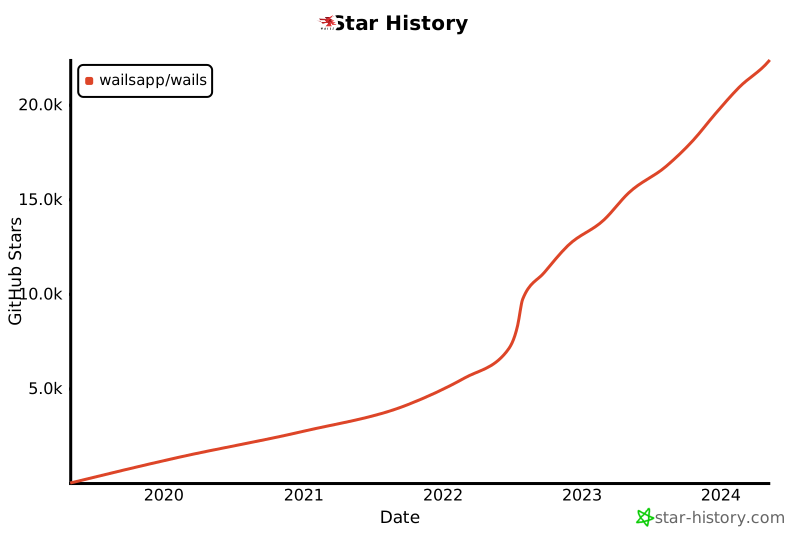](https://star-history.com/#wailsapp/wails&Date)
|
||||
|
||||
## Colaboradores
|
||||
|
||||
¡La lista de colaboradores se está volviendo demasiado grande para el archivo
|
||||
readme! Todas las personas increíbles que han contribuido a este proyecto tienen
|
||||
su propia página [aqui](https://wails.io/credits#contributors).
|
||||
|
||||
## Licencia
|
||||
|
||||
[](https://app.fossa.com/projects/git%2Bgithub.com%2Fwailsapp%2Fwails?ref=badge_large)
|
||||
|
||||
## Inspiración
|
||||
|
||||
Este proyecto fue construido mientras se escuchaban estos álbumes:
|
||||
|
||||
- [Manic Street Preachers - Resistance Is Futile](https://open.spotify.com/album/1R2rsEUqXjIvAbzM0yHrxA)
|
||||
- [Manic Street Preachers - This Is My Truth, Tell Me Yours](https://open.spotify.com/album/4VzCL9kjhgGQeKCiojK1YN)
|
||||
- [The Midnight - Endless Summer](https://open.spotify.com/album/4Krg8zvprquh7TVn9OxZn8)
|
||||
- [Gary Newman - Savage (Songs from a Broken World)](https://open.spotify.com/album/3kMfsD07Q32HRWKRrpcexr)
|
||||
- [Steve Vai - Passion & Warfare](https://open.spotify.com/album/0oL0OhrE2rYVns4IGj8h2m)
|
||||
- [Ben Howard - Every Kingdom](https://open.spotify.com/album/1nJsbWm3Yy2DW1KIc1OKle)
|
||||
- [Ben Howard - Noonday Dream](https://open.spotify.com/album/6astw05cTiXEc2OvyByaPs)
|
||||
- [Adwaith - Melyn](https://open.spotify.com/album/2vBE40Rp60tl7rNqIZjaXM)
|
||||
- [Gwidaith Hen Fran - Cedors Hen Wrach](https://open.spotify.com/album/3v2hrfNGINPLuDP0YDTOjm)
|
||||
- [Metallica - Metallica](https://open.spotify.com/album/2Kh43m04B1UkVcpcRa1Zug)
|
||||
- [Bloc Party - Silent Alarm](https://open.spotify.com/album/6SsIdN05HQg2GwYLfXuzLB)
|
||||
- [Maxthor - Another World](https://open.spotify.com/album/3tklE2Fgw1hCIUstIwPBJF)
|
||||
- [Alun Tan Lan - Y Distawrwydd](https://open.spotify.com/album/0c32OywcLpdJCWWMC6vB8v)
|
||||
[Alun Tan Lan - Y Distawrwydd](https://open.spotify.com/album/0c32OywcLpdJCWWMC6vB8v)
|
||||
+1
-3
@@ -42,9 +42,7 @@
|
||||
<strong>
|
||||
<samp>
|
||||
|
||||
[English](README.md) · [简体中文](README.zh-Hans.md) · [日本語](README.ja.md) ·
|
||||
[한국어](README.ko.md) · [Español](README.es.md) · [Português](README.pt-br.md) ·
|
||||
[Русский](README.ru.md)
|
||||
[English](README.md) · [简体中文](README.zh-Hans.md) · [日本語](README.ja.md) · [한국어](README.ko.md)
|
||||
|
||||
</samp>
|
||||
</strong>
|
||||
|
||||
+1
-3
@@ -42,9 +42,7 @@
|
||||
<strong>
|
||||
<samp>
|
||||
|
||||
[English](README.md) · [简体中文](README.zh-Hans.md) · [日本語](README.ja.md) ·
|
||||
[한국어](README.ko.md) · [Español](README.es.md) · [Português](README.pt-br.md) ·
|
||||
[Русский](README.ru.md)
|
||||
[English](README.md) · [简体中文](README.zh-Hans.md) · [日本語](README.ja.md) · [한국어](README.ko.md)
|
||||
|
||||
</samp>
|
||||
</strong>
|
||||
|
||||
@@ -40,9 +40,7 @@
|
||||
<strong>
|
||||
<samp>
|
||||
|
||||
[English](README.md) · [简体中文](README.zh-Hans.md) · [日本語](README.ja.md) ·
|
||||
[한국어](README.ko.md) · [Español](README.es.md) · [Português](README.pt-br.md) ·
|
||||
[Русский](README.ru.md)
|
||||
[English](README.md) · [简体中文](README.zh-Hans.md) · [日本語](README.ja.md) · [한국어](README.ko.md)
|
||||
|
||||
</samp>
|
||||
</strong>
|
||||
|
||||
-150
@@ -1,150 +0,0 @@
|
||||
<p align="center" style="text-align: center">
|
||||
<img src="./assets/images/logo-universal.png" width="55%"><br/>
|
||||
</p>
|
||||
|
||||
<p align="center">
|
||||
Crie aplicativos de desktop usando Go e tecnologias Web.
|
||||
<br/>
|
||||
<br/>
|
||||
<a href="https://github.com/wailsapp/wails/blob/master/LICENSE">
|
||||
<img alt="GitHub" src="https://img.shields.io/github/license/wailsapp/wails"/>
|
||||
</a>
|
||||
<a href="https://goreportcard.com/report/github.com/wailsapp/wails">
|
||||
<img src="https://goreportcard.com/badge/github.com/wailsapp/wails" />
|
||||
</a>
|
||||
<a href="https://pkg.go.dev/github.com/wailsapp/wails">
|
||||
<img src="https://pkg.go.dev/badge/github.com/wailsapp/wails.svg" alt="Go Reference"/>
|
||||
</a>
|
||||
<a href="https://github.com/wailsapp/wails/issues">
|
||||
<img src="https://img.shields.io/badge/contributions-welcome-brightgreen.svg?style=flat" alt="CodeFactor" />
|
||||
</a>
|
||||
<a href="https://app.fossa.com/projects/git%2Bgithub.com%2Fwailsapp%2Fwails?ref=badge_shield" alt="FOSSA Status">
|
||||
<img src="https://app.fossa.com/api/projects/git%2Bgithub.com%2Fwailsapp%2Fwails.svg?type=shield" />
|
||||
</a>
|
||||
<a href="https://github.com/avelino/awesome-go" rel="nofollow">
|
||||
<img src="https://cdn.rawgit.com/sindresorhus/awesome/d7305f38d29fed78fa85652e3a63e154dd8e8829/media/badge.svg" alt="Awesome" />
|
||||
</a>
|
||||
<a href="https://discord.gg/BrRSWTaxVK">
|
||||
<img alt="Discord" src="https://dcbadge.vercel.app/api/server/BrRSWTaxVK?style=flat"/>
|
||||
</a>
|
||||
<br/>
|
||||
<a href="https://github.com/wailsapp/wails/actions/workflows/build-and-test.yml" rel="nofollow">
|
||||
<img src="https://img.shields.io/github/actions/workflow/status/wailsapp/wails/build-and-test.yml?branch=master&logo=Github" alt="Build" />
|
||||
</a>
|
||||
<a href="https://github.com/wailsapp/wails/tags" rel="nofollow">
|
||||
<img alt="GitHub tag (latest SemVer pre-release)" src="https://img.shields.io/github/v/tag/wailsapp/wails?include_prereleases&label=version"/>
|
||||
</a>
|
||||
</p>
|
||||
|
||||
<div align="center">
|
||||
<strong>
|
||||
<samp>
|
||||
|
||||
[English](README.md) · [简体中文](README.zh-Hans.md) · [日本語](README.ja.md) ·
|
||||
[한국어](README.ko.md) · [Español](README.es.md) · [Português](README.pt-br.md)
|
||||
|
||||
</samp>
|
||||
</strong>
|
||||
</div>
|
||||
|
||||
## Índice
|
||||
|
||||
- [Índice](#índice)
|
||||
- [Introdução](#introdução)
|
||||
- [Recursos e funcionalidades](#recursos-e-funcionalidades)
|
||||
- [Plano de trabalho](#plano-de-trabalho)
|
||||
- [Iniciando](#iniciando)
|
||||
- [Patrocinadores](#patrocinadores)
|
||||
- [Perguntas frequentes](#perguntas-frequentes)
|
||||
- [Estrelas ao longo do tempo](#estrelas-ao-longo-do-tempo)
|
||||
- [Colaboradores](#colaboradores)
|
||||
- [Licença](#licença)
|
||||
- [Inspiração](#inspiração)
|
||||
|
||||
## Introdução
|
||||
|
||||
O método tradicional de fornecer interfaces da Web para programas Go é por meio de um servidor da Web integrado. Wails oferece uma
|
||||
abordagem: fornece a capacidade de agrupar o código Go e um front-end da Web em um único binário. As ferramentas são fornecidas para
|
||||
que torne isso mais fácil para você lidando com a criação, compilação e agrupamento de projetos. Tudo o que você precisa fazer é ser criativo!
|
||||
|
||||
## Recursos e funcionalidades
|
||||
|
||||
- Use Go padrão para o back-end
|
||||
- Use qualquer tecnologia de front-end com a qual você já esteja familiarizado para criar sua interface do usuário
|
||||
- Crie rapidamente um front-end avançado para seus programas Go usando modelos pré-construídos
|
||||
- Chame facilmente métodos Go com JavaScript
|
||||
- Definições TypeScript geradas automaticamente para suas estruturas e métodos Go
|
||||
- Diálogos e menus nativos
|
||||
- Suporte nativo ao modo escuro/claro
|
||||
- Suporta translucidez moderna e efeitos de "janela fosca"
|
||||
- Sistema de eventos unificado entre Go e JavaScript
|
||||
- Poderosa ferramenta cli para gerar e construir rapidamente seus projetos
|
||||
- Multiplataforma
|
||||
- Usa mecanismos de renderização nativos - _sem navegador incorporado_!
|
||||
|
||||
### Plano de trabalho
|
||||
|
||||
O plano de trabalho do projeto pode ser encontrado [aqui](https://github.com/wailsapp/wails/discussions/1484). Por favor consulte
|
||||
isso antes de abrir um pedido de melhoria.
|
||||
|
||||
## Iniciando
|
||||
|
||||
As instruções de instalação estão no [site oficial](https://wails.io/docs/gettingstarted/installation).
|
||||
|
||||
## Patrocinadores
|
||||
|
||||
Este projeto é apoiado por estas simpáticas pessoas/empresas:
|
||||
<img src="website/static/img/sponsors.svg" style="width:100%;max-width:800px;"/>
|
||||
|
||||
<p align="center">
|
||||
<img src="https://wails.io/img/sponsor/jetbrains-grayscale.webp" style="width: 100px"/>
|
||||
</p>
|
||||
|
||||
## Perguntas frequentes
|
||||
|
||||
- Esta é uma alternativa ao Electron?
|
||||
|
||||
Depende de seus requisitos. Ele foi projetado para tornar mais fácil para os programadores Go criar aplicações desktop
|
||||
e adicionar um front-end aos seus aplicativos existentes. O Wails oferece elementos nativos, como menus
|
||||
e diálogos, por isso pode ser considerada uma alternativa leve, se comparado ao Electron.
|
||||
|
||||
- A quem se destina este projeto?
|
||||
|
||||
Programadores Go que desejam agrupar um front-end HTML/JS/CSS com seus aplicativos, sem recorrer à criação de um
|
||||
servidor e abrir um navegador para visualizá-lo.
|
||||
|
||||
- Qual é o significado do nome?
|
||||
|
||||
Quando vi o WebView, pensei "O que eu realmente quero é ferramentas para construir um aplicativo WebView, algo semelhante ao que Rails é para Ruby". Portanto, inicialmente era um jogo de palavras (WebView on Rails). Por acaso, também era um homófono do
|
||||
Nome em inglês para o [país](https://en.wikipedia.org/wiki/Wales) de onde eu sou. Então ficou com esse nome.
|
||||
|
||||
## Estrelas ao longo do tempo
|
||||
|
||||
[](https://star-history.com/#wailsapp/wails&Date)
|
||||
|
||||
## Colaboradores
|
||||
|
||||
A lista de colaboradores está ficando grande demais para o arquivo readme! Todas as pessoas incríveis que contribuíram para o
|
||||
projeto tem sua própria página [aqui](https://wails.io/credits#contributors).
|
||||
|
||||
## Licença
|
||||
|
||||
[](https://app.fossa.com/projects/git%2Bgithub.com%2Fwailsapp%2Fwails?ref=badge_large)
|
||||
|
||||
## Inspiração
|
||||
|
||||
Este projeto foi construído ouvindo esses álbuns:
|
||||
|
||||
- [Manic Street Preachers - Resistance Is Futile](https://open.spotify.com/album/1R2rsEUqXjIvAbzM0yHrxA)
|
||||
- [Manic Street Preachers - This Is My Truth, Tell Me Yours](https://open.spotify.com/album/4VzCL9kjhgGQeKCiojK1YN)
|
||||
- [The Midnight - Endless Summer](https://open.spotify.com/album/4Krg8zvprquh7TVn9OxZn8)
|
||||
- [Gary Newman - Savage (Songs from a Broken World)](https://open.spotify.com/album/3kMfsD07Q32HRWKRrpcexr)
|
||||
- [Steve Vai - Passion & Warfare](https://open.spotify.com/album/0oL0OhrE2rYVns4IGj8h2m)
|
||||
- [Ben Howard - Every Kingdom](https://open.spotify.com/album/1nJsbWm3Yy2DW1KIc1OKle)
|
||||
- [Ben Howard - Noonday Dream](https://open.spotify.com/album/6astw05cTiXEc2OvyByaPs)
|
||||
- [Adwaith - Melyn](https://open.spotify.com/album/2vBE40Rp60tl7rNqIZjaXM)
|
||||
- [Gwidaith Hen Fran - Cedors Hen Wrach](https://open.spotify.com/album/3v2hrfNGINPLuDP0YDTOjm)
|
||||
- [Metallica - Metallica](https://open.spotify.com/album/2Kh43m04B1UkVcpcRa1Zug)
|
||||
- [Bloc Party - Silent Alarm](https://open.spotify.com/album/6SsIdN05HQg2GwYLfXuzLB)
|
||||
- [Maxthor - Another World](https://open.spotify.com/album/3tklE2Fgw1hCIUstIwPBJF)
|
||||
- [Alun Tan Lan - Y Distawrwydd](https://open.spotify.com/album/0c32OywcLpdJCWWMC6vB8v)
|
||||
-153
@@ -1,153 +0,0 @@
|
||||
<p align="center" style="text-align: center">
|
||||
<img src="./assets/images/logo-universal.png" width="55%"><br/>
|
||||
</p>
|
||||
|
||||
<p align="center">
|
||||
Собирайте Desktop приложения используя Go и Web технологии
|
||||
<br/>
|
||||
<br/>
|
||||
<a href="https://github.com/wailsapp/wails/blob/master/LICENSE">
|
||||
<img alt="GitHub" src="https://img.shields.io/github/license/wailsapp/wails"/>
|
||||
</a>
|
||||
<a href="https://goreportcard.com/report/github.com/wailsapp/wails">
|
||||
<img src="https://goreportcard.com/badge/github.com/wailsapp/wails" />
|
||||
</a>
|
||||
<a href="https://pkg.go.dev/github.com/wailsapp/wails">
|
||||
<img src="https://pkg.go.dev/badge/github.com/wailsapp/wails.svg" alt="Go Reference"/>
|
||||
</a>
|
||||
<a href="https://github.com/wailsapp/wails/issues">
|
||||
<img src="https://img.shields.io/badge/contributions-welcome-brightgreen.svg?style=flat" alt="CodeFactor" />
|
||||
</a>
|
||||
<a href="https://app.fossa.com/projects/git%2Bgithub.com%2Fwailsapp%2Fwails?ref=badge_shield" alt="FOSSA Status">
|
||||
<img src="https://app.fossa.com/api/projects/git%2Bgithub.com%2Fwailsapp%2Fwails.svg?type=shield" />
|
||||
</a>
|
||||
<a href="https://github.com/avelino/awesome-go" rel="nofollow">
|
||||
<img src="https://cdn.rawgit.com/sindresorhus/awesome/d7305f38d29fed78fa85652e3a63e154dd8e8829/media/badge.svg" alt="Awesome" />
|
||||
</a>
|
||||
<a href="https://discord.gg/BrRSWTaxVK">
|
||||
<img alt="Discord" src="https://dcbadge.vercel.app/api/server/BrRSWTaxVK?style=flat"/>
|
||||
</a>
|
||||
<br/>
|
||||
<a href="https://github.com/wailsapp/wails/actions/workflows/build-and-test.yml" rel="nofollow">
|
||||
<img src="https://img.shields.io/github/actions/workflow/status/wailsapp/wails/build-and-test.yml?branch=master&logo=Github" alt="Build" />
|
||||
</a>
|
||||
<a href="https://github.com/wailsapp/wails/tags" rel="nofollow">
|
||||
<img alt="GitHub tag (latest SemVer pre-release)" src="https://img.shields.io/github/v/tag/wailsapp/wails?include_prereleases&label=version"/>
|
||||
</a>
|
||||
</p>
|
||||
|
||||
<div align="center">
|
||||
<strong>
|
||||
<samp>
|
||||
|
||||
[English](README.md) · [简体中文](README.zh-Hans.md) · [日本語](README.ja.md) ·
|
||||
[한국어](README.ko.md) · [Español](README.es.md) · [Русский](README.ru.md)
|
||||
|
||||
</samp>
|
||||
</strong>
|
||||
</div>
|
||||
|
||||
## Содержание
|
||||
|
||||
- [Содержание](#содержание)
|
||||
- [Вступление](#вступление)
|
||||
- [Особенности](#особенности)
|
||||
- [Roadmap](#roadmap)
|
||||
- [Быстрый старт](#быстрый-старт)
|
||||
- [Спонсоры](#спонсоры)
|
||||
- [FAQ](#faq)
|
||||
- [График звёздочек](#график-звёздочек-репозитория-относительно-времени)
|
||||
- [Контребьюторы](#контребьюторы)
|
||||
- [Лицензия](#лицензия)
|
||||
- [Вдохновение](#вдохновение)
|
||||
|
||||
## Вступление
|
||||
|
||||
Обычно, веб-интерфейсы для программ Go - это встроенный веб-сервер и веб-браузер.
|
||||
У Walls другой подход: он оборачивает как код Go, так и веб-интерфейс в один бинарник (EXE файл).
|
||||
Облегчает вам создание вашего приложения, управляя созданием, компиляцией и объединением проектов.
|
||||
Все ограничивается лишь вашей фантазией!
|
||||
|
||||
## Особенности
|
||||
|
||||
- Использование Go для backend
|
||||
- Поддержка любой frontend технологии, с которой вы уже знакомы для создания вашего UI
|
||||
- Быстрое создание frontend для ваших программ, используя готовые шаблоны
|
||||
- Очень лёгкий вызов функция Go из JavaScript
|
||||
- Автогене рация TypeScript типов для Go структур и функций
|
||||
- Нативные диалоги и меню
|
||||
- Нативная поддержка тёмной и светлой темы
|
||||
- Поддержка современной прозрачности и эффекта "матового окна"
|
||||
- Единая система Эвентов для Go и JavaScript
|
||||
- Мощный CLI для быстрого создания ваших проектов
|
||||
- Мультиплатформенность
|
||||
- Использование нативного движка рендеринга - нет встроенному браузеру!
|
||||
|
||||
### Roadmap
|
||||
|
||||
Roadmap проекта вы можете найти [здесь](https://github.com/wailsapp/wails/discussions/1484).
|
||||
Пожалуйста, проконсультируйтесь перед предложением улучшения.
|
||||
|
||||
## Быстрый старт
|
||||
|
||||
Инструкции по установке находятся на [официальном сайте](https://wails.io/docs/gettingstarted/installation).
|
||||
|
||||
## Спонсоры
|
||||
|
||||
Проект поддерживается этими добрыми людьми / компаниями:
|
||||
<img src="website/static/img/sponsors.svg" style="width:100%;max-width:800px;"/>
|
||||
|
||||
<p align="center">
|
||||
<img src="https://wails.io/img/sponsor/jetbrains-grayscale.webp" style="width: 100px"/>
|
||||
</p>
|
||||
|
||||
## FAQ
|
||||
|
||||
- Это альтернатива Electron?
|
||||
|
||||
Зависит от ваших требований. Wails разработан для легкого создания Desktop приложений или расширения интерфейсной
|
||||
части к своим существующим приложениям программистам Go. Wails действительно предлагает встроенные элементы, такие как
|
||||
меню и диалоги, так что его можно считать облегченной альтернативой Electron.
|
||||
|
||||
- Для кого нацелен этот проект?
|
||||
|
||||
Для Golang программистов, которые хотят создавать приложение используя HTML JS и CSS, без создания Web сервера и
|
||||
открытия браузера для его просмотра.
|
||||
|
||||
- Что это за название?
|
||||
|
||||
Когда я увидел WebView, я подумал: "Что мне действительно нужно, так это инструменты для создания приложения WebView,
|
||||
немного похожие на Rails для Ruby". Итак, изначально это была игра слов (Webview on Rails). Просто так получилось, что
|
||||
это также омофон английского названия для [Страны](https://en.wikipedia.org/wiki/Wales) от куда я родом. Так что это
|
||||
прижилось.
|
||||
|
||||
## График звёздочек репозитория, относительно времени
|
||||
|
||||
[](https://star-history.com/#wailsapp/wails&Date)
|
||||
|
||||
## Контребьюторы
|
||||
|
||||
Список участников слишком большой для README! У всех замечательных людей, которые внесли свой вклад в этот
|
||||
проект, есть своя [страничка](https://wails.io/credits#contributors).
|
||||
|
||||
## Лицензия
|
||||
|
||||
[](https://app.fossa.com/projects/git%2Bgithub.com%2Fwailsapp%2Fwails?ref=badge_large)
|
||||
|
||||
## Вдохновение
|
||||
|
||||
Этот проект был создан, в основном, под эти альбомы:
|
||||
|
||||
- [Manic Street Preachers - Resistance Is Futile](https://open.spotify.com/album/1R2rsEUqXjIvAbzM0yHrxA)
|
||||
- [Manic Street Preachers - This Is My Truth, Tell Me Yours](https://open.spotify.com/album/4VzCL9kjhgGQeKCiojK1YN)
|
||||
- [The Midnight - Endless Summer](https://open.spotify.com/album/4Krg8zvprquh7TVn9OxZn8)
|
||||
- [Gary Newman - Savage (Songs from a Broken World)](https://open.spotify.com/album/3kMfsD07Q32HRWKRrpcexr)
|
||||
- [Steve Vai - Passion & Warfare](https://open.spotify.com/album/0oL0OhrE2rYVns4IGj8h2m)
|
||||
- [Ben Howard - Every Kingdom](https://open.spotify.com/album/1nJsbWm3Yy2DW1KIc1OKle)
|
||||
- [Ben Howard - Noonday Dream](https://open.spotify.com/album/6astw05cTiXEc2OvyByaPs)
|
||||
- [Adwaith - Melyn](https://open.spotify.com/album/2vBE40Rp60tl7rNqIZjaXM)
|
||||
- [Gwidaith Hen Fran - Cedors Hen Wrach](https://open.spotify.com/album/3v2hrfNGINPLuDP0YDTOjm)
|
||||
- [Metallica - Metallica](https://open.spotify.com/album/2Kh43m04B1UkVcpcRa1Zug)
|
||||
- [Bloc Party - Silent Alarm](https://open.spotify.com/album/6SsIdN05HQg2GwYLfXuzLB)
|
||||
- [Maxthor - Another World](https://open.spotify.com/album/3tklE2Fgw1hCIUstIwPBJF)
|
||||
- [Alun Tan Lan - Y Distawrwydd](https://open.spotify.com/album/0c32OywcLpdJCWWMC6vB8v)
|
||||
+2
-4
@@ -42,9 +42,7 @@
|
||||
<strong>
|
||||
<samp>
|
||||
|
||||
[English](README.md) · [简体中文](README.zh-Hans.md) · [日本語](README.ja.md) ·
|
||||
[한국어](README.ko.md) · [Español](README.es.md) · [Português](README.pt-br.md) ·
|
||||
[Русский](README.ru.md)
|
||||
[English](README.md) · [简体中文](README.zh-Hans.md) · [日本語](README.ja.md) · [한국어](README.ko.md)
|
||||
|
||||
</samp>
|
||||
</strong>
|
||||
@@ -89,7 +87,7 @@
|
||||
|
||||
## 快速入门
|
||||
|
||||
使用说明在 [官网](https://wails.io/zh-Hans/docs/gettingstarted/installation/)。
|
||||
使用说明在 [官网](https://wails.io/docs/gettingstarted/installation)。
|
||||
|
||||
## 赞助商
|
||||
|
||||
|
||||
@@ -16,11 +16,6 @@ includes:
|
||||
dir: v3
|
||||
optional: true
|
||||
|
||||
docs:
|
||||
taskfile: mkdocs-website
|
||||
dir: mkdocs-website
|
||||
optional: true
|
||||
|
||||
tasks:
|
||||
contributors:check:
|
||||
cmds:
|
||||
|
||||
@@ -1,43 +0,0 @@
|
||||
# v3 Docs
|
||||
|
||||
This is the documentation for Wails v3. It is currently a work in progress.
|
||||
|
||||
If you do not wish to build it locally, it is available online at [https://wailsapp.github.io/wails/](https://wailsapp.github.io/wails/).
|
||||
|
||||
## Recommended Setup Steps
|
||||
|
||||
Install the wails3 CLI if you haven't already:
|
||||
|
||||
```shell
|
||||
go install github.com/wailsapp/wails/v3/cmd/wails3@latest
|
||||
```
|
||||
|
||||
The documentation uses mkdocs, so you will need to install [Python](https://www.python.org/). Once installed,
|
||||
you can setup the documentation by running the following command:
|
||||
|
||||
```bash
|
||||
wails3 task docs:setup
|
||||
```
|
||||
|
||||
This will install the required dependencies for you.
|
||||
|
||||
If you have installed the wails3 CLI, you can run the following command to build the documentation and serve it locally:
|
||||
|
||||
```bash
|
||||
wails3 task docs:serve
|
||||
```
|
||||
|
||||
### Manual Setup
|
||||
|
||||
To install manually, you will need to do the following:
|
||||
|
||||
- Install [Python](https://www.python.org/)
|
||||
- Run `pip install -r requirements.txt` to install the required dependencies
|
||||
- Run `mkdocs serve` to serve the documentation locally
|
||||
- Run `mkdocs build` to build the documentation
|
||||
|
||||
|
||||
## Contributing
|
||||
|
||||
If you would like to contribute to the documentation, please feel free to open a PR!
|
||||
|
||||
@@ -1,53 +0,0 @@
|
||||
# https://taskfile.dev
|
||||
|
||||
version: '3'
|
||||
|
||||
tasks:
|
||||
|
||||
setup:
|
||||
summary: Setup the project
|
||||
preconditions:
|
||||
- sh: python{{exeExt}} --version
|
||||
msg: "Looks like Python isn't installed. Python is required to build the documentation: https://www.python.org/downloads/"
|
||||
cmds:
|
||||
- python -m pip install -r requirements.txt --user
|
||||
|
||||
setup:insiders:
|
||||
summary: Setup the project (insiders)
|
||||
preconditions:
|
||||
- sh: python{{exeExt}} --version
|
||||
msg: "Looks like Python isn't installed. Python is required to build the documentation: https://www.python.org/downloads/"
|
||||
cmds:
|
||||
- python -m pip install -r requirements.insiders.txt --user
|
||||
|
||||
upgrade:insiders:
|
||||
summary: Upgrade the project (insiders)
|
||||
preconditions:
|
||||
- sh: python{{exeExt}} --version
|
||||
msg: "Looks like Python isn't installed. Python is required to build the documentation: https://www.python.org/downloads/"
|
||||
cmds:
|
||||
- python -m pip install -r requirements.insiders.txt --upgrade --user
|
||||
|
||||
build:
|
||||
summary: Builds the documentation
|
||||
preconditions:
|
||||
- sh: mkdocs --version
|
||||
msg: "Looks like mkdocs isn't installed. Run `wails3 task setup` or `task setup` in the documentation directory to install it."
|
||||
cmds:
|
||||
- mkdocs build
|
||||
|
||||
serve:
|
||||
summary: Builds the documentation and serves it locally
|
||||
preconditions:
|
||||
- sh: mkdocs --version
|
||||
msg: "Looks like mkdocs isn't installed. Run `wails3 task setup` or `task setup` in the documentation directory to install it."
|
||||
cmds:
|
||||
- mkdocs serve
|
||||
|
||||
serve:insiders:
|
||||
summary: Builds the documentation and serves it locally
|
||||
preconditions:
|
||||
- sh: mkdocs --version
|
||||
msg: "Looks like mkdocs isn't installed. Run `wails3 task setup` or `task setup` in the documentation directory to install it."
|
||||
cmds:
|
||||
- mkdocs serve --config-file mkdocs.insiders.yml
|
||||
@@ -1,36 +0,0 @@
|
||||
# Changelog
|
||||
|
||||
<!--
|
||||
All notable changes to this project will be documented in this file.
|
||||
|
||||
The format is based on [Keep a Changelog](https://keepachangelog.com/en/1.0.0/),
|
||||
and this project adheres to [Semantic Versioning](https://semver.org/spec/v2.0.0.html).
|
||||
|
||||
- `Added` for new features.
|
||||
- `Changed` for changes in existing functionality.
|
||||
- `Deprecated` for soon-to-be removed features.
|
||||
- `Removed` for now removed features.
|
||||
- `Fixed` for any bug fixes.
|
||||
- `Security` in case of vulnerabilities.
|
||||
|
||||
-->
|
||||
|
||||
## [Unreleased]
|
||||
|
||||
|
||||
### Added
|
||||
* [darwin] add getPrimaryScreen/getScreens to impl by @tmclane in https://github.com/wailsapp/wails/pull/2618
|
||||
|
||||
### Fixed
|
||||
|
||||
- Fixed background colours of examples on Windows by [mmgvh](https://github.com/mmghv) in [#2750](https://github.com/wailsapp/wails/pull/2750).
|
||||
- Fixed default context menus by [mmgvh](https://github.com/mmghv) in [#2753](https://github.com/wailsapp/wails/pull/2753).
|
||||
|
||||
### Changed
|
||||
|
||||
### Removed
|
||||
|
||||
### Deprecated
|
||||
|
||||
### Security
|
||||
|
||||
@@ -1,359 +0,0 @@
|
||||
# Changes for v3
|
||||
|
||||
!!! note
|
||||
This is currently an unsorted brain dump of changes. It will be organised into a more readable format soon.
|
||||
|
||||
## Options
|
||||
|
||||
The application options have been revised since v2.
|
||||
|
||||
## Events
|
||||
|
||||
In v3, there are 3 types of events:
|
||||
|
||||
- Application Events
|
||||
- Window Events
|
||||
- Custom Events
|
||||
|
||||
### Application Events
|
||||
|
||||
Application events are events that are emitted by the application. These events include native events such as `ApplicationDidFinishLaunching` on macOS.
|
||||
|
||||
### Window Events
|
||||
|
||||
Window events are events that are emitted by a window. These events include native events such as `WindowDidBecomeMain` on macOS. Common events are also defined, so they work cross-platform, e.g. `WindowClosing`.
|
||||
|
||||
### Custom Events
|
||||
|
||||
Events that the user defines are called `WailsEvents`. This is to differentiate them from the `Event` object that is used to communicate with the browser. WailsEvents are now objects that encapsulate all the details of an event. This includes the event name, the data, and the source of the event.
|
||||
|
||||
The data associated with a WailsEvent is now a single value. If multiple values are required, then a struct can be used.
|
||||
|
||||
### Event callbacks and `Emit` function signature
|
||||
|
||||
The signatures events callbacks (as used by `On`, `Once` & `OnMultiple`) have changed. In v2, the callback function received optional data. In v3, the callback function receives a `WailsEvent` object that contains all data related to the event.
|
||||
|
||||
Similarly, the `Emit` function has changed. Instead of taking a name and optional data, it now takes a single `WailsEvent` object that it will emit.
|
||||
|
||||
### `Off` and `OffAll`
|
||||
|
||||
In v2, `Off` and `OffAll` calls would remove events in both JS and Go. Due to the multi-window nature of v3, this has been changed so that these methods only apply to the context they are called in. For example, if you call `Off` in a window, it will only remove events for that window. If you use `Off` in Go, it will only remove events for Go.
|
||||
|
||||
### Hooks
|
||||
|
||||
Event Hooks are a new feature in v3. They allow you to hook into the event system and perform actions when certain events are emitted. For example, you can hook into the `WindowClosing` event and perform some cleanup before the window closes.
|
||||
Hooks can be registered at the application level or at the window level using `RegisterHook`. Application level are for application events. Window level hooks will only be called for the window they are registered with.
|
||||
|
||||
### Logging
|
||||
|
||||
Logging in v2 was confusing as both application logs and system (internal) logs were using the same logger. We have simplified this as follows:
|
||||
|
||||
- Internal logs are now handled using the standard Go `slog` logger. This is configured using the `logger` option in the application options. By default, this uses the [tint](https://github.com/lmittmann/tint) logger.
|
||||
- Application logs can now be achieved through the new `log` plugin which utilises `slog` under the hood. This plugin provides a simple API for logging to the console. It is available in both Go and JS.
|
||||
|
||||
|
||||
### Developer notes
|
||||
|
||||
When emitting an event in Go, it will dispatch the event to local Go listeners and also each window in the application.
|
||||
When emitting an event in JS, it now sends the event to the application. This will be processed as if it was emitted in Go, however the sender ID will be that of the window.
|
||||
|
||||
## Window
|
||||
|
||||
The Window API has largely remained the same, however the methods are now on an instance of a window rather than the runtime.
|
||||
Some notable differences are:
|
||||
- Windows now have a Name that identifies them. This is used to identify the window when emitting events.
|
||||
- Windows have even more methods on the that were previously unavailable, such as `AbsolutePosition` and `ToggleDevTools`.
|
||||
- Windows can now accept files via native drag and drop. See the Drag and Drop section for more details.
|
||||
|
||||
## ClipBoard
|
||||
|
||||
The clipboard API has been simplified. There is now a single `Clipboard` object that can be used to read and write to the clipboard. The `Clipboard` object is available in both Go and JS. `SetText()` to set the text and `Text()` to get the text.
|
||||
|
||||
## Bindings
|
||||
|
||||
Bindings work in a similar way to v2, by providing a means to bind struct methods to the frontend.
|
||||
These can be called in the frontend using the binding wrappers generated by the `wails3 generate bindings` command:
|
||||
|
||||
```javascript
|
||||
// @ts-check
|
||||
// Cynhyrchwyd y ffeil hon yn awtomatig. PEIDIWCH Â MODIWL
|
||||
// This file is automatically generated. DO NOT EDIT
|
||||
|
||||
import {main} from './models';
|
||||
|
||||
window.go = window.go || {};
|
||||
window.go.main = {
|
||||
GreetService: {
|
||||
|
||||
/**
|
||||
* GreetService.Greet
|
||||
* Greet greets a person
|
||||
* @param name {string}
|
||||
* @returns {Promise<string>}
|
||||
**/
|
||||
Greet: function(name) { wails.CallByID(1411160069, ...Array.prototype.slice.call(arguments, 0)); },
|
||||
|
||||
/**
|
||||
* GreetService.GreetPerson
|
||||
* GreetPerson greets a person
|
||||
* @param person {main.Person}
|
||||
* @returns {Promise<string>}
|
||||
**/
|
||||
GreetPerson: function(person) { wails.CallByID(4021313248, ...Array.prototype.slice.call(arguments, 0)); },
|
||||
},
|
||||
};
|
||||
|
||||
|
||||
```
|
||||
|
||||
Bound methods are obfuscated by default, and are identified using uint32 IDs, calculated using the [FNV hashing algorithm](https://en.wikipedia.org/wiki/Fowler%E2%80%93Noll%E2%80%93Vo_hash_function). This is to prevent the method name from being exposed in production builds.
|
||||
In debug mode, the method IDs are logged along with the calculated ID of the method to aid in debugging. If you wish to add an extra layer of obfuscation, you can use the `BindAliases` option. This allows you to specify a map of alias IDs to method IDs. When the frontend calls a method using an ID, the method ID will be looked up in the alias map first for a match. If it does not find it, it assumes it's a standard method ID and tries to find the method in the usual way.
|
||||
|
||||
Example:
|
||||
|
||||
```go
|
||||
app := application.New(application.Options{
|
||||
Bind: []any{
|
||||
&GreetService{},
|
||||
},
|
||||
BindAliases: map[uint32]uint32{
|
||||
1: 1411160069,
|
||||
2: 4021313248,
|
||||
},
|
||||
Assets: application.AssetOptions{
|
||||
FS: assets,
|
||||
},
|
||||
Mac: application.MacOptions{
|
||||
ApplicationShouldTerminateAfterLastWindowClosed: true,
|
||||
},
|
||||
})
|
||||
```
|
||||
|
||||
We can now call using this alias in the frontend: `wails.Call(1, "world!")`.
|
||||
|
||||
### Insecure calls
|
||||
|
||||
If you don't mind your calls being available in plain text in your binary and have no intention of using [garble](https://github.com/burrowers/garble),
|
||||
then you can use the insecure `wails.CallByName()` method. This method takes the fully qualified name of the method to call and the arguments to pass to it.
|
||||
Example:
|
||||
|
||||
```go
|
||||
wails.CallByName("main.GreetService.Greet", "world!")
|
||||
```
|
||||
|
||||
!!! danger
|
||||
|
||||
This is only provided as a convenience method for development. It is not recommended to use this in production.
|
||||
|
||||
|
||||
## Dialogs
|
||||
|
||||
Dialogs are now available in JavaScript!
|
||||
|
||||
### Windows
|
||||
|
||||
Dialog buttons in Windows are not configurable and are constant depending on the type of dialog. To trigger a callback when a button is pressed, create a button with the same name as the button you wish to have the callback attached to.
|
||||
Example: Create a button with the label `Ok` and use `OnClick()` to set the callback method:
|
||||
```go
|
||||
dialog := app.QuestionDialog().
|
||||
SetTitle("Update").
|
||||
SetMessage("The cancel button is selected when pressing escape")
|
||||
ok := dialog.AddButton("Ok")
|
||||
ok.OnClick(func() {
|
||||
// Do something
|
||||
})
|
||||
no := dialog.AddButton("Cancel")
|
||||
dialog.SetDefaultButton(ok)
|
||||
dialog.SetCancelButton(no)
|
||||
dialog.Show()
|
||||
```
|
||||
|
||||
## Drag and Drop
|
||||
|
||||
Native drag and drop can be enabled per-window. Simply set the `EnableDragAndDrop` window config option to `true` and the window will allow files to be dragged onto it. When this happens, the `events.FilesDropped` event will be emitted. The filenames can then be retrieved from the `WindowEvent.Context()` using the `DroppedFiles()` method. This returns a slice of strings containing the filenames.
|
||||
|
||||
## Context Menus
|
||||
|
||||
Context menus are contextual menus that are shown when the user right-clicks on an element. Creating a context menu is the same as creating a standard menu , by using `app.NewMenu()`. To make the context menu available to a window, call `window.RegisterContextMenu(name, menu)`. The name will be the id of the context menu and used by the frontend.
|
||||
|
||||
To indicate that an element has a context menu, add the `data-contextmenu` attribute to the element. The value of this attribute should be the name of a context menu previously registered with the window.
|
||||
|
||||
It is possible to register a context menu at the application level, making it available to all windows. This can be done using `app.RegisterContextMenu(name, menu)`. If a context menu cannot be found at the window level, the application context menus will be checked. A demo of this can be found in `v3/examples/contextmenus`.
|
||||
|
||||
## Wails Markup Language (WML)
|
||||
|
||||
The Wails Markup Language is a simple markup language that allows you to add functionality to standard HTML elements without the use of Javascript.
|
||||
|
||||
The following tags are currently supported:
|
||||
|
||||
### `data-wml-event`
|
||||
|
||||
This specifies that a Wails event will be emitted when the element is clicked. The value of the attribute should be the name of the event to emit.
|
||||
|
||||
Example:
|
||||
```html
|
||||
<button data-wml-event="myevent">Click Me</button>
|
||||
```
|
||||
Sometimes you need the user to confirm an action. This can be done by adding the `data-wml-confirm` attribute to the element. The value of this attribute will be the message to display to the user.
|
||||
|
||||
Example:
|
||||
```html
|
||||
<button data-wml-event="delete-all-items" data-wml-confirm="Are you sure?">Delete All Items</button>
|
||||
```
|
||||
|
||||
### `data-wml-window`
|
||||
|
||||
Any `wails.window` method can be called by adding the `data-wml-window` attribute to an element. The value of the attribute should be the name of the method to call. The method name should be in the same case as the method.
|
||||
|
||||
```html
|
||||
<button data-wml-window="Close">Close Window</button>
|
||||
```
|
||||
|
||||
### `data-wml-trigger`
|
||||
|
||||
This attribute specifies which javascript event should trigger the action. The default is `click`.
|
||||
|
||||
```html
|
||||
<button data-wml-event="hover-box" data-wml-trigger="mouseover">Hover over me!</button>
|
||||
```
|
||||
|
||||
|
||||
## Systray
|
||||
|
||||
Wails 3 comes with a built-in systray. This is a fully featured systray that has been designed to be as simple as possible to use.
|
||||
It is possible to set the icon, tooltip and menu of the systray. It is possible to also "attach" a window to the systray. Doing this will provide the following functionality:
|
||||
|
||||
- Clicking the systray icon with toggle the window visibility
|
||||
- Right-clicking the systray will open the menu, if there is one
|
||||
|
||||
On macOS, if there is no attached window, the systray will use the default method of displaying the menu (any button).
|
||||
If there is an attached window but no menu, the systray will toggle the window regardless of the button pressed.
|
||||
|
||||
## Plugins
|
||||
|
||||
Plugins are a way to extend the functionality of your Wails application.
|
||||
|
||||
### Creating a plugin
|
||||
|
||||
Plugins are standard Go structure that adhere to the following interface:
|
||||
|
||||
```go
|
||||
type Plugin interface {
|
||||
Name() string
|
||||
Init(*application.App) error
|
||||
Shutdown()
|
||||
CallableByJS() []string
|
||||
InjectJS() string
|
||||
}
|
||||
```
|
||||
|
||||
The `Name()` method returns the name of the plugin. This is used for logging purposes.
|
||||
|
||||
The `Init(*application.App) error` method is called when the plugin is loaded. The `*application.App`
|
||||
parameter is the application that the plugin is being loaded into. Any errors will prevent
|
||||
the application from starting.
|
||||
|
||||
The `Shutdown()` method is called when the application is shutting down.
|
||||
|
||||
The `CallableByJS()` method returns a list of exported functions that can be called from
|
||||
the frontend. These method names must exactly match the names of the methods exported
|
||||
by the plugin.
|
||||
|
||||
The `InjectJS()` method returns JavaScript that should be injected into all windows as they are created. This is useful for adding custom JavaScript functions that complement the plugin.
|
||||
|
||||
### Tips
|
||||
|
||||
#### Enums
|
||||
|
||||
In Go, enums are often defined as a type and a set of constants. For example:
|
||||
|
||||
```go
|
||||
type MyEnum int
|
||||
|
||||
const (
|
||||
MyEnumOne MyEnum = iota
|
||||
MyEnumTwo
|
||||
MyEnumThree
|
||||
)
|
||||
```
|
||||
|
||||
Due to incompatibility between Go and JavaScript, custom types cannot be used in this way. The best strategy is to use a type alias for float64:
|
||||
|
||||
```go
|
||||
type MyEnum = float64
|
||||
|
||||
const (
|
||||
MyEnumOne MyEnum = iota
|
||||
MyEnumTwo
|
||||
MyEnumThree
|
||||
)
|
||||
```
|
||||
|
||||
In Javascript, you can then use the following:
|
||||
|
||||
```js
|
||||
const MyEnum = {
|
||||
MyEnumOne: 0,
|
||||
MyEnumTwo: 1,
|
||||
MyEnumThree: 2
|
||||
}
|
||||
```
|
||||
|
||||
- Why use `float64`? Can't we use `int`?
|
||||
- Because JavaScript doesn't have a concept of `int`. Everything is a `number`, which translates to `float64` in Go. There are also restrictions on casting types in Go's reflection package, which means using `int` doesn't work.
|
||||
|
||||
### BackgroundColour
|
||||
|
||||
In v2, this was a pointer to an `RGBA` struct. In v3, this is an `RGBA` struct value.
|
||||
|
||||
### WindowIsTranslucent
|
||||
|
||||
This flag has been removed. Now there is a `BackgroundType` flag that can be used to set the type of background the window should have.
|
||||
This flag can be set to any of the following values:
|
||||
- `BackgroundTypeSolid` - The window will have a solid background
|
||||
- `BackgroundTypeTransparent` - The window will have a transparent background
|
||||
- `BackgroundTypeTranslucent` - The window will have a translucent background
|
||||
|
||||
On Windows, if the `BackgroundType` is set to `BackgroundTypeTranslucent`, the type of translucency can be set using the
|
||||
`BackdropType` flag in the `WindowsWindow` options. This can be set to any of the following values:
|
||||
- `Auto` - The window will use an effect determined by the system
|
||||
- `None` - The window will have no background
|
||||
- `Mica` - The window will use the Mica effect
|
||||
- `Acrylic` - The window will use the acrylic effect
|
||||
- `Tabbed` - The window will use the tabbed effect
|
||||
|
||||
|
||||
## Windows Application Options
|
||||
|
||||
### WndProcInterceptor
|
||||
|
||||
If this is set, the WndProc will be intercepted and the function will be called. This allows you to handle Windows
|
||||
messages directly. The function should have the following signature:
|
||||
|
||||
```go
|
||||
func(hwnd uintptr, msg uint32, wParam, lParam uintptr) (returnValue uintptr, shouldReturn)
|
||||
```
|
||||
|
||||
The `shouldReturn` value should be set to `true` if the returnValue should be returned by the main wndProc method.
|
||||
If it is set to `false`, the return value will be ignored and the message will continue to be processed by the main
|
||||
wndProc method.
|
||||
|
||||
## Hide Window on Close + OnBeforeClose
|
||||
|
||||
In v2, there was the `HideWindowOnClose` flag to hide the window when it closed. There was a logical overlap between
|
||||
this flag and the `OnBeforeClose` callback. In v3, the `HideWindowOnClose` flag has been removed and the `OnBeforeClose`
|
||||
callback has been renamed to `ShouldClose`. The `ShouldClose` callback is called when the user attempts to close a
|
||||
window. If the callback returns `true`, the window will close. If it returns `false`, the window will not close.
|
||||
This can be used to hide the window instead of closing it.
|
||||
|
||||
## Window Drag
|
||||
|
||||
In v2, the `--wails-drag` attribute was used to indicate that an element could be used to drag the window.
|
||||
In v3, this has been replaced with `--webkit-app-region` to be more in line with the way other frameworks
|
||||
handle this. The `--webkit-app-region` attribute can be set to any of the following values:
|
||||
- `drag` - The element can be used to drag the window
|
||||
- `no-drag` - The element cannot be used to drag the window
|
||||
|
||||
We would have ideally liked to use `app-region`, however this is not supported by the `getComputedStyle` call on
|
||||
webkit on macOS.
|
||||
|
||||
@@ -1,174 +0,0 @@
|
||||
# Introduction
|
||||
|
||||
!!! note
|
||||
This guide is a work in progress.
|
||||
|
||||
Thanks for wanting to help out with development of Wails! This guide will help you get started.
|
||||
|
||||
## Getting Started
|
||||
|
||||
- Git clone this repository. Checkout the `v3-alpha` branch.
|
||||
- Install the CLI: `cd v3/cmd/wails3 && go install`
|
||||
|
||||
- Optional: If you are wanting to use the build system to build frontend code, you will need to install [npm](https://nodejs.org/en/download).
|
||||
|
||||
## Building
|
||||
|
||||
For simple programs, you can use the standard `go build` command. It's also possible to use `go run`.
|
||||
|
||||
Wails also comes with a build system that can be used to build more complex projects. It utilises the awesome [Task](https://taskfile.dev) build system.
|
||||
For more information, check out the task homepage or run `wails task --help`.
|
||||
|
||||
## Project layout
|
||||
|
||||
The project has the following structure:
|
||||
|
||||
```
|
||||
v3
|
||||
├── cmd/wails3 // CLI
|
||||
├── examples // Examples of Wails apps
|
||||
├── internal // Internal packages
|
||||
| ├── runtime // The Wails JS runtime
|
||||
| └── templates // The supported project templates
|
||||
├── pkg
|
||||
| ├── application // The core Wails library
|
||||
| └── events // The event definitions
|
||||
| └── mac // macOS specific code used by plugins
|
||||
| └── w32 // Windows specific code
|
||||
├── plugins // Supported plugins
|
||||
├── tasks // General tasks
|
||||
└── Taskfile.yaml // Development tasks configuration
|
||||
```
|
||||
|
||||
## Development
|
||||
|
||||
### Adding window functionality
|
||||
|
||||
The preferred way to add window functionality is to add a new function to the `pkg/application/webview_window.go` file. This should implement all the functionality required for all platforms. Any platform specific code should be called via a `webviewWindowImpl` interface method. This interface is implemented by each of the target platforms to provide the platform specific functionality. In some cases, this may do nothing.
|
||||
Once you've added the interface method, ensure each platform implements it. A good example of this is the `SetMinSize` method.
|
||||
|
||||
- Mac: `webview_window_darwin.go`
|
||||
- Windows: `webview_window_windows.go`
|
||||
- Linux: `webview_window_linux.go`
|
||||
|
||||
Most, if not all, of the platform specific code should be run on the main thread. To simplify this, there are a number of `invokeSync` methods defined in `application.go`.
|
||||
|
||||
### Updating the runtime
|
||||
|
||||
The runtime is located in `v3/internal/runtime`. When the runtime is updated, the following steps need to be taken:
|
||||
|
||||
```shell
|
||||
wails3 task runtime:build
|
||||
```
|
||||
|
||||
### Events
|
||||
|
||||
Events are defined in `v3/pkg/events`. When adding a new event, the following steps need to be taken:
|
||||
|
||||
- Add the event to the `events.txt` file
|
||||
- Run `wails3 task events:generate`
|
||||
|
||||
There are a number of types of events: platform specific application and window events + common events. The common events are useful for cross-platform event handling, but you aren't limited to the "lowest common denominator". You can use the platform specific events if you need to.
|
||||
|
||||
When adding a common event, ensure that the platform specific events are mapped. An example of this is in `window_webview_darwin.go`:
|
||||
|
||||
```go
|
||||
// Translate ShouldClose to common WindowClosing event
|
||||
w.parent.On(events.Mac.WindowShouldClose, func(_ *WindowEventContext) {
|
||||
w.parent.emit(events.Common.WindowClosing)
|
||||
})
|
||||
```
|
||||
|
||||
NOTE: We may try to automate this in the future by adding the mapping to the event definition.
|
||||
|
||||
### Plugins
|
||||
|
||||
Plugins are a way to extend the functionality of your Wails application.
|
||||
|
||||
#### Creating a plugin
|
||||
|
||||
Plugins are standard Go structure that adhere to the following interface:
|
||||
|
||||
```go
|
||||
type Plugin interface {
|
||||
Name() string
|
||||
Init(*application.App) error
|
||||
Shutdown()
|
||||
CallableByJS() []string
|
||||
InjectJS() string
|
||||
}
|
||||
```
|
||||
|
||||
The `Name()` method returns the name of the plugin. This is used for logging purposes.
|
||||
|
||||
The `Init(*application.App) error` method is called when the plugin is loaded. The `*application.App`
|
||||
parameter is the application that the plugin is being loaded into. Any errors will prevent
|
||||
the application from starting.
|
||||
|
||||
The `Shutdown()` method is called when the application is shutting down.
|
||||
|
||||
The `CallableByJS()` method returns a list of exported functions that can be called from
|
||||
the frontend. These method names must exactly match the names of the methods exported
|
||||
by the plugin.
|
||||
|
||||
The `InjectJS()` method returns JavaScript that should be injected into all windows as they are created. This is useful for adding custom JavaScript functions that complement the plugin.
|
||||
|
||||
|
||||
## Misc Tasks
|
||||
|
||||
### Upgrading Taskfile
|
||||
|
||||
The Wails CLI uses the [Task](https://taskfile.dev) build system. It is imported as a library and used to run the tasks defined in `Taskfile.yaml`.
|
||||
The main interfacing with Task happens in `v3/internal/commands/task.go`.
|
||||
|
||||
To check if there's an upgrade for Taskfile, run `wails3 task -version` and check against the Task website.
|
||||
|
||||
To upgrade the version of Taskfile used, run:
|
||||
|
||||
```shell
|
||||
wails3 task taskfile:upgrade
|
||||
```
|
||||
|
||||
If there are incompatibilities then they should appear in the `v3/internal/commands/task.go` file.
|
||||
|
||||
Usually the best way to fix incompatibilities is to clone the task repo at `https://github.com/go-task/task` and look at the git history to determine what has changed and why.
|
||||
|
||||
To check all changes have worked correctly, re-install the CLI and check the version again:
|
||||
|
||||
```shell
|
||||
wails3 task cli:install
|
||||
wails3 task -version
|
||||
```
|
||||
|
||||
## Opening a PR
|
||||
|
||||
Make sure that all PRs have a ticket associated with them providing context to the change. If there is no ticket, please create one first.
|
||||
Ensure that all PRs have updated the CHANGELOG.md file with the changes made. The CHANGELOG.md file is located in the `v3` directory.
|
||||
|
||||
|
||||
## Misc Tasks
|
||||
|
||||
### Upgrading Taskfile
|
||||
|
||||
The Wails CLI uses the [Task](https://taskfile.dev) build system. It is imported as a library and used to run the tasks defined in `Taskfile.yaml`.
|
||||
The main interfacing with Task happens in `v3/internal/commands/task.go`.
|
||||
|
||||
To check if there's an upgrade for Taskfile, run `wails3 task -version` and check against the Task website.
|
||||
|
||||
To upgrade the version of Taskfile used, run:
|
||||
|
||||
```shell
|
||||
wails3 task taskfile:upgrade
|
||||
```
|
||||
|
||||
If there are incompatibilities then they should appear in the `v3/internal/commands/task.go` file.
|
||||
|
||||
Usually the best way to fix incompatibilities is to clone the task repo at `https://github.com/go-task/task` and look at the git history to determine what has changed and why.
|
||||
|
||||
To check all changes have worked correctly, re-install the CLI and check the version again:
|
||||
|
||||
```shell
|
||||
wails3 task cli:install
|
||||
wails3 task -version
|
||||
```
|
||||
|
||||
@@ -1,413 +0,0 @@
|
||||
# Status
|
||||
|
||||
Status of features in v3.
|
||||
|
||||
!!! note
|
||||
|
||||
This list is a mixture of public and internal API support.<br/>
|
||||
It is not complete and probably not up to date.
|
||||
|
||||
## Known Issues
|
||||
|
||||
- Linux is not yet up to feature parity with Windows/Mac
|
||||
|
||||
## Application
|
||||
|
||||
Application interface methods
|
||||
|
||||
| Method | Windows | Linux | Mac | Notes |
|
||||
|---------------------------------------------------------------|---------|-------|-----|-------|
|
||||
| run() error | Y | Y | Y | |
|
||||
| destroy() | | Y | Y | |
|
||||
| setApplicationMenu(menu *Menu) | Y | Y | Y | |
|
||||
| name() string | | Y | Y | |
|
||||
| getCurrentWindowID() uint | Y | Y | Y | |
|
||||
| showAboutDialog(name string, description string, icon []byte) | | Y | Y | |
|
||||
| setIcon(icon []byte) | - | Y | Y | |
|
||||
| on(id uint) | | | Y | |
|
||||
| dispatchOnMainThread(fn func()) | Y | Y | Y | |
|
||||
| hide() | Y | Y | Y | |
|
||||
| show() | Y | Y | Y | |
|
||||
| getPrimaryScreen() (*Screen, error) | | Y | Y | |
|
||||
| getScreens() ([]*Screen, error) | | Y | Y | |
|
||||
|
||||
## Webview Window
|
||||
|
||||
Webview Window Interface Methods
|
||||
|
||||
| Method | Windows | Linux | Mac | Notes |
|
||||
|----------------------------------------------------|---------|-------|-----|------------------------------------------|
|
||||
| center() | Y | Y | Y | |
|
||||
| close() | y | Y | Y | |
|
||||
| destroy() | | Y | Y | |
|
||||
| execJS(js string) | y | Y | Y | |
|
||||
| focus() | Y | Y | | |
|
||||
| forceReload() | | Y | Y | |
|
||||
| fullscreen() | Y | Y | Y | |
|
||||
| getScreen() (*Screen, error) | y | Y | Y | |
|
||||
| getZoom() float64 | | Y | Y | |
|
||||
| height() int | Y | Y | Y | |
|
||||
| hide() | Y | Y | Y | |
|
||||
| isFullscreen() bool | Y | Y | Y | |
|
||||
| isMaximised() bool | Y | Y | Y | |
|
||||
| isMinimised() bool | Y | Y | Y | |
|
||||
| maximise() | Y | Y | Y | |
|
||||
| minimise() | Y | Y | Y | |
|
||||
| nativeWindowHandle() (uintptr, error) | Y | Y | | |
|
||||
| on(eventID uint) | y | | Y | |
|
||||
| openContextMenu(menu *Menu, data *ContextMenuData) | y | | Y | |
|
||||
| relativePosition() (int, int) | Y | Y | Y | |
|
||||
| reload() | y | Y | Y | |
|
||||
| run() | Y | Y | Y | |
|
||||
| setAlwaysOnTop(alwaysOnTop bool) | Y | Y | Y | |
|
||||
| setBackgroundColour(color RGBA) | Y | Y | Y | |
|
||||
| setEnabled(bool) | | Y | Y | |
|
||||
| setFrameless(bool) | | Y | Y | |
|
||||
| setFullscreenButtonEnabled(enabled bool) | - | Y | Y | There is no fullscreen button in Windows |
|
||||
| setHTML(html string) | Y | Y | Y | |
|
||||
| setMaxSize(width, height int) | Y | Y | Y | |
|
||||
| setMinSize(width, height int) | Y | Y | Y | |
|
||||
| setRelativePosition(x int, y int) | Y | Y | Y | |
|
||||
| setResizable(resizable bool) | Y | Y | Y | |
|
||||
| setSize(width, height int) | Y | Y | Y | |
|
||||
| setTitle(title string) | Y | Y | Y | |
|
||||
| setURL(url string) | Y | Y | Y | |
|
||||
| setZoom(zoom float64) | Y | Y | Y | |
|
||||
| show() | Y | Y | Y | |
|
||||
| size() (int, int) | Y | Y | Y | |
|
||||
| toggleDevTools() | Y | Y | Y | |
|
||||
| unfullscreen() | Y | Y | Y | |
|
||||
| unmaximise() | Y | Y | Y | |
|
||||
| unminimise() | Y | Y | Y | |
|
||||
| width() int | Y | Y | Y | |
|
||||
| zoom() | | Y | Y | |
|
||||
| zoomIn() | Y | Y | Y | |
|
||||
| zoomOut() | Y | Y | Y | |
|
||||
| zoomReset() | Y | Y | Y | |
|
||||
|
||||
## Runtime
|
||||
|
||||
### Application
|
||||
|
||||
| Feature | Windows | Linux | Mac | Notes |
|
||||
|---------|---------|-------|-----|-------|
|
||||
| Quit | Y | Y | Y | |
|
||||
| Hide | Y | | Y | |
|
||||
| Show | Y | | Y | |
|
||||
|
||||
### Dialogs
|
||||
|
||||
| Feature | Windows | Linux | Mac | Notes |
|
||||
|----------|---------|-------|-----|-------|
|
||||
| Info | Y | Y | Y | |
|
||||
| Warning | Y | Y | Y | |
|
||||
| Error | Y | Y | Y | |
|
||||
| Question | Y | Y | Y | |
|
||||
| OpenFile | Y | | Y | |
|
||||
| SaveFile | Y | | Y | |
|
||||
|
||||
### Clipboard
|
||||
|
||||
| Feature | Windows | Linux | Mac | Notes |
|
||||
|---------|---------|-------|-----|-------|
|
||||
| SetText | Y | | Y | |
|
||||
| Text | Y | | Y | |
|
||||
|
||||
### ContextMenu
|
||||
|
||||
| Feature | Windows | Linux | Mac | Notes |
|
||||
|------------------|---------|-------|-----|-------|
|
||||
| OpenContextMenu | Y | | Y | |
|
||||
| On By Default | | | | |
|
||||
| Control via HTML | Y | | | |
|
||||
|
||||
The default context menu is enabled by default for all elements that are `contentEditable: true`, `<input>`
|
||||
or `<textarea>` tags or have the `--default-contextmenu: true` style set.
|
||||
The `--default-contextmenu: show` style will always show the context menu
|
||||
The `--default-contextmenu: hide` style will always hide the context menu
|
||||
|
||||
Anything nested under a tag with `--default-contextmenu: hide` style will not show the context menu unless it is
|
||||
explicitly set with `--default-contextmenu: show`.
|
||||
|
||||
### Screens
|
||||
|
||||
| Feature | Windows | Linux | Mac | Notes |
|
||||
|------------|---------|-------|-----|-------|
|
||||
| GetAll | Y | Y | Y | |
|
||||
| GetPrimary | Y | Y | Y | |
|
||||
| GetCurrent | Y | Y | Y | |
|
||||
|
||||
### System
|
||||
|
||||
| Feature | Windows | Linux | Mac | Notes |
|
||||
|------------|---------|-------|-----|-------|
|
||||
| IsDarkMode | | | Y | |
|
||||
|
||||
### Window
|
||||
|
||||
Y = Supported
|
||||
U = Untested
|
||||
|
||||
- = Not available
|
||||
|
||||
| Feature | Windows | Linux | Mac | Notes |
|
||||
|---------------------|---------|-------|-----|--------------------------------------------------------------------------------------|
|
||||
| Center | Y | Y | Y | |
|
||||
| Focus | Y | Y | | |
|
||||
| FullScreen | Y | Y | Y | |
|
||||
| GetZoom | Y | Y | Y | Get current view scale |
|
||||
| Height | Y | Y | Y | |
|
||||
| Hide | Y | Y | Y | |
|
||||
| Maximise | Y | Y | Y | |
|
||||
| Minimise | Y | Y | Y | |
|
||||
| RelativePosition | Y | Y | Y | |
|
||||
| Screen | Y | Y | Y | Get screen for window |
|
||||
| SetAlwaysOnTop | Y | Y | Y | |
|
||||
| SetBackgroundColour | Y | Y | Y | https://github.com/MicrosoftEdge/WebView2Feedback/issues/1621#issuecomment-938234294 |
|
||||
| SetEnabled | Y | U | U | Set the window to be enabled/disabled |
|
||||
| SetMaxSize | Y | Y | Y | |
|
||||
| SetMinSize | Y | Y | Y | |
|
||||
| SetRelativePosition | Y | Y | Y | |
|
||||
| SetResizable | Y | Y | Y | |
|
||||
| SetSize | Y | Y | Y | |
|
||||
| SetTitle | Y | Y | Y | |
|
||||
| SetZoom | Y | Y | Y | Set view scale |
|
||||
| Show | Y | Y | Y | |
|
||||
| Size | Y | Y | Y | |
|
||||
| UnFullscreen | Y | Y | Y | |
|
||||
| UnMaximise | Y | Y | Y | |
|
||||
| UnMinimise | Y | Y | Y | |
|
||||
| Width | Y | Y | Y | |
|
||||
| ZoomIn | Y | Y | Y | Increase view scale |
|
||||
| ZoomOut | Y | Y | Y | Decrease view scale |
|
||||
| ZoomReset | Y | Y | Y | Reset view scale |
|
||||
|
||||
### Window Options
|
||||
|
||||
A 'Y' in the table below indicates that the option has been tested and is applied when the window is created.
|
||||
An 'X' indicates that the option is not supported by the platform.
|
||||
|
||||
| Feature | Windows | Linux | Mac | Notes |
|
||||
|---------------------------------|---------|-------|-----|--------------------------------------------|
|
||||
| AlwaysOnTop | Y | | | |
|
||||
| BackgroundColour | Y | Y | | |
|
||||
| BackgroundType | | | | Acrylic seems to work but the others don't |
|
||||
| CSS | Y | Y | | |
|
||||
| DevToolsEnabled | Y | Y | Y | |
|
||||
| DisableResize | Y | Y | | |
|
||||
| EnableDragAndDrop | | Y | | |
|
||||
| EnableFraudulentWebsiteWarnings | | | | |
|
||||
| Focused | Y | Y | | |
|
||||
| Frameless | Y | Y | | |
|
||||
| FullscreenButtonEnabled | Y | | | |
|
||||
| Height | Y | Y | | |
|
||||
| Hidden | Y | Y | | |
|
||||
| HTML | Y | Y | | |
|
||||
| JS | Y | Y | | |
|
||||
| Mac | - | - | | |
|
||||
| MaxHeight | Y | Y | | |
|
||||
| MaxWidth | Y | Y | | |
|
||||
| MinHeight | Y | Y | | |
|
||||
| MinWidth | Y | Y | | |
|
||||
| Name | Y | Y | | |
|
||||
| OpenInspectorOnStartup | | | | |
|
||||
| StartState | Y | | | |
|
||||
| Title | Y | Y | | |
|
||||
| URL | Y | Y | | |
|
||||
| Width | Y | Y | | |
|
||||
| Windows | Y | - | - | |
|
||||
| X | Y | Y | | |
|
||||
| Y | Y | Y | | |
|
||||
| Zoom | | | | |
|
||||
| ZoomControlEnabled | | | | |
|
||||
|
||||
### Log
|
||||
|
||||
To log or not to log? System logger vs custom logger.
|
||||
|
||||
## Menu
|
||||
|
||||
| Event | Windows | Linux | Mac | Notes |
|
||||
|--------------------------|---------|-------|-----|-------|
|
||||
| Default Application Menu | Y | Y | Y | |
|
||||
|
||||
## Tray Menus
|
||||
|
||||
| Feature | Windows | Linux | Mac | Notes |
|
||||
|--------------------|---------|-------|-----|----------------------------------------------------------------------|
|
||||
| Icon | Y | | Y | Windows has default icons for light/dark mode & supports PNG or ICO. |
|
||||
| Label | - | | Y | |
|
||||
| Label (ANSI Codes) | - | | | |
|
||||
| Menu | Y | | Y | |
|
||||
|
||||
### Methods
|
||||
|
||||
| Method | Windows | Linux | Mac | Notes |
|
||||
|-------------------------------|---------|-------|-----|-------|
|
||||
| setLabel(label string) | - | | Y | |
|
||||
| run() | Y | | Y | |
|
||||
| setIcon(icon []byte) | Y | | Y | |
|
||||
| setMenu(menu *Menu) | Y | | Y | |
|
||||
| setIconPosition(position int) | - | | Y | |
|
||||
| setTemplateIcon(icon []byte) | - | | Y | |
|
||||
| destroy() | Y | | Y | |
|
||||
| setDarkModeIcon(icon []byte) | Y | | Y | |
|
||||
|
||||
## Cross Platform Events
|
||||
|
||||
Mapping native events to cross-platform events.
|
||||
|
||||
| Event | Windows | Linux | Mac | Notes |
|
||||
|--------------------------|---------|-------|-----------------|-------|
|
||||
| WindowWillClose | | | WindowWillClose | |
|
||||
| WindowDidClose | | | | |
|
||||
| WindowDidResize | | | | |
|
||||
| WindowDidHide | | | | |
|
||||
| ApplicationWillTerminate | | | | |
|
||||
|
||||
... Add more
|
||||
|
||||
## Bindings Generation
|
||||
|
||||
Working well.
|
||||
|
||||
## Models Generation
|
||||
|
||||
Working well.
|
||||
|
||||
## Task file
|
||||
|
||||
Contains a lot needed for development.
|
||||
|
||||
## Theme
|
||||
|
||||
| Mode | Windows | Linux | Mac | Notes |
|
||||
|--------|---------|-------|-----|-------|
|
||||
| Dark | Y | | | |
|
||||
| Light | Y | | | |
|
||||
| System | Y | | | |
|
||||
|
||||
## NSIS Installer
|
||||
|
||||
TBD
|
||||
|
||||
## Templates
|
||||
|
||||
All templates are working.
|
||||
|
||||
## Plugins
|
||||
|
||||
Built-in plugin support:
|
||||
|
||||
| Plugin | Windows | Linux | Mac | Notes |
|
||||
|-----------------|---------|-------|-----|-------|
|
||||
| Browser | Y | | Y | |
|
||||
| KV Store | Y | Y | Y | |
|
||||
| Log | Y | Y | Y | |
|
||||
| Single Instance | Y | | Y | |
|
||||
| SQLite | Y | Y | Y | |
|
||||
| Start at login | Y | | Y | |
|
||||
| Server | | | | |
|
||||
|
||||
TODO:
|
||||
|
||||
- Ensure each plugin has a JS wrapper that can be injected into the window.
|
||||
|
||||
## Packaging
|
||||
|
||||
| | Windows | Linux | Mac | Notes |
|
||||
|-----------------|---------|-------|-----|-------|
|
||||
| Icon Generation | Y | | Y | |
|
||||
| Icon Embedding | Y | | Y | |
|
||||
| Info.plist | - | | Y | |
|
||||
| NSIS Installer | | | - | |
|
||||
| Mac bundle | - | | Y | |
|
||||
| Windows exe | Y | | - | |
|
||||
|
||||
## Frameless Windows
|
||||
|
||||
| Feature | Windows | Linux | Mac | Notes |
|
||||
|---------|---------|-------|-----|------------------------------------------------|
|
||||
| Resize | Y | | Y | |
|
||||
| Drag | Y | Y | Y | Linux - can always drag with `Meta`+left mouse |
|
||||
|
||||
## Mac Specific
|
||||
|
||||
- [x] Translucency
|
||||
|
||||
### Mac Options
|
||||
|
||||
| Feature | Default | Notes |
|
||||
|-------------------------|-------------------|------------------------------------------------------|
|
||||
| Backdrop | MacBackdropNormal | Standard solid window |
|
||||
| DisableShadow | false | |
|
||||
| TitleBar | | Standard window decorations by default |
|
||||
| Appearance | DefaultAppearance | |
|
||||
| InvisibleTitleBarHeight | 0 | Creates an invisible title bar for frameless windows |
|
||||
| DisableShadow | false | Disables the window drop shadow |
|
||||
|
||||
## Windows Specific
|
||||
|
||||
- [x] Translucency
|
||||
- [x] Custom Themes
|
||||
|
||||
### Windows Options
|
||||
|
||||
| Feature | Default | Notes |
|
||||
|-----------------------------------|---------------|---------------------------------------------|
|
||||
| BackdropType | Solid | |
|
||||
| DisableIcon | false | |
|
||||
| Theme | SystemDefault | |
|
||||
| CustomTheme | nil | |
|
||||
| DisableFramelessWindowDecorations | false | |
|
||||
| WindowMask | nil | Makes the window the contents of the bitmap |
|
||||
|
||||
## Linux Specific
|
||||
|
||||
Implementation details for the functions utilized by the `*_linux.go` files are located in the following files:
|
||||
|
||||
- linux_cgo.go: CGo implementation
|
||||
- linux_purego.go: PureGo implementation
|
||||
|
||||
### CGO
|
||||
|
||||
By default CGO is utilized to compile the Linux port. This prevents easy cross-compilation and so the PureGo
|
||||
implementation is also being simultaneously developed.
|
||||
|
||||
### Purego
|
||||
|
||||
The examples can be compiled using the following command:
|
||||
|
||||
CGO_ENABLED=0 go build -tags purego
|
||||
|
||||
Note: things are currently not working after the refactor
|
||||
|
||||
## Examples
|
||||
|
||||
| Example | Windows | Linux | Mac |
|
||||
|--------------|----------------------|-------|-----|
|
||||
| binding | NO | | |
|
||||
| build | Yes (Debug + Prod) | | |
|
||||
| clipboard | Yes | | |
|
||||
| contextmenus | Yes | | |
|
||||
| dialogs | Almost | | |
|
||||
| drag-n-drop | NO | | |
|
||||
| events | NO | | |
|
||||
| frameless | Yes | | |
|
||||
| kitchensink | Yes | | |
|
||||
| menu | Yes | | |
|
||||
| plain | Yes | | |
|
||||
| plugins | Yes | | |
|
||||
| screen | Yes | | |
|
||||
| systray | Yes | | Yes |
|
||||
| window | Yes | | |
|
||||
| windowjs | Example not complete | | |
|
||||
| wml | Yes | | |
|
||||
|
||||
# Alpha Release TODO
|
||||
|
||||
- [ ] Check all runtime methods are available in the JS runtime
|
||||
|
||||
# Beta Release TODO
|
||||
|
||||
- [ ] Make better looking examples
|
||||
Binary file not shown.
|
Before Width: | Height: | Size: 109 KiB |
@@ -1,56 +0,0 @@
|
||||
# Feedback
|
||||
|
||||
We welcome (and encourage) your feedback! Here are the different ways to provide feedback:
|
||||
|
||||
=== "Bugs"
|
||||
|
||||
If you find a bug, please let us know by posting into the [v3 Alpha Feedback](https://discord.gg/3mgVyGua) channel on Discord:
|
||||
|
||||
- The post should clearly state what the bug is and have a simple reproducible example. If the docs are unclear what *should* happen, please include that in the post.
|
||||
- The post should be given the `Bug` tag.
|
||||
- Please include the output of `wails doctor` in your post.
|
||||
- *Remember* unexpected behaviour isn't necessarily a bug - it might just not do what you expect it to do. Use [Suggestions](#suggestions) for this.
|
||||
|
||||
=== "Fixes"
|
||||
|
||||
If you have a fix for a bug or an update for documentation, please do the following:
|
||||
|
||||
- Open a pull request on the [Wails repository](https://github.com/wailsapp/wails). The title of the PR should start with `[v3]`.
|
||||
- Create a post in the [v3 Alpha Feedback](https://discord.gg/3mgVyGua) channel.
|
||||
- The post should be given the `PR` tag.
|
||||
- Please include a link to the PR in your post.
|
||||
|
||||
=== "Suggestions"
|
||||
|
||||
If you have a suggestion, please let us know by posting into the [v3 Alpha Feedback](https://discord.gg/3mgVyGua) channel on Discord:
|
||||
|
||||
- The post should be given the `Suggestion` tag.
|
||||
|
||||
Please feel free to reach out to us on [Discord](https://discord.gg/3mgVyGua) if you have any questions.
|
||||
|
||||
=== "Upvoting"
|
||||
|
||||
- Posts can be "upvoted" by using the :thumbsup: emoji. Please apply to any posts that are a priority for you.
|
||||
- Please *don't* just add comments like "+1" or "me too".
|
||||
- Please feel free to comment if there is more to add to the post, such as "this bug also affect ARM builds" or "Another option would be to ....."
|
||||
|
||||
|
||||
Things we are looking for feedback on:
|
||||
|
||||
- The API
|
||||
- Is it easy to use?
|
||||
- Does it do what you expect?
|
||||
- Is it missing anything?
|
||||
- Is there anything that should be removed?
|
||||
- Is it consistent between Go and JS?
|
||||
- The build system
|
||||
- Is it easy to use?
|
||||
- Can we improve it?
|
||||
- The examples
|
||||
- Are they clear?
|
||||
- Do they cover the basics?
|
||||
- Features
|
||||
- What features are missing?
|
||||
- What features are not needed?
|
||||
- Documentation
|
||||
- What could be clearer?
|
||||
Some files were not shown because too many files have changed in this diff Show More
Reference in New Issue
Block a user