mirror of
https://github.com/wavetermdev/wails.git
synced 2026-04-22 15:26:15 -07:00
Compare commits
1 Commits
| Author | SHA1 | Date | |
|---|---|---|---|
 Lea Anthony Lea Anthony
|
7caf7854a6 |
@@ -1,120 +0,0 @@
|
||||
name: Build + Test v3 alpha
|
||||
|
||||
on:
|
||||
push:
|
||||
branches: [v3-alpha]
|
||||
paths-ignore:
|
||||
- 'mkdocs-website/**/*'
|
||||
workflow_dispatch:
|
||||
|
||||
jobs:
|
||||
test_go:
|
||||
name: Run Go Tests
|
||||
if: github.repository == 'wailsapp/wails'
|
||||
runs-on: ${{ matrix.os }}
|
||||
strategy:
|
||||
matrix:
|
||||
os: [windows-latest, macos-latest, ubuntu-latest]
|
||||
go-version: [1.21]
|
||||
|
||||
steps:
|
||||
- name: Checkout code
|
||||
uses: actions/checkout@v3
|
||||
|
||||
- name: Install linux dependencies
|
||||
if: matrix.os == 'ubuntu-latest'
|
||||
run: sudo apt-get update -y && sudo apt-get install -y libgtk-3-dev libwebkit2gtk-4.0-dev libayatana-appindicator3-dev build-essential pkg-config
|
||||
|
||||
- name: Setup Go
|
||||
uses: actions/setup-go@v3
|
||||
with:
|
||||
go-version: ${{ matrix.go-version }}
|
||||
|
||||
- name: Run tests (mac)
|
||||
if: matrix.os == 'macos-latest'
|
||||
env:
|
||||
CGO_LDFLAGS: -framework UniformTypeIdentifiers -mmacosx-version-min=10.13
|
||||
working-directory: ./v3
|
||||
run: go test -v ./...
|
||||
|
||||
- name: Run tests (!mac)
|
||||
if: matrix.os != 'macos-latest'
|
||||
working-directory: ./v3
|
||||
run: go test -v ./...
|
||||
|
||||
test_js:
|
||||
name: Run JS Tests
|
||||
if: github.repository == 'wailsapp/wails'
|
||||
runs-on: ubuntu-latest
|
||||
strategy:
|
||||
matrix:
|
||||
node-version: [18.x]
|
||||
|
||||
steps:
|
||||
- name: Checkout code
|
||||
uses: actions/checkout@v3
|
||||
|
||||
- name: Use Node.js ${{ matrix.node-version }}
|
||||
uses: actions/setup-node@v3
|
||||
with:
|
||||
node-version: ${{ matrix.node-version }}
|
||||
|
||||
- name: Install dependencies
|
||||
run: npm install
|
||||
working-directory: v2/internal/frontend/runtime
|
||||
|
||||
- name: Run tests
|
||||
run: npm test
|
||||
working-directory: v2/internal/frontend/runtime
|
||||
|
||||
test_templates:
|
||||
name: Test Templates
|
||||
needs: test_go
|
||||
runs-on: ${{ matrix.os }}
|
||||
strategy:
|
||||
fail-fast: true
|
||||
matrix:
|
||||
os: [ubuntu-latest, windows-latest, macos-latest]
|
||||
template:
|
||||
[
|
||||
svelte,
|
||||
svelte-ts,
|
||||
vue,
|
||||
vue-ts,
|
||||
react,
|
||||
react-ts,
|
||||
preact,
|
||||
preact-ts,
|
||||
lit,
|
||||
lit-ts,
|
||||
vanilla,
|
||||
vanilla-ts,
|
||||
]
|
||||
go-version: [1.21]
|
||||
steps:
|
||||
- name: Checkout
|
||||
uses: actions/checkout@v3
|
||||
|
||||
- name: Setup Go
|
||||
uses: actions/setup-go@v3
|
||||
with:
|
||||
go-version: ${{ matrix.go-version }}
|
||||
|
||||
- name: Build Wails3 CLI
|
||||
run: |
|
||||
cd ./v3/cmd/wails3
|
||||
go install
|
||||
wails3 -help
|
||||
|
||||
- name: Install linux dependencies
|
||||
if: matrix.os == 'ubuntu-latest'
|
||||
run: sudo apt-get update -y && sudo apt-get install -y libgtk-3-dev libwebkit2gtk-4.0-dev libayatana-appindicator3-dev build-essential pkg-config
|
||||
|
||||
- name: Generate template '${{ matrix.template }}'
|
||||
run: |
|
||||
go install github.com/go-task/task/v3/cmd/task@latest
|
||||
mkdir -p ./test-${{ matrix.template }}
|
||||
cd ./test-${{ matrix.template }}
|
||||
wails3 init -n ${{ matrix.template }} -t ${{ matrix.template }}
|
||||
cd ${{ matrix.template }}
|
||||
wails3 build
|
||||
@@ -0,0 +1,33 @@
|
||||
name: Format Markdown Files
|
||||
|
||||
|
||||
jobs:
|
||||
format_markdown_files:
|
||||
runs-on: ubuntu-latest
|
||||
if: github.repository == 'wailsapp/wails'
|
||||
steps:
|
||||
- uses: actions/checkout@v3
|
||||
|
||||
- name: Setup Nodejs
|
||||
uses: actions/setup-node@v2
|
||||
with:
|
||||
node-version: 18.x
|
||||
|
||||
- name: Install Task
|
||||
uses: arduino/setup-task@v1
|
||||
with:
|
||||
version: 3.x
|
||||
repo-token: ${{ secrets.GITHUB_TOKEN }}
|
||||
|
||||
- name: Format All Markdown Files
|
||||
run: task format-all-md
|
||||
|
||||
- name: Create Pull Request
|
||||
uses: peter-evans/create-pull-request@v4
|
||||
with:
|
||||
commit-message: "docs: format document"
|
||||
title: "docs: format document"
|
||||
body: "- [x] Format all Markdown(x) documents"
|
||||
branch: chore/format-markdown-files
|
||||
delete-branch: true
|
||||
draft: false
|
||||
@@ -1,35 +0,0 @@
|
||||
name: v3 docs
|
||||
on:
|
||||
push:
|
||||
branches:
|
||||
- v3-alpha
|
||||
paths:
|
||||
- 'mkdocs-website/**/*'
|
||||
permissions:
|
||||
contents: write
|
||||
jobs:
|
||||
deploy:
|
||||
runs-on: ubuntu-latest
|
||||
if: github.event.repository.fork == false
|
||||
defaults:
|
||||
run:
|
||||
working-directory: ./mkdocs-website
|
||||
steps:
|
||||
- uses: actions/checkout@v3
|
||||
- uses: actions/setup-python@v4
|
||||
with:
|
||||
python-version: 3.x
|
||||
- run: echo "cache_id=$(date --utc '+%V')" >> $GITHUB_ENV
|
||||
- uses: actions/cache@v3
|
||||
with:
|
||||
key: mkdocs-material-${{ env.cache_id }}
|
||||
path: .cache
|
||||
restore-keys: |
|
||||
mkdocs-material-
|
||||
- run: sudo apt-get install pngquant
|
||||
- run: pip install pillow cairosvg
|
||||
- run: pip install git+https://${GH_TOKEN}@github.com/squidfunk/mkdocs-material-insiders.git
|
||||
- run: mkdocs build --config-file mkdocs.insiders.yml
|
||||
- run: mkdocs gh-deploy --force
|
||||
env:
|
||||
GH_TOKEN: ${{ secrets.GH_TOKEN }}
|
||||
@@ -36,6 +36,3 @@ v2/cmd/wails/internal/commands/initialise/templates/testtemplates/
|
||||
/v3/examples/build/bin/testapp
|
||||
/websitev3/site/
|
||||
/v3/examples/plugins/bin/testapp
|
||||
|
||||
# Temporary called mkdocs, should be renamed to more standard -website or similar
|
||||
/mkdocs-website/site
|
||||
|
||||
-168
@@ -1,168 +0,0 @@
|
||||
<p align="center" style="text-align: center">
|
||||
<img src="./assets/images/logo-universal.png" width="55%"><br/>
|
||||
</p>
|
||||
|
||||
<p align="center">
|
||||
Construye aplicaciones de escritorio usando Go y tecnologías web.
|
||||
<br/>
|
||||
<br/>
|
||||
<a href="https://github.com/wailsapp/wails/blob/master/LICENSE">
|
||||
<img alt="GitHub" src="https://img.shields.io/github/license/wailsapp/wails"/>
|
||||
</a>
|
||||
<a href="https://goreportcard.com/report/github.com/wailsapp/wails">
|
||||
<img src="https://goreportcard.com/badge/github.com/wailsapp/wails" />
|
||||
</a>
|
||||
<a href="https://pkg.go.dev/github.com/wailsapp/wails">
|
||||
<img src="https://pkg.go.dev/badge/github.com/wailsapp/wails.svg" alt="Go Reference"/>
|
||||
</a>
|
||||
<a href="https://github.com/wailsapp/wails/issues">
|
||||
<img src="https://img.shields.io/badge/contributions-welcome-brightgreen.svg?style=flat" alt="CodeFactor" />
|
||||
</a>
|
||||
<a href="https://app.fossa.com/projects/git%2Bgithub.com%2Fwailsapp%2Fwails?ref=badge_shield" alt="FOSSA Status">
|
||||
<img src="https://app.fossa.com/api/projects/git%2Bgithub.com%2Fwailsapp%2Fwails.svg?type=shield" />
|
||||
</a>
|
||||
<a href="https://github.com/avelino/awesome-go" rel="nofollow">
|
||||
<img src="https://cdn.rawgit.com/sindresorhus/awesome/d7305f38d29fed78fa85652e3a63e154dd8e8829/media/badge.svg" alt="Awesome" />
|
||||
</a>
|
||||
<a href="https://discord.gg/BrRSWTaxVK">
|
||||
<img alt="Discord" src="https://dcbadge.vercel.app/api/server/BrRSWTaxVK?style=flat"/>
|
||||
</a>
|
||||
<br/>
|
||||
<a href="https://github.com/wailsapp/wails/actions/workflows/build-and-test.yml" rel="nofollow">
|
||||
<img src="https://img.shields.io/github/actions/workflow/status/wailsapp/wails/build-and-test.yml?branch=master&logo=Github" alt="Build" />
|
||||
</a>
|
||||
<a href="https://github.com/wailsapp/wails/tags" rel="nofollow">
|
||||
<img alt="GitHub tag (latest SemVer pre-release)" src="https://img.shields.io/github/v/tag/wailsapp/wails?include_prereleases&label=version"/>
|
||||
</a>
|
||||
</p>
|
||||
|
||||
<div align="center">
|
||||
<strong>
|
||||
<samp>
|
||||
|
||||
[English](README.md) · [简体中文](README.zh-Hans.md) · [日本語](README.ja.md) ·
|
||||
[한국어](README.ko.md) · [Español](README.es.md) · [Português](README.pt-br.md) ·
|
||||
[Русский](README.ru.md)
|
||||
|
||||
</samp>
|
||||
</strong>
|
||||
</div>
|
||||
|
||||
## Tabla de Contenidos
|
||||
|
||||
- [Tabla de Contenidos](#tabla-de-contenidos)
|
||||
- [Introducción](#introducción)
|
||||
- [Funcionalidades](#funcionalidades)
|
||||
- [Plan de Trabajo](#plan-de-trabajo)
|
||||
- [Empezando](#empezando)
|
||||
- [Patrocinadores](#patrocinadores)
|
||||
- [Preguntas Frecuentes](#preguntas-frecuentes)
|
||||
- [Estrellas a lo Largo del Tiempo](#estrellas-a-lo-largo-del-tiempo)
|
||||
- [Colaboradores](#colaboradores)
|
||||
- [Licencia](#licencia)
|
||||
- [Inspiración](#inspiración)
|
||||
|
||||
## Introducción
|
||||
|
||||
El método tradicional para proveer una interfaz web en programas hechos con Go
|
||||
es a través del servidor web incorporado. Wails ofrece un enfoque diferente al
|
||||
permitir combinar el código hecho en Go con un frontend web en un solo archivo
|
||||
binario. Las herramientas que proporcionamos facilitan este trabajo para ti, al
|
||||
crear, compilar y empaquetar tu proyecto. ¡Lo único que debes hacer es ponerte
|
||||
creativo!
|
||||
|
||||
## Funcionalidades
|
||||
|
||||
- Utiliza Go estándar para el backend
|
||||
- Utiliza cualquier tecnología frontend con la que ya estés familiarizado para
|
||||
construir tu interfaz de usuario
|
||||
- Crea rápidamente interfaces de usuario enriquecidas para tus programas en Go
|
||||
utilizando plantillas predefinidas
|
||||
- Invoca fácilmente métodos de Go desde Javascript
|
||||
- Definiciones de Typescript generadas automáticamente para tus structs y
|
||||
métodos de Go
|
||||
- Diálogos y menús nativos
|
||||
- Soporte nativo de modo oscuro / claro
|
||||
- Soporte de translucidez y efectos de ventana esmerilada
|
||||
- Sistema de eventos unificado entre Go y Javascript
|
||||
- Herramienta CLI potente para generar y construir tus proyectos rápidamente
|
||||
- Multiplataforma
|
||||
- Usa motores de renderizado nativos - ¡_sin navegador integrado_!
|
||||
|
||||
### Plan de Trabajo
|
||||
|
||||
El plan de trabajo se puede encontrar
|
||||
[aqui](https://github.com/wailsapp/wails/discussions/1484). Por favor,
|
||||
consúltalo antes de abrir una solicitud de mejora.
|
||||
|
||||
## Empezando
|
||||
|
||||
Las instrucciones de instalacion se encuentran en nuestra
|
||||
[pagina web oficial](https://wails.io/docs/gettingstarted/installation).
|
||||
|
||||
## Patrocinadores
|
||||
|
||||
Este Proyecto cuenta con el apoyo de estas amables personas/ compañías:
|
||||
<img src="website/static/img/sponsors.svg" style="width:100%;max-width:800px;"/>
|
||||
|
||||
<p align="center">
|
||||
<img src="https://wails.io/img/sponsor/jetbrains-grayscale.webp" style="width: 100px"/>
|
||||
</p>
|
||||
|
||||
## Preguntas Frecuentes
|
||||
|
||||
- ¿Es esta una alternativa a Electron?
|
||||
|
||||
Depende de tus requisitos. Está diseñado para facilitar a los programadores de
|
||||
Go la creación de aplicaciones de escritorio livianas o agregar una interfaz
|
||||
gráfica a sus aplicaciones existentes. Wails ofrece elementos nativos como
|
||||
menús y diálogos, por lo que podría considerarse una alternativa liviana a
|
||||
Electron.
|
||||
|
||||
- ¿A quien esta dirigido este proyecto?
|
||||
|
||||
El proyecto esta dirigido a programadores de Go que desean integrar una
|
||||
interfaz HMTL/JS/CSS en sus aplicaciones, sin tener que recurrir a la creación
|
||||
de un servidor y abrir el navegador para visualizarla.
|
||||
|
||||
- ¿Cual es el significado del nombre?
|
||||
|
||||
Cuando vi WebView, pensé: "Lo que realmente quiero es una herramienta para
|
||||
construir una aplicación WebView, algo similar a lo que Rails es para Ruby".
|
||||
Así que inicialmente fue un juego de palabras (WebView en Rails). Además, por
|
||||
casualidad, también es homófono del nombre en inglés del
|
||||
[país](https://en.wikipedia.org/wiki/Wales) del que provengo. Así que se quedó
|
||||
con ese nombre.
|
||||
|
||||
## Estrellas a lo Largo del Tiempo
|
||||
|
||||
[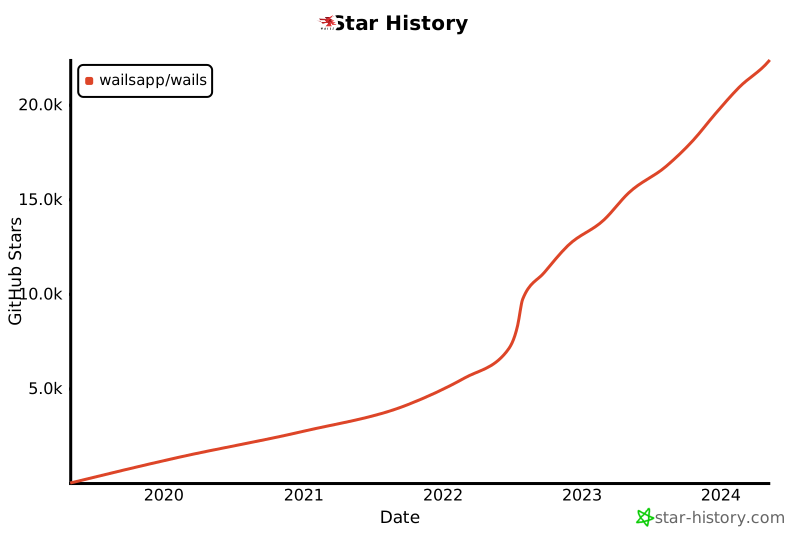](https://star-history.com/#wailsapp/wails&Date)
|
||||
|
||||
## Colaboradores
|
||||
|
||||
¡La lista de colaboradores se está volviendo demasiado grande para el archivo
|
||||
readme! Todas las personas increíbles que han contribuido a este proyecto tienen
|
||||
su propia página [aqui](https://wails.io/credits#contributors).
|
||||
|
||||
## Licencia
|
||||
|
||||
[](https://app.fossa.com/projects/git%2Bgithub.com%2Fwailsapp%2Fwails?ref=badge_large)
|
||||
|
||||
## Inspiración
|
||||
|
||||
Este proyecto fue construido mientras se escuchaban estos álbumes:
|
||||
|
||||
- [Manic Street Preachers - Resistance Is Futile](https://open.spotify.com/album/1R2rsEUqXjIvAbzM0yHrxA)
|
||||
- [Manic Street Preachers - This Is My Truth, Tell Me Yours](https://open.spotify.com/album/4VzCL9kjhgGQeKCiojK1YN)
|
||||
- [The Midnight - Endless Summer](https://open.spotify.com/album/4Krg8zvprquh7TVn9OxZn8)
|
||||
- [Gary Newman - Savage (Songs from a Broken World)](https://open.spotify.com/album/3kMfsD07Q32HRWKRrpcexr)
|
||||
- [Steve Vai - Passion & Warfare](https://open.spotify.com/album/0oL0OhrE2rYVns4IGj8h2m)
|
||||
- [Ben Howard - Every Kingdom](https://open.spotify.com/album/1nJsbWm3Yy2DW1KIc1OKle)
|
||||
- [Ben Howard - Noonday Dream](https://open.spotify.com/album/6astw05cTiXEc2OvyByaPs)
|
||||
- [Adwaith - Melyn](https://open.spotify.com/album/2vBE40Rp60tl7rNqIZjaXM)
|
||||
- [Gwidaith Hen Fran - Cedors Hen Wrach](https://open.spotify.com/album/3v2hrfNGINPLuDP0YDTOjm)
|
||||
- [Metallica - Metallica](https://open.spotify.com/album/2Kh43m04B1UkVcpcRa1Zug)
|
||||
- [Bloc Party - Silent Alarm](https://open.spotify.com/album/6SsIdN05HQg2GwYLfXuzLB)
|
||||
- [Maxthor - Another World](https://open.spotify.com/album/3tklE2Fgw1hCIUstIwPBJF)
|
||||
- [Alun Tan Lan - Y Distawrwydd](https://open.spotify.com/album/0c32OywcLpdJCWWMC6vB8v)
|
||||
[Alun Tan Lan - Y Distawrwydd](https://open.spotify.com/album/0c32OywcLpdJCWWMC6vB8v)
|
||||
+1
-3
@@ -42,9 +42,7 @@
|
||||
<strong>
|
||||
<samp>
|
||||
|
||||
[English](README.md) · [简体中文](README.zh-Hans.md) · [日本語](README.ja.md) ·
|
||||
[한국어](README.ko.md) · [Español](README.es.md) · [Português](README.pt-br.md) ·
|
||||
[Русский](README.ru.md)
|
||||
[English](README.md) · [简体中文](README.zh-Hans.md) · [日本語](README.ja.md) · [한국어](README.ko.md)
|
||||
|
||||
</samp>
|
||||
</strong>
|
||||
|
||||
+1
-3
@@ -42,9 +42,7 @@
|
||||
<strong>
|
||||
<samp>
|
||||
|
||||
[English](README.md) · [简体中文](README.zh-Hans.md) · [日本語](README.ja.md) ·
|
||||
[한국어](README.ko.md) · [Español](README.es.md) · [Português](README.pt-br.md) ·
|
||||
[Русский](README.ru.md)
|
||||
[English](README.md) · [简体中文](README.zh-Hans.md) · [日本語](README.ja.md) · [한국어](README.ko.md)
|
||||
|
||||
</samp>
|
||||
</strong>
|
||||
|
||||
@@ -40,9 +40,7 @@
|
||||
<strong>
|
||||
<samp>
|
||||
|
||||
[English](README.md) · [简体中文](README.zh-Hans.md) · [日本語](README.ja.md) ·
|
||||
[한국어](README.ko.md) · [Español](README.es.md) · [Português](README.pt-br.md) ·
|
||||
[Русский](README.ru.md)
|
||||
[English](README.md) · [简体中文](README.zh-Hans.md) · [日本語](README.ja.md) · [한국어](README.ko.md)
|
||||
|
||||
</samp>
|
||||
</strong>
|
||||
|
||||
-150
@@ -1,150 +0,0 @@
|
||||
<p align="center" style="text-align: center">
|
||||
<img src="./assets/images/logo-universal.png" width="55%"><br/>
|
||||
</p>
|
||||
|
||||
<p align="center">
|
||||
Crie aplicativos de desktop usando Go e tecnologias Web.
|
||||
<br/>
|
||||
<br/>
|
||||
<a href="https://github.com/wailsapp/wails/blob/master/LICENSE">
|
||||
<img alt="GitHub" src="https://img.shields.io/github/license/wailsapp/wails"/>
|
||||
</a>
|
||||
<a href="https://goreportcard.com/report/github.com/wailsapp/wails">
|
||||
<img src="https://goreportcard.com/badge/github.com/wailsapp/wails" />
|
||||
</a>
|
||||
<a href="https://pkg.go.dev/github.com/wailsapp/wails">
|
||||
<img src="https://pkg.go.dev/badge/github.com/wailsapp/wails.svg" alt="Go Reference"/>
|
||||
</a>
|
||||
<a href="https://github.com/wailsapp/wails/issues">
|
||||
<img src="https://img.shields.io/badge/contributions-welcome-brightgreen.svg?style=flat" alt="CodeFactor" />
|
||||
</a>
|
||||
<a href="https://app.fossa.com/projects/git%2Bgithub.com%2Fwailsapp%2Fwails?ref=badge_shield" alt="FOSSA Status">
|
||||
<img src="https://app.fossa.com/api/projects/git%2Bgithub.com%2Fwailsapp%2Fwails.svg?type=shield" />
|
||||
</a>
|
||||
<a href="https://github.com/avelino/awesome-go" rel="nofollow">
|
||||
<img src="https://cdn.rawgit.com/sindresorhus/awesome/d7305f38d29fed78fa85652e3a63e154dd8e8829/media/badge.svg" alt="Awesome" />
|
||||
</a>
|
||||
<a href="https://discord.gg/BrRSWTaxVK">
|
||||
<img alt="Discord" src="https://dcbadge.vercel.app/api/server/BrRSWTaxVK?style=flat"/>
|
||||
</a>
|
||||
<br/>
|
||||
<a href="https://github.com/wailsapp/wails/actions/workflows/build-and-test.yml" rel="nofollow">
|
||||
<img src="https://img.shields.io/github/actions/workflow/status/wailsapp/wails/build-and-test.yml?branch=master&logo=Github" alt="Build" />
|
||||
</a>
|
||||
<a href="https://github.com/wailsapp/wails/tags" rel="nofollow">
|
||||
<img alt="GitHub tag (latest SemVer pre-release)" src="https://img.shields.io/github/v/tag/wailsapp/wails?include_prereleases&label=version"/>
|
||||
</a>
|
||||
</p>
|
||||
|
||||
<div align="center">
|
||||
<strong>
|
||||
<samp>
|
||||
|
||||
[English](README.md) · [简体中文](README.zh-Hans.md) · [日本語](README.ja.md) ·
|
||||
[한국어](README.ko.md) · [Español](README.es.md) · [Português](README.pt-br.md)
|
||||
|
||||
</samp>
|
||||
</strong>
|
||||
</div>
|
||||
|
||||
## Índice
|
||||
|
||||
- [Índice](#índice)
|
||||
- [Introdução](#introdução)
|
||||
- [Recursos e funcionalidades](#recursos-e-funcionalidades)
|
||||
- [Plano de trabalho](#plano-de-trabalho)
|
||||
- [Iniciando](#iniciando)
|
||||
- [Patrocinadores](#patrocinadores)
|
||||
- [Perguntas frequentes](#perguntas-frequentes)
|
||||
- [Estrelas ao longo do tempo](#estrelas-ao-longo-do-tempo)
|
||||
- [Colaboradores](#colaboradores)
|
||||
- [Licença](#licença)
|
||||
- [Inspiração](#inspiração)
|
||||
|
||||
## Introdução
|
||||
|
||||
O método tradicional de fornecer interfaces da Web para programas Go é por meio de um servidor da Web integrado. Wails oferece uma
|
||||
abordagem: fornece a capacidade de agrupar o código Go e um front-end da Web em um único binário. As ferramentas são fornecidas para
|
||||
que torne isso mais fácil para você lidando com a criação, compilação e agrupamento de projetos. Tudo o que você precisa fazer é ser criativo!
|
||||
|
||||
## Recursos e funcionalidades
|
||||
|
||||
- Use Go padrão para o back-end
|
||||
- Use qualquer tecnologia de front-end com a qual você já esteja familiarizado para criar sua interface do usuário
|
||||
- Crie rapidamente um front-end avançado para seus programas Go usando modelos pré-construídos
|
||||
- Chame facilmente métodos Go com JavaScript
|
||||
- Definições TypeScript geradas automaticamente para suas estruturas e métodos Go
|
||||
- Diálogos e menus nativos
|
||||
- Suporte nativo ao modo escuro/claro
|
||||
- Suporta translucidez moderna e efeitos de "janela fosca"
|
||||
- Sistema de eventos unificado entre Go e JavaScript
|
||||
- Poderosa ferramenta cli para gerar e construir rapidamente seus projetos
|
||||
- Multiplataforma
|
||||
- Usa mecanismos de renderização nativos - _sem navegador incorporado_!
|
||||
|
||||
### Plano de trabalho
|
||||
|
||||
O plano de trabalho do projeto pode ser encontrado [aqui](https://github.com/wailsapp/wails/discussions/1484). Por favor consulte
|
||||
isso antes de abrir um pedido de melhoria.
|
||||
|
||||
## Iniciando
|
||||
|
||||
As instruções de instalação estão no [site oficial](https://wails.io/docs/gettingstarted/installation).
|
||||
|
||||
## Patrocinadores
|
||||
|
||||
Este projeto é apoiado por estas simpáticas pessoas/empresas:
|
||||
<img src="website/static/img/sponsors.svg" style="width:100%;max-width:800px;"/>
|
||||
|
||||
<p align="center">
|
||||
<img src="https://wails.io/img/sponsor/jetbrains-grayscale.webp" style="width: 100px"/>
|
||||
</p>
|
||||
|
||||
## Perguntas frequentes
|
||||
|
||||
- Esta é uma alternativa ao Electron?
|
||||
|
||||
Depende de seus requisitos. Ele foi projetado para tornar mais fácil para os programadores Go criar aplicações desktop
|
||||
e adicionar um front-end aos seus aplicativos existentes. O Wails oferece elementos nativos, como menus
|
||||
e diálogos, por isso pode ser considerada uma alternativa leve, se comparado ao Electron.
|
||||
|
||||
- A quem se destina este projeto?
|
||||
|
||||
Programadores Go que desejam agrupar um front-end HTML/JS/CSS com seus aplicativos, sem recorrer à criação de um
|
||||
servidor e abrir um navegador para visualizá-lo.
|
||||
|
||||
- Qual é o significado do nome?
|
||||
|
||||
Quando vi o WebView, pensei "O que eu realmente quero é ferramentas para construir um aplicativo WebView, algo semelhante ao que Rails é para Ruby". Portanto, inicialmente era um jogo de palavras (WebView on Rails). Por acaso, também era um homófono do
|
||||
Nome em inglês para o [país](https://en.wikipedia.org/wiki/Wales) de onde eu sou. Então ficou com esse nome.
|
||||
|
||||
## Estrelas ao longo do tempo
|
||||
|
||||
[](https://star-history.com/#wailsapp/wails&Date)
|
||||
|
||||
## Colaboradores
|
||||
|
||||
A lista de colaboradores está ficando grande demais para o arquivo readme! Todas as pessoas incríveis que contribuíram para o
|
||||
projeto tem sua própria página [aqui](https://wails.io/credits#contributors).
|
||||
|
||||
## Licença
|
||||
|
||||
[](https://app.fossa.com/projects/git%2Bgithub.com%2Fwailsapp%2Fwails?ref=badge_large)
|
||||
|
||||
## Inspiração
|
||||
|
||||
Este projeto foi construído ouvindo esses álbuns:
|
||||
|
||||
- [Manic Street Preachers - Resistance Is Futile](https://open.spotify.com/album/1R2rsEUqXjIvAbzM0yHrxA)
|
||||
- [Manic Street Preachers - This Is My Truth, Tell Me Yours](https://open.spotify.com/album/4VzCL9kjhgGQeKCiojK1YN)
|
||||
- [The Midnight - Endless Summer](https://open.spotify.com/album/4Krg8zvprquh7TVn9OxZn8)
|
||||
- [Gary Newman - Savage (Songs from a Broken World)](https://open.spotify.com/album/3kMfsD07Q32HRWKRrpcexr)
|
||||
- [Steve Vai - Passion & Warfare](https://open.spotify.com/album/0oL0OhrE2rYVns4IGj8h2m)
|
||||
- [Ben Howard - Every Kingdom](https://open.spotify.com/album/1nJsbWm3Yy2DW1KIc1OKle)
|
||||
- [Ben Howard - Noonday Dream](https://open.spotify.com/album/6astw05cTiXEc2OvyByaPs)
|
||||
- [Adwaith - Melyn](https://open.spotify.com/album/2vBE40Rp60tl7rNqIZjaXM)
|
||||
- [Gwidaith Hen Fran - Cedors Hen Wrach](https://open.spotify.com/album/3v2hrfNGINPLuDP0YDTOjm)
|
||||
- [Metallica - Metallica](https://open.spotify.com/album/2Kh43m04B1UkVcpcRa1Zug)
|
||||
- [Bloc Party - Silent Alarm](https://open.spotify.com/album/6SsIdN05HQg2GwYLfXuzLB)
|
||||
- [Maxthor - Another World](https://open.spotify.com/album/3tklE2Fgw1hCIUstIwPBJF)
|
||||
- [Alun Tan Lan - Y Distawrwydd](https://open.spotify.com/album/0c32OywcLpdJCWWMC6vB8v)
|
||||
-153
@@ -1,153 +0,0 @@
|
||||
<p align="center" style="text-align: center">
|
||||
<img src="./assets/images/logo-universal.png" width="55%"><br/>
|
||||
</p>
|
||||
|
||||
<p align="center">
|
||||
Собирайте Desktop приложения используя Go и Web технологии
|
||||
<br/>
|
||||
<br/>
|
||||
<a href="https://github.com/wailsapp/wails/blob/master/LICENSE">
|
||||
<img alt="GitHub" src="https://img.shields.io/github/license/wailsapp/wails"/>
|
||||
</a>
|
||||
<a href="https://goreportcard.com/report/github.com/wailsapp/wails">
|
||||
<img src="https://goreportcard.com/badge/github.com/wailsapp/wails" />
|
||||
</a>
|
||||
<a href="https://pkg.go.dev/github.com/wailsapp/wails">
|
||||
<img src="https://pkg.go.dev/badge/github.com/wailsapp/wails.svg" alt="Go Reference"/>
|
||||
</a>
|
||||
<a href="https://github.com/wailsapp/wails/issues">
|
||||
<img src="https://img.shields.io/badge/contributions-welcome-brightgreen.svg?style=flat" alt="CodeFactor" />
|
||||
</a>
|
||||
<a href="https://app.fossa.com/projects/git%2Bgithub.com%2Fwailsapp%2Fwails?ref=badge_shield" alt="FOSSA Status">
|
||||
<img src="https://app.fossa.com/api/projects/git%2Bgithub.com%2Fwailsapp%2Fwails.svg?type=shield" />
|
||||
</a>
|
||||
<a href="https://github.com/avelino/awesome-go" rel="nofollow">
|
||||
<img src="https://cdn.rawgit.com/sindresorhus/awesome/d7305f38d29fed78fa85652e3a63e154dd8e8829/media/badge.svg" alt="Awesome" />
|
||||
</a>
|
||||
<a href="https://discord.gg/BrRSWTaxVK">
|
||||
<img alt="Discord" src="https://dcbadge.vercel.app/api/server/BrRSWTaxVK?style=flat"/>
|
||||
</a>
|
||||
<br/>
|
||||
<a href="https://github.com/wailsapp/wails/actions/workflows/build-and-test.yml" rel="nofollow">
|
||||
<img src="https://img.shields.io/github/actions/workflow/status/wailsapp/wails/build-and-test.yml?branch=master&logo=Github" alt="Build" />
|
||||
</a>
|
||||
<a href="https://github.com/wailsapp/wails/tags" rel="nofollow">
|
||||
<img alt="GitHub tag (latest SemVer pre-release)" src="https://img.shields.io/github/v/tag/wailsapp/wails?include_prereleases&label=version"/>
|
||||
</a>
|
||||
</p>
|
||||
|
||||
<div align="center">
|
||||
<strong>
|
||||
<samp>
|
||||
|
||||
[English](README.md) · [简体中文](README.zh-Hans.md) · [日本語](README.ja.md) ·
|
||||
[한국어](README.ko.md) · [Español](README.es.md) · [Русский](README.ru.md)
|
||||
|
||||
</samp>
|
||||
</strong>
|
||||
</div>
|
||||
|
||||
## Содержание
|
||||
|
||||
- [Содержание](#содержание)
|
||||
- [Вступление](#вступление)
|
||||
- [Особенности](#особенности)
|
||||
- [Roadmap](#roadmap)
|
||||
- [Быстрый старт](#быстрый-старт)
|
||||
- [Спонсоры](#спонсоры)
|
||||
- [FAQ](#faq)
|
||||
- [График звёздочек](#график-звёздочек-репозитория-относительно-времени)
|
||||
- [Контребьюторы](#контребьюторы)
|
||||
- [Лицензия](#лицензия)
|
||||
- [Вдохновение](#вдохновение)
|
||||
|
||||
## Вступление
|
||||
|
||||
Обычно, веб-интерфейсы для программ Go - это встроенный веб-сервер и веб-браузер.
|
||||
У Walls другой подход: он оборачивает как код Go, так и веб-интерфейс в один бинарник (EXE файл).
|
||||
Облегчает вам создание вашего приложения, управляя созданием, компиляцией и объединением проектов.
|
||||
Все ограничивается лишь вашей фантазией!
|
||||
|
||||
## Особенности
|
||||
|
||||
- Использование Go для backend
|
||||
- Поддержка любой frontend технологии, с которой вы уже знакомы для создания вашего UI
|
||||
- Быстрое создание frontend для ваших программ, используя готовые шаблоны
|
||||
- Очень лёгкий вызов функция Go из JavaScript
|
||||
- Автогене рация TypeScript типов для Go структур и функций
|
||||
- Нативные диалоги и меню
|
||||
- Нативная поддержка тёмной и светлой темы
|
||||
- Поддержка современной прозрачности и эффекта "матового окна"
|
||||
- Единая система Эвентов для Go и JavaScript
|
||||
- Мощный CLI для быстрого создания ваших проектов
|
||||
- Мультиплатформенность
|
||||
- Использование нативного движка рендеринга - нет встроенному браузеру!
|
||||
|
||||
### Roadmap
|
||||
|
||||
Roadmap проекта вы можете найти [здесь](https://github.com/wailsapp/wails/discussions/1484).
|
||||
Пожалуйста, проконсультируйтесь перед предложением улучшения.
|
||||
|
||||
## Быстрый старт
|
||||
|
||||
Инструкции по установке находятся на [официальном сайте](https://wails.io/docs/gettingstarted/installation).
|
||||
|
||||
## Спонсоры
|
||||
|
||||
Проект поддерживается этими добрыми людьми / компаниями:
|
||||
<img src="website/static/img/sponsors.svg" style="width:100%;max-width:800px;"/>
|
||||
|
||||
<p align="center">
|
||||
<img src="https://wails.io/img/sponsor/jetbrains-grayscale.webp" style="width: 100px"/>
|
||||
</p>
|
||||
|
||||
## FAQ
|
||||
|
||||
- Это альтернатива Electron?
|
||||
|
||||
Зависит от ваших требований. Wails разработан для легкого создания Desktop приложений или расширения интерфейсной
|
||||
части к своим существующим приложениям программистам Go. Wails действительно предлагает встроенные элементы, такие как
|
||||
меню и диалоги, так что его можно считать облегченной альтернативой Electron.
|
||||
|
||||
- Для кого нацелен этот проект?
|
||||
|
||||
Для Golang программистов, которые хотят создавать приложение используя HTML JS и CSS, без создания Web сервера и
|
||||
открытия браузера для его просмотра.
|
||||
|
||||
- Что это за название?
|
||||
|
||||
Когда я увидел WebView, я подумал: "Что мне действительно нужно, так это инструменты для создания приложения WebView,
|
||||
немного похожие на Rails для Ruby". Итак, изначально это была игра слов (Webview on Rails). Просто так получилось, что
|
||||
это также омофон английского названия для [Страны](https://en.wikipedia.org/wiki/Wales) от куда я родом. Так что это
|
||||
прижилось.
|
||||
|
||||
## График звёздочек репозитория, относительно времени
|
||||
|
||||
[](https://star-history.com/#wailsapp/wails&Date)
|
||||
|
||||
## Контребьюторы
|
||||
|
||||
Список участников слишком большой для README! У всех замечательных людей, которые внесли свой вклад в этот
|
||||
проект, есть своя [страничка](https://wails.io/credits#contributors).
|
||||
|
||||
## Лицензия
|
||||
|
||||
[](https://app.fossa.com/projects/git%2Bgithub.com%2Fwailsapp%2Fwails?ref=badge_large)
|
||||
|
||||
## Вдохновение
|
||||
|
||||
Этот проект был создан, в основном, под эти альбомы:
|
||||
|
||||
- [Manic Street Preachers - Resistance Is Futile](https://open.spotify.com/album/1R2rsEUqXjIvAbzM0yHrxA)
|
||||
- [Manic Street Preachers - This Is My Truth, Tell Me Yours](https://open.spotify.com/album/4VzCL9kjhgGQeKCiojK1YN)
|
||||
- [The Midnight - Endless Summer](https://open.spotify.com/album/4Krg8zvprquh7TVn9OxZn8)
|
||||
- [Gary Newman - Savage (Songs from a Broken World)](https://open.spotify.com/album/3kMfsD07Q32HRWKRrpcexr)
|
||||
- [Steve Vai - Passion & Warfare](https://open.spotify.com/album/0oL0OhrE2rYVns4IGj8h2m)
|
||||
- [Ben Howard - Every Kingdom](https://open.spotify.com/album/1nJsbWm3Yy2DW1KIc1OKle)
|
||||
- [Ben Howard - Noonday Dream](https://open.spotify.com/album/6astw05cTiXEc2OvyByaPs)
|
||||
- [Adwaith - Melyn](https://open.spotify.com/album/2vBE40Rp60tl7rNqIZjaXM)
|
||||
- [Gwidaith Hen Fran - Cedors Hen Wrach](https://open.spotify.com/album/3v2hrfNGINPLuDP0YDTOjm)
|
||||
- [Metallica - Metallica](https://open.spotify.com/album/2Kh43m04B1UkVcpcRa1Zug)
|
||||
- [Bloc Party - Silent Alarm](https://open.spotify.com/album/6SsIdN05HQg2GwYLfXuzLB)
|
||||
- [Maxthor - Another World](https://open.spotify.com/album/3tklE2Fgw1hCIUstIwPBJF)
|
||||
- [Alun Tan Lan - Y Distawrwydd](https://open.spotify.com/album/0c32OywcLpdJCWWMC6vB8v)
|
||||
+2
-4
@@ -42,9 +42,7 @@
|
||||
<strong>
|
||||
<samp>
|
||||
|
||||
[English](README.md) · [简体中文](README.zh-Hans.md) · [日本語](README.ja.md) ·
|
||||
[한국어](README.ko.md) · [Español](README.es.md) · [Português](README.pt-br.md) ·
|
||||
[Русский](README.ru.md)
|
||||
[English](README.md) · [简体中文](README.zh-Hans.md) · [日本語](README.ja.md) · [한국어](README.ko.md)
|
||||
|
||||
</samp>
|
||||
</strong>
|
||||
@@ -89,7 +87,7 @@
|
||||
|
||||
## 快速入门
|
||||
|
||||
使用说明在 [官网](https://wails.io/zh-Hans/docs/gettingstarted/installation/)。
|
||||
使用说明在 [官网](https://wails.io/docs/gettingstarted/installation)。
|
||||
|
||||
## 赞助商
|
||||
|
||||
|
||||
@@ -16,11 +16,6 @@ includes:
|
||||
dir: v3
|
||||
optional: true
|
||||
|
||||
docs:
|
||||
taskfile: mkdocs-website
|
||||
dir: mkdocs-website
|
||||
optional: true
|
||||
|
||||
tasks:
|
||||
contributors:check:
|
||||
cmds:
|
||||
|
||||
@@ -1,45 +0,0 @@
|
||||
# v3 Docs
|
||||
|
||||
This is the documentation for Wails v3. It is currently a work in progress.
|
||||
|
||||
If you do not wish to build it locally, it is available online at
|
||||
[https://wailsapp.github.io/wails/](https://wailsapp.github.io/wails/).
|
||||
|
||||
## Recommended Setup Steps
|
||||
|
||||
Install the wails3 CLI if you haven't already:
|
||||
|
||||
```shell
|
||||
go install github.com/wailsapp/wails/v3/cmd/wails3@latest
|
||||
```
|
||||
|
||||
The documentation uses mkdocs, so you will need to install
|
||||
[Python](https://www.python.org/). Once installed, you can setup the
|
||||
documentation by running the following command:
|
||||
|
||||
```bash
|
||||
wails3 task docs:setup
|
||||
```
|
||||
|
||||
This will install the required dependencies for you.
|
||||
|
||||
If you have installed the wails3 CLI, you can run the following command to build
|
||||
the documentation and serve it locally:
|
||||
|
||||
```bash
|
||||
wails3 task docs:serve
|
||||
```
|
||||
|
||||
### Manual Setup
|
||||
|
||||
To install manually, you will need to do the following:
|
||||
|
||||
- Install [Python](https://www.python.org/)
|
||||
- Run `pip install -r requirements.txt` to install the required dependencies
|
||||
- Run `mkdocs serve` to serve the documentation locally
|
||||
- Run `mkdocs build` to build the documentation
|
||||
|
||||
## Contributing
|
||||
|
||||
If you would like to contribute to the documentation, please feel free to open a
|
||||
PR!
|
||||
@@ -1,59 +0,0 @@
|
||||
# https://taskfile.dev
|
||||
|
||||
version: '3'
|
||||
|
||||
tasks:
|
||||
|
||||
setup:
|
||||
summary: Setup the project
|
||||
preconditions:
|
||||
- sh: python{{exeExt}} --version
|
||||
msg: "Looks like Python isn't installed. Python is required to build the documentation: https://www.python.org/downloads/"
|
||||
cmds:
|
||||
- python -m pip install -r requirements.txt --user
|
||||
|
||||
setup:insiders:
|
||||
summary: Setup the project (insiders)
|
||||
preconditions:
|
||||
- sh: python{{exeExt}} --version
|
||||
msg: "Looks like Python isn't installed. Python is required to build the documentation: https://www.python.org/downloads/"
|
||||
cmds:
|
||||
- python -m pip install -r requirements.insiders.txt --user
|
||||
|
||||
upgrade:insiders:
|
||||
summary: Upgrade the project (insiders)
|
||||
preconditions:
|
||||
- sh: python{{exeExt}} --version
|
||||
msg: "Looks like Python isn't installed. Python is required to build the documentation: https://www.python.org/downloads/"
|
||||
cmds:
|
||||
- python -m pip install -r requirements.insiders.txt --upgrade --user
|
||||
|
||||
build:
|
||||
summary: Builds the documentation
|
||||
preconditions:
|
||||
- sh: mkdocs --version
|
||||
msg: "Looks like mkdocs isn't installed. Run `wails3 task setup` or `task setup` in the documentation directory to install it."
|
||||
cmds:
|
||||
- mkdocs build
|
||||
|
||||
serve:
|
||||
summary: Builds the documentation and serves it locally
|
||||
preconditions:
|
||||
- sh: mkdocs --version
|
||||
msg: "Looks like mkdocs isn't installed. Run `wails3 task setup` or `task setup` in the documentation directory to install it."
|
||||
cmds:
|
||||
- mkdocs serve
|
||||
|
||||
serve:insiders:
|
||||
summary: Builds the documentation and serves it locally
|
||||
preconditions:
|
||||
- sh: mkdocs --version
|
||||
msg: "Looks like mkdocs isn't installed. Run `wails3 task setup` or `task setup` in the documentation directory to install it."
|
||||
cmds:
|
||||
- mkdocs serve --config-file mkdocs.insiders.yml
|
||||
|
||||
update:api:
|
||||
summary: Updates the API documentation
|
||||
dir: generate
|
||||
cmds:
|
||||
- go run .
|
||||
@@ -1,359 +0,0 @@
|
||||
# Application
|
||||
|
||||
The application API assists in creating an application using the Wails
|
||||
framework.
|
||||
|
||||
### New
|
||||
|
||||
API: `New(appOptions Options) *App`
|
||||
|
||||
`New(appOptions Options)` creates a new application using the given application
|
||||
options . It applies default values for unspecified options, merges them with
|
||||
the provided ones, initializes and returns an instance of the application.
|
||||
|
||||
In case of an error during initialization, the application is stopped with the
|
||||
error message provided.
|
||||
|
||||
It should be noted that if a global application instance already exists, that
|
||||
instance will be returned instead of creating a new one.
|
||||
|
||||
```go title="main.go" hl_lines="6-9"
|
||||
package main
|
||||
|
||||
import "github.com/wailsapp/wails/v3/pkg/application"
|
||||
|
||||
func main() {
|
||||
app := application.New(application.Options{
|
||||
Name: "WebviewWindow Demo",
|
||||
// Other options
|
||||
})
|
||||
|
||||
// Rest of application
|
||||
}
|
||||
```
|
||||
|
||||
### Get
|
||||
|
||||
`Get()` returns the global application instance. It's useful when you need to
|
||||
access the application from different parts of your code.
|
||||
|
||||
```go
|
||||
// Get the application instance
|
||||
app := application.Get()
|
||||
```
|
||||
|
||||
### Capabilities
|
||||
|
||||
API: `Capabilities() capabilities.Capabilities`
|
||||
|
||||
`Capabilities()` retrieves a map of capabilities that the application currently
|
||||
has. Capabilities can be about different features the operating system provides,
|
||||
like webview features.
|
||||
|
||||
```go
|
||||
// Get the application capabilities
|
||||
capabilities := app.Capabilities()
|
||||
if capabilities.HasNativeDrag {
|
||||
// Do something
|
||||
}
|
||||
```
|
||||
|
||||
### GetPID
|
||||
|
||||
API: `GetPID() int`
|
||||
|
||||
`GetPID()` returns the Process ID of the application.
|
||||
|
||||
```go
|
||||
pid := app.GetPID()
|
||||
```
|
||||
|
||||
### Run
|
||||
|
||||
API: `Run() error`
|
||||
|
||||
`Run()` starts the execution of the application and its components.
|
||||
|
||||
```go
|
||||
app := application.New(application.Options{
|
||||
//options
|
||||
})
|
||||
// Run the application
|
||||
err := application.Run()
|
||||
if err != nil {
|
||||
// Handle error
|
||||
}
|
||||
```
|
||||
|
||||
### Quit
|
||||
|
||||
API: `Quit()`
|
||||
|
||||
`Quit()` quits the application by destroying windows and potentially other
|
||||
components.
|
||||
|
||||
```go
|
||||
// Quit the application
|
||||
app.Quit()
|
||||
```
|
||||
|
||||
### IsDarkMode
|
||||
|
||||
API: `IsDarkMode() bool`
|
||||
|
||||
`IsDarkMode()` checks if the application is running in dark mode. It returns a
|
||||
boolean indicating whether dark mode is enabled.
|
||||
|
||||
```go
|
||||
// Check if dark mode is enabled
|
||||
if app.IsDarkMode() {
|
||||
// Do something
|
||||
}
|
||||
```
|
||||
|
||||
### Hide
|
||||
|
||||
API: `Hide()`
|
||||
|
||||
`Hide()` hides the application window.
|
||||
|
||||
```go
|
||||
// Hide the application window
|
||||
app.Hide()
|
||||
```
|
||||
|
||||
### Show
|
||||
|
||||
API: `Show()`
|
||||
|
||||
`Show()` shows the application window.
|
||||
|
||||
```go
|
||||
// Show the application window
|
||||
app.Show()
|
||||
```
|
||||
|
||||
### NewWebviewWindow
|
||||
|
||||
API: `NewWebviewWindow() *WebviewWindow`
|
||||
|
||||
`NewWebviewWindow()` creates a new Webview window with default options, and
|
||||
returns it.
|
||||
|
||||
```go
|
||||
// Create a new webview window
|
||||
window := app.NewWebviewWindow()
|
||||
```
|
||||
|
||||
### NewWebviewWindowWithOptions
|
||||
|
||||
API:
|
||||
`NewWebviewWindowWithOptions(windowOptions WebviewWindowOptions) *WebviewWindow`
|
||||
|
||||
`NewWebviewWindowWithOptions()` creates a new webview window with custom
|
||||
options. The newly created window is added to a map of windows managed by the
|
||||
application.
|
||||
|
||||
```go
|
||||
// Create a new webview window with custom options
|
||||
window := app.NewWebviewWindowWithOptions(WebviewWindowOptions{
|
||||
Name: "Main",
|
||||
Title: "My Window",
|
||||
Width: 800,
|
||||
Height: 600,
|
||||
})
|
||||
```
|
||||
|
||||
### OnWindowCreation
|
||||
|
||||
API: `OnWindowCreation(callback func(window *WebviewWindow))`
|
||||
|
||||
`OnWindowCreation()` registers a callback function to be called when a window is
|
||||
created.
|
||||
|
||||
```go
|
||||
// Register a callback to be called when a window is created
|
||||
app.OnWindowCreation(func(window *WebviewWindow) {
|
||||
// Do something
|
||||
})
|
||||
```
|
||||
|
||||
### GetWindowByName
|
||||
|
||||
API: `GetWindowByName(name string) *WebviewWindow`
|
||||
|
||||
`GetWindowByName()` fetches and returns a window with a specific name.
|
||||
|
||||
```go
|
||||
// Get a window by name
|
||||
window := app.GetWindowByName("Main")
|
||||
```
|
||||
|
||||
### CurrentWindow
|
||||
|
||||
API: `CurrentWindow() *WebviewWindow`
|
||||
|
||||
`CurrentWindow()` fetches and returns a pointer to the currently active window
|
||||
in the application. If there is no window, it returns nil.
|
||||
|
||||
```go
|
||||
// Get the current window
|
||||
window := app.CurrentWindow()
|
||||
```
|
||||
|
||||
### RegisterContextMenu
|
||||
|
||||
API: `RegisterContextMenu(name string, menu *Menu)`
|
||||
|
||||
`RegisterContextMenu()` registers a context menu with a given name. This menu
|
||||
can be used later in the application.
|
||||
|
||||
```go
|
||||
|
||||
// Create a new menu
|
||||
ctxmenu := app.NewMenu()
|
||||
|
||||
// Register the menu as a context menu
|
||||
app.RegisterContextMenu("MyContextMenu", ctxmenu)
|
||||
```
|
||||
|
||||
### SetMenu
|
||||
|
||||
API: `SetMenu(menu *Menu)`
|
||||
|
||||
`SetMenu()` sets the menu for the application. On Mac, this will be the global
|
||||
menu. For Windows and Linux, this will be the default menu for any new window
|
||||
created.
|
||||
|
||||
```go
|
||||
// Create a new menu
|
||||
menu := app.NewMenu()
|
||||
|
||||
// Set the menu for the application
|
||||
app.SetMenu(menu)
|
||||
```
|
||||
|
||||
### ShowAboutDialog
|
||||
|
||||
API: `ShowAboutDialog()`
|
||||
|
||||
`ShowAboutDialog()` shows an "About" dialog box. It can show the application's
|
||||
name, description and icon.
|
||||
|
||||
```go
|
||||
// Show the about dialog
|
||||
app.ShowAboutDialog()
|
||||
```
|
||||
|
||||
### Info
|
||||
|
||||
API: `InfoDialog()`
|
||||
|
||||
`InfoDialog()` creates and returns a new instance of `MessageDialog` with an
|
||||
`InfoDialogType`. This dialog is typically used to display informational
|
||||
messages to the user.
|
||||
|
||||
### Question
|
||||
|
||||
API: `QuestionDialog()`
|
||||
|
||||
`QuestionDialog()` creates and returns a new instance of `MessageDialog` with a
|
||||
`QuestionDialogType`. This dialog is often used to ask a question to the user
|
||||
and expect a response.
|
||||
|
||||
### Warning
|
||||
|
||||
API: `WarningDialog()`
|
||||
|
||||
`WarningDialog()` creates and returns a new instance of `MessageDialog` with a
|
||||
`WarningDialogType`. As the name suggests, this dialog is primarily used to
|
||||
display warning messages to the user.
|
||||
|
||||
### Error
|
||||
|
||||
API: `ErrorDialog()`
|
||||
|
||||
`ErrorDialog()` creates and returns a new instance of `MessageDialog` with an
|
||||
`ErrorDialogType`. This dialog is designed to be used when you need to display
|
||||
an error message to the user.
|
||||
|
||||
### OpenFile
|
||||
|
||||
API: `OpenFileDialog()`
|
||||
|
||||
`OpenFileDialog()` creates and returns a new `OpenFileDialogStruct`. This dialog
|
||||
prompts the user to select one or more files from their file system.
|
||||
|
||||
### SaveFile
|
||||
|
||||
API: `SaveFileDialog()`
|
||||
|
||||
`SaveFileDialog()` creates and returns a new `SaveFileDialogStruct`. This dialog
|
||||
prompts the user to choose a location on their file system where a file should
|
||||
be saved.
|
||||
|
||||
### OpenDirectory
|
||||
|
||||
API: `OpenDirectoryDialog()`
|
||||
|
||||
`OpenDirectoryDialog()` creates and returns a new instance of `MessageDialog`
|
||||
with an `OpenDirectoryDialogType`. This dialog enables the user to choose a
|
||||
directory from their file system.
|
||||
|
||||
### On
|
||||
|
||||
API:
|
||||
`On(eventType events.ApplicationEventType, callback func(event *Event)) func()`
|
||||
|
||||
`On()` registers an event listener for specific application events. The callback
|
||||
function provided will be triggered when the corresponding event occurs. The
|
||||
function returns a function that can be called to remove the listener.
|
||||
|
||||
### RegisterHook
|
||||
|
||||
API:
|
||||
`RegisterHook(eventType events.ApplicationEventType, callback func(event *Event)) func()`
|
||||
|
||||
`RegisterHook()` registers a callback to be run as a hook during specific
|
||||
events. These hooks are run before listeners attached with `On()`. The function
|
||||
returns a function that can be called to remove the hook.
|
||||
|
||||
### GetPrimaryScreen
|
||||
|
||||
API: `GetPrimaryScreen() (*Screen, error)`
|
||||
|
||||
`GetPrimaryScreen()` returns the primary screen of the system.
|
||||
|
||||
### GetScreens
|
||||
|
||||
API: `GetScreens() ([]*Screen, error)`
|
||||
|
||||
`GetScreens()` returns information about all screens attached to the system.
|
||||
|
||||
This is a brief summary of the exported methods in the provided `App` struct. Do
|
||||
note that for more detailed functionality or considerations, refer to the actual
|
||||
Go code or further internal documentation.
|
||||
|
||||
## Options
|
||||
|
||||
```go title="application_options.go"
|
||||
--8<--
|
||||
../v3/pkg/application/options_application.go
|
||||
--8<--
|
||||
```
|
||||
|
||||
### Windows Options
|
||||
|
||||
```go title="application_options_windows.go"
|
||||
--8<--
|
||||
../v3/pkg/application/options_application_win.go
|
||||
--8<--
|
||||
```
|
||||
|
||||
### Mac Options
|
||||
|
||||
```go title="options_application_mac.go"
|
||||
--8<--
|
||||
../v3/pkg/application/options_application_mac.go
|
||||
--8<--
|
||||
```
|
||||
File diff suppressed because it is too large
Load Diff
@@ -1,50 +0,0 @@
|
||||
# Main Thread Functions
|
||||
|
||||
These methods are utility functions to run code on the main thread. This is
|
||||
required when you want to run custom code on the UI thread.
|
||||
|
||||
### InvokeSync
|
||||
|
||||
API: `InvokeSync(fn func())`
|
||||
|
||||
This function runs the passed function (`fn`) synchronously. It uses a WaitGroup
|
||||
(`wg`) to ensure that the main thread waits for the `fn` function to finish
|
||||
before it continues. If a panic occurs inside `fn`, it will be passed to the
|
||||
handler function `PanicHandler`, defined in the application options.
|
||||
|
||||
### InvokeSyncWithResult
|
||||
|
||||
API: `InvokeSyncWithResult[T any](fn func() T) (res T)`
|
||||
|
||||
This function works similarly to `InvokeSync(fn func())`, however, it yields a
|
||||
result. Use this for calling any function with a single return.
|
||||
|
||||
### InvokeSyncWithError
|
||||
|
||||
API: `InvokeSyncWithError(fn func() error) (err error)`
|
||||
|
||||
This function runs `fn` synchronously and returns any error that `fn` produces.
|
||||
Note that this function will recover from a panic if one occurs during `fn`'s
|
||||
execution.
|
||||
|
||||
### InvokeSyncWithResultAndError
|
||||
|
||||
API:
|
||||
`InvokeSyncWithResultAndError[T any](fn func() (T, error)) (res T, err error)`
|
||||
|
||||
This function runs `fn` synchronously and returns both a result of type `T` and
|
||||
an error.
|
||||
|
||||
### InvokeAsync
|
||||
|
||||
API: `InvokeAsync(fn func())`
|
||||
|
||||
This function runs `fn` asynchronously. It runs the given function on the main
|
||||
thread. If a panic occurs inside `fn`, it will be passed to the handler function
|
||||
`PanicHandler`, defined in the application options.
|
||||
|
||||
---
|
||||
|
||||
_Note_: These functions will block execution until `fn` has finished. It's
|
||||
critical to ensure that `fn` doesn't block. If you need to run a function that
|
||||
blocks, use `InvokeAsync` instead.
|
||||
@@ -1,69 +0,0 @@
|
||||
# Menu
|
||||
|
||||
Menus can be created and added to the application. They can be used to create
|
||||
context menus, system tray menus and application menus.
|
||||
|
||||
To create a new menu, call:
|
||||
|
||||
```go
|
||||
// Create a new menu
|
||||
menu := app.NewMenu()
|
||||
```
|
||||
|
||||
The following operations are then available on the `Menu` type:
|
||||
|
||||
### Add
|
||||
|
||||
API: `Add(label string) *MenuItem`
|
||||
|
||||
This method takes a `label` of type `string` as an input and adds a new
|
||||
`MenuItem` with the given label to the menu. It returns the `MenuItem` added.
|
||||
|
||||
### AddSeparator
|
||||
|
||||
API: `AddSeparator()`
|
||||
|
||||
This method adds a new separator `MenuItem` to the menu.
|
||||
|
||||
### AddCheckbox
|
||||
|
||||
API: `AddCheckbox(label string, enabled bool) *MenuItem`
|
||||
|
||||
This method takes a `label` of type `string` and `enabled` of type `bool` as
|
||||
inputs and adds a new checkbox `MenuItem` with the given label and enabled state
|
||||
to the menu. It returns the `MenuItem` added.
|
||||
|
||||
### AddRadio
|
||||
|
||||
API: `AddRadio(label string, enabled bool) *MenuItem`
|
||||
|
||||
This method takes a `label` of type `string` and `enabled` of type `bool` as
|
||||
inputs and adds a new radio `MenuItem` with the given label and enabled state to
|
||||
the menu. It returns the `MenuItem` added.
|
||||
|
||||
### Update
|
||||
|
||||
API: `Update()`
|
||||
|
||||
This method processes any radio groups and updates the menu if a menu
|
||||
implementation is not initialized.
|
||||
|
||||
### AddSubmenu
|
||||
|
||||
API: `AddSubmenu(s string) *Menu`
|
||||
|
||||
This method takes a `s` of type `string` as input and adds a new submenu
|
||||
`MenuItem` with the given label to the menu. It returns the submenu added.
|
||||
|
||||
### AddRole
|
||||
|
||||
API: `AddRole(role Role) *Menu`
|
||||
|
||||
This method takes `role` of type `Role` as input, adds it to the menu if it is
|
||||
not `nil` and returns the `Menu`.
|
||||
|
||||
### SetLabel
|
||||
|
||||
API: `SetLabel(label string)`
|
||||
|
||||
This method sets the `label` of the `Menu`.
|
||||
@@ -1,112 +0,0 @@
|
||||
# System Tray
|
||||
|
||||
The system tray houses notification area on a desktop environment, which can
|
||||
contain both icons of currently-running applications and specific system
|
||||
notifications.
|
||||
|
||||
You create a system tray by calling `app.NewSystemTray()`:
|
||||
|
||||
```go
|
||||
// Create a new system tray
|
||||
tray := app.NewSystemTray()
|
||||
```
|
||||
|
||||
The following methods are available on the `SystemTray` type:
|
||||
|
||||
### SetLabel
|
||||
|
||||
API: `SetLabel(label string)`
|
||||
|
||||
The `SetLabel` method sets the tray's label.
|
||||
|
||||
### Label
|
||||
|
||||
API: `Label() string`
|
||||
|
||||
The `Label` method retrieves the tray's label.
|
||||
|
||||
### PositionWindow
|
||||
|
||||
API: `PositionWindow(*WebviewWindow, offset int) error`
|
||||
|
||||
The `PositionWindow` method calls both `AttachWindow` and `WindowOffset`
|
||||
methods.
|
||||
|
||||
### SetIcon
|
||||
|
||||
API: `SetIcon(icon []byte) *SystemTray`
|
||||
|
||||
The `SetIcon` method sets the system tray's icon.
|
||||
|
||||
### SetDarkModeIcon
|
||||
|
||||
API: `SetDarkModeIcon(icon []byte) *SystemTray`
|
||||
|
||||
The `SetDarkModeIcon` method sets the system tray's icon when in dark mode.
|
||||
|
||||
### SetMenu
|
||||
|
||||
API: `SetMenu(menu *Menu) *SystemTray`
|
||||
|
||||
The `SetMenu` method sets the system tray's menu.
|
||||
|
||||
### Destroy
|
||||
|
||||
API: `Destroy()`
|
||||
|
||||
The `Destroy` method destroys the system tray instance.
|
||||
|
||||
### OnClick
|
||||
|
||||
API: `OnClick(handler func()) *SystemTray`
|
||||
|
||||
The `OnClick` method sets the function to execute when the tray icon is clicked.
|
||||
|
||||
### OnRightClick
|
||||
|
||||
API: `OnRightClick(handler func()) *SystemTray`
|
||||
|
||||
The `OnRightClick` method sets the function to execute when right-clicking the
|
||||
tray icon.
|
||||
|
||||
### OnDoubleClick
|
||||
|
||||
API: `OnDoubleClick(handler func()) *SystemTray`
|
||||
|
||||
The `OnDoubleClick` method sets the function to execute when double-clicking the
|
||||
tray icon.
|
||||
|
||||
### OnRightDoubleClick
|
||||
|
||||
API: `OnRightDoubleClick(handler func()) *SystemTray`
|
||||
|
||||
The `OnRightDoubleClick` method sets the function to execute when right
|
||||
double-clicking the tray icon.
|
||||
|
||||
### AttachWindow
|
||||
|
||||
API: `AttachWindow(window *WebviewWindow) *SystemTray`
|
||||
|
||||
The `AttachWindow` method attaches a window to the system tray. The window will
|
||||
be shown when the system tray icon is clicked.
|
||||
|
||||
### WindowOffset
|
||||
|
||||
API: `WindowOffset(offset int) *SystemTray`
|
||||
|
||||
The `WindowOffset` method sets the gap in pixels between the system tray and the
|
||||
window.
|
||||
|
||||
### WindowDebounce
|
||||
|
||||
API: `WindowDebounce(debounce time.Duration) *SystemTray`
|
||||
|
||||
The `WindowDebounce` method sets a debounce time. In the context of Windows,
|
||||
this is used to specify how long to wait before responding to a mouse up event
|
||||
on the notification icon.
|
||||
|
||||
### OpenMenu
|
||||
|
||||
API: `OpenMenu()`
|
||||
|
||||
The `OpenMenu` method opens the menu associated with the system tray.
|
||||
@@ -1,114 +0,0 @@
|
||||
# Window
|
||||
|
||||
To create a window, use
|
||||
[Application.NewWebviewWindow](application.md#newwebviewwindow) or
|
||||
[Application.NewWebviewWindowWithOptions](application.md#newwebviewwindowwithoptions).
|
||||
The former creates a window with default options, while the latter allows you to
|
||||
specify custom options.
|
||||
|
||||
These methods are callable on the returned WebviewWindow object:
|
||||
|
||||
### SetTitle
|
||||
|
||||
API: `SetTitle(title string) *WebviewWindow`
|
||||
|
||||
This method updates the window title to the provided string. It returns the
|
||||
WebviewWindow object, allowing for method chaining.
|
||||
|
||||
### Name
|
||||
|
||||
API: `Name() string`
|
||||
|
||||
This function returns the name of the WebviewWindow.
|
||||
|
||||
### SetSize
|
||||
|
||||
API: `SetSize(width, height int) *WebviewWindow`
|
||||
|
||||
This method sets the size of the WebviewWindow to the provided width and height
|
||||
parameters. If the dimensions provided exceed the constraints, they are adjusted
|
||||
appropriately.
|
||||
|
||||
### SetAlwaysOnTop
|
||||
|
||||
API: `SetAlwaysOnTop(b bool) *WebviewWindow`
|
||||
|
||||
This function sets the window to stay on top based on the boolean flag provided.
|
||||
|
||||
### Show
|
||||
|
||||
API: `Show() *WebviewWindow`
|
||||
|
||||
`Show` method is used to make the window visible. If the window is not running,
|
||||
it first invokes the `run` method to start the window and then makes it visible.
|
||||
|
||||
### Hide
|
||||
|
||||
API: `Hide() *WebviewWindow`
|
||||
|
||||
`Hide` method is used to hide the window. It sets the hidden status of the
|
||||
window to true and emits the window hide event.
|
||||
|
||||
### SetURL
|
||||
|
||||
API: `SetURL(s string) *WebviewWindow`
|
||||
|
||||
`SetURL` method is used to set the URL of the window to the given URL string.
|
||||
|
||||
### SetZoom
|
||||
|
||||
API: `SetZoom(magnification float64) *WebviewWindow`
|
||||
|
||||
`SetZoom` method sets the zoom level of the window content to the provided
|
||||
magnification level.
|
||||
|
||||
### GetZoom
|
||||
|
||||
API: `GetZoom() float64`
|
||||
|
||||
`GetZoom` function returns the current zoom level of the window content.
|
||||
|
||||
### GetScreen
|
||||
|
||||
API: `GetScreen() (*Screen, error)`
|
||||
|
||||
`GetScreen` method returns the screen on which the window is displayed.
|
||||
|
||||
#### SetFrameless
|
||||
|
||||
API: `SetFrameless(frameless bool) *WebviewWindow`
|
||||
|
||||
This function is used to remove the window frame and title bar. It toggles the
|
||||
framelessness of the window according to the boolean value provided (true for
|
||||
frameless, false for framed).
|
||||
|
||||
#### RegisterContextMenu
|
||||
|
||||
API: `RegisterContextMenu(name string, menu *Menu)`
|
||||
|
||||
This function is used to register a context menu and assigns it the given name.
|
||||
|
||||
#### NativeWindowHandle
|
||||
|
||||
API: `NativeWindowHandle() (uintptr, error)`
|
||||
|
||||
This function is used to fetch the platform native window handle for the window.
|
||||
|
||||
#### Focus
|
||||
|
||||
API: `Focus()`
|
||||
|
||||
This function is used to focus the window.
|
||||
|
||||
#### SetEnabled
|
||||
|
||||
API: `SetEnabled(enabled bool)`
|
||||
|
||||
This function is used to enable/disable the window based on the provided boolean
|
||||
value.
|
||||
|
||||
#### SetAbsolutePosition
|
||||
|
||||
API: `SetAbsolutePosition(x int, y int)`
|
||||
|
||||
This function sets the absolute position of the window in the screen.
|
||||
Some files were not shown because too many files have changed in this diff Show More
Reference in New Issue
Block a user