* Init GTK in `NewFrontend`, not `init`
So apps that have a headless / non-gui mode will be able to run, since
they needn't call `NewFrontend` (which is called by `CreateApp`).
Previously, `init` would call `C.gtk_init` regardless of whether
CreateApp was called.
Also change to call `C.gtk_init_check` with a panic, instead of
`C.gtk_init`, since `gtk_init` just exits the process if it fails,
without a sensible error message.
Fixes#2628.
* Update changelog
- remove type assertions
- update contentTypeSniffer to capture the status code
- move logic in ServeHTTP to serveHTTP
- wrap serveHTTP with ServeHTTP adding logging & duration calculation
* spanish readme translation

add spanish to readme

remove line

* change Spanish to Español

* Add links to README.es.md to the other language translations
* [v2, darwin] Add "Hide, Hide Others, Show All“ to appmenu

This also includes shortcuts support for those commands.
Arrange the menu items in the well known MacOS order.

* [v2, darwin] Add Window menu with well known shortcuts Minimize, Full-Screen and Zoom.
This fixes some long-standing inconsistencies between
dev mode builds and production builds but is a breaking
change. Dev mode uses custom scheme for Vite versions >= 3.0.0
and for older it still behaves in the old way.
Depende de seus requisitos. Ele foi projetado para tornar mais fácil para os programadores Go criar aplicações desktop
e adicionar um front-end aos seus aplicativos existentes. O Wails oferece elementos nativos, como menus
e diálogos, por isso pode ser considerada uma alternativa leve, se comparado ao Electron.
- A quem se destina este projeto?
Programadores Go que desejam agrupar um front-end HTML/JS/CSS com seus aplicativos, sem recorrer à criação de um
servidor e abrir um navegador para visualizá-lo.
- Qual é o significado do nome?
Quando vi o WebView, pensei "O que eu realmente quero é ferramentas para construir um aplicativo WebView, algo semelhante ao que Rails é para Ruby". Portanto, inicialmente era um jogo de palavras (WebView on Rails). Por acaso, também era um homófono do
Nome em inglês para o [país](https://en.wikipedia.org/wiki/Wales) de onde eu sou. Então ficou com esse nome.
## Estrelas ao longo do tempo
[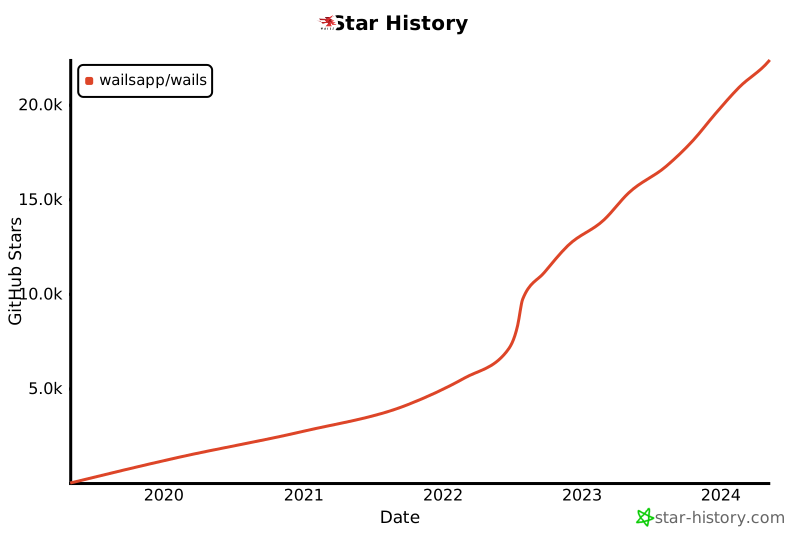](https://star-history.com/#wailsapp/wails&Date)
## Colaboradores
A lista de colaboradores está ficando grande demais para o arquivo readme! Todas as pessoas incríveis que contribuíram para o
projeto tem sua própria página [aqui](https://wails.io/credits#contributors).
This is currently an unsorted brain dump of changes. It will be organised into a more readable format soon.
## Options
The application options have been revised since v2.
## Events
In v3, there are 3 types of events:
- Application Events
- Window Events
- Custom Events
### Application Events
Application events are events that are emitted by the application. These events include native events such as `ApplicationDidFinishLaunching` on macOS.
### Window Events
Window events are events that are emitted by a window. These events include native events such as `WindowDidBecomeMain` on macOS. Common events are also defined, so they work cross-platform, e.g. `WindowClosing`.
### Custom Events
Events that the user defines are called `WailsEvents`. This is to differentiate them from the `Event` object that is used to communicate with the browser. WailsEvents are now objects that encapsulate all the details of an event. This includes the event name, the data, and the source of the event.
The data associated with a WailsEvent is now a single value. If multiple values are required, then a struct can be used.
### Event callbacks and `Emit` function signature
The signatures events callbacks (as used by `On`, `Once` & `OnMultiple`) have changed. In v2, the callback function received optional data. In v3, the callback function receives a `WailsEvent` object that contains all data related to the event.
Similarly, the `Emit` function has changed. Instead of taking a name and optional data, it now takes a single `WailsEvent` object that it will emit.
### `Off` and `OffAll`
In v2, `Off` and `OffAll` calls would remove events in both JS and Go. Due to the multi-window nature of v3, this has been changed so that these methods only apply to the context they are called in. For example, if you call `Off` in a window, it will only remove events for that window. If you use `Off` in Go, it will only remove events for Go.
### Hooks
Event Hooks are a new feature in v3. They allow you to hook into the event system and perform actions when certain events are emitted. For example, you can hook into the `WindowClosing` event and perform some cleanup before the window closes.
Hooks can be registered at the application level or at the window level using `RegisterHook`. Application level are for application events. Window level hooks will only be called for the window they are registered with.
### Logging
Logging in v2 was confusing as both application logs and system (internal) logs were using the same logger. We have simplified this as follows:
- Internal logs are now handled using the standard Go `slog` logger. This is configured using the `logger` option in the application options. By default, this uses the [tint](https://github.com/lmittmann/tint) logger.
- Application logs can now be achieved through the new `log` plugin which utilises `slog` under the hood. This plugin provides a simple API for logging to the console. It is available in both Go and JS.
### Developer notes
When emitting an event in Go, it will dispatch the event to local Go listeners and also each window in the application.
When emitting an event in JS, it now sends the event to the application. This will be processed as if it was emitted in Go, however the sender ID will be that of the window.
## Window
The Window API has largely remained the same, however the methods are now on an instance of a window rather than the runtime.
Some notable differences are:
- Windows now have a Name that identifies them. This is used to identify the window when emitting events.
- Windows have even more methods on the that were previously unavailable, such as `AbsolutePosition` and `ToggleDevTools`.
- Windows can now accept files via native drag and drop. See the Drag and Drop section for more details.
## ClipBoard
The clipboard API has been simplified. There is now a single `Clipboard` object that can be used to read and write to the clipboard. The `Clipboard` object is available in both Go and JS. `SetText()` to set the text and `Text()` to get the text.
## Bindings
Bindings work in a similar way to v2, by providing a means to bind struct methods to the frontend.
These can be called in the frontend using the binding wrappers generated by the `wails3 generate bindings` command:
```javascript
// @ts-check
// Cynhyrchwyd y ffeil hon yn awtomatig. PEIDIWCH Â MODIWL
// This file is automatically generated. DO NOT EDIT
Bound methods are obfuscated by default, and are identified using uint32 IDs, calculated using the [FNV hashing algorithm](https://en.wikipedia.org/wiki/Fowler%E2%80%93Noll%E2%80%93Vo_hash_function). This is to prevent the method name from being exposed in production builds.
In debug mode, the method IDs are logged along with the calculated ID of the method to aid in debugging. If you wish to add an extra layer of obfuscation, you can use the `BindAliases` option. This allows you to specify a map of alias IDs to method IDs. When the frontend calls a method using an ID, the method ID will be looked up in the alias map first for a match. If it does not find it, it assumes it's a standard method ID and tries to find the method in the usual way.
We can now call using this alias in the frontend: `wails.Call(1, "world!")`.
### Insecure calls
If you don't mind your calls being available in plain text in your binary and have no intention of using [garble](https://github.com/burrowers/garble),
then you can use the insecure `wails.CallByName()` method. This method takes the fully qualified name of the method to call and the arguments to pass to it.
This is only provided as a convenience method for development. It is not recommended to use this in production.
## Dialogs
Dialogs are now available in JavaScript!
### Windows
Dialog buttons in Windows are not configurable and are constant depending on the type of dialog. To trigger a callback when a button is pressed, create a button with the same name as the button you wish to have the callback attached to.
Example: Create a button with the label `Ok` and use `OnClick()` to set the callback method:
```go
dialog := app.QuestionDialog().
SetTitle("Update").
SetMessage("The cancel button is selected when pressing escape")
ok := dialog.AddButton("Ok")
ok.OnClick(func() {
// Do something
})
no := dialog.AddButton("Cancel")
dialog.SetDefaultButton(ok)
dialog.SetCancelButton(no)
dialog.Show()
```
## Drag and Drop
Native drag and drop can be enabled per-window. Simply set the `EnableDragAndDrop` window config option to `true` and the window will allow files to be dragged onto it. When this happens, the `events.FilesDropped` event will be emitted. The filenames can then be retrieved from the `WindowEvent.Context()` using the `DroppedFiles()` method. This returns a slice of strings containing the filenames.
## Context Menus
Context menus are contextual menus that are shown when the user right-clicks on an element. Creating a context menu is the same as creating a standard menu , by using `app.NewMenu()`. To make the context menu available to a window, call `window.RegisterContextMenu(name, menu)`. The name will be the id of the context menu and used by the frontend.
To indicate that an element has a context menu, add the `data-contextmenu` attribute to the element. The value of this attribute should be the name of a context menu previously registered with the window.
It is possible to register a context menu at the application level, making it available to all windows. This can be done using `app.RegisterContextMenu(name, menu)`. If a context menu cannot be found at the window level, the application context menus will be checked. A demo of this can be found in `v3/examples/contextmenus`.
## Wails Markup Language (WML)
The Wails Markup Language is a simple markup language that allows you to add functionality to standard HTML elements without the use of Javascript.
The following tags are currently supported:
### `data-wml-event`
This specifies that a Wails event will be emitted when the element is clicked. The value of the attribute should be the name of the event to emit.
Sometimes you need the user to confirm an action. This can be done by adding the `data-wml-confirm` attribute to the element. The value of this attribute will be the message to display to the user.
Example:
```html
<button data-wml-event="delete-all-items" data-wml-confirm="Are you sure?">Delete All Items</button>
```
### `data-wml-window`
Any `wails.window` method can be called by adding the `data-wml-window` attribute to an element. The value of the attribute should be the name of the method to call. The method name should be in the same case as the method.
This attribute specifies which javascript event should trigger the action. The default is `click`.
```html
<button data-wml-event="hover-box" data-wml-trigger="mouseover">Hover over me!</button>
```
## Systray
Wails 3 comes with a built-in systray. This is a fully featured systray that has been designed to be as simple as possible to use.
It is possible to set the icon, tooltip and menu of the systray. It is possible to also "attach" a window to the systray. Doing this will provide the following functionality:
- Clicking the systray icon with toggle the window visibility
- Right-clicking the systray will open the menu, if there is one
On macOS, if there is no attached window, the systray will use the default method of displaying the menu (any button).
If there is an attached window but no menu, the systray will toggle the window regardless of the button pressed.
## Plugins
Plugins are a way to extend the functionality of your Wails application.
### Creating a plugin
Plugins are standard Go structure that adhere to the following interface:
```go
type Plugin interface {
Name() string
Init(*application.App) error
Shutdown()
CallableByJS() []string
InjectJS() string
}
```
The `Name()` method returns the name of the plugin. This is used for logging purposes.
The `Init(*application.App) error` method is called when the plugin is loaded. The `*application.App`
parameter is the application that the plugin is being loaded into. Any errors will prevent
the application from starting.
The `Shutdown()` method is called when the application is shutting down.
The `CallableByJS()` method returns a list of exported functions that can be called from
the frontend. These method names must exactly match the names of the methods exported
by the plugin.
The `InjectJS()` method returns JavaScript that should be injected into all windows as they are created. This is useful for adding custom JavaScript functions that complement the plugin.
### Tips
#### Enums
In Go, enums are often defined as a type and a set of constants. For example:
```go
type MyEnum int
const (
MyEnumOne MyEnum = iota
MyEnumTwo
MyEnumThree
)
```
Due to incompatibility between Go and JavaScript, custom types cannot be used in this way. The best strategy is to use a type alias for float64:
```go
type MyEnum = float64
const (
MyEnumOne MyEnum = iota
MyEnumTwo
MyEnumThree
)
```
In Javascript, you can then use the following:
```js
const MyEnum = {
MyEnumOne: 0,
MyEnumTwo: 1,
MyEnumThree: 2
}
```
- Why use `float64`? Can't we use `int`?
- Because JavaScript doesn't have a concept of `int`. Everything is a `number`, which translates to `float64` in Go. There are also restrictions on casting types in Go's reflection package, which means using `int` doesn't work.
### BackgroundColour
In v2, this was a pointer to an `RGBA` struct. In v3, this is an `RGBA` struct value.
### WindowIsTranslucent
This flag has been removed. Now there is a `BackgroundType` flag that can be used to set the type of background the window should have.
This flag can be set to any of the following values:
- `BackgroundTypeSolid` - The window will have a solid background
- `BackgroundTypeTransparent` - The window will have a transparent background
- `BackgroundTypeTranslucent` - The window will have a translucent background
On Windows, if the `BackgroundType` is set to `BackgroundTypeTranslucent`, the type of translucency can be set using the
`BackdropType` flag in the `WindowsWindow` options. This can be set to any of the following values:
- `Auto` - The window will use an effect determined by the system
- `None` - The window will have no background
- `Mica` - The window will use the Mica effect
- `Acrylic` - The window will use the acrylic effect
- `Tabbed` - The window will use the tabbed effect
## Windows Application Options
### WndProcInterceptor
If this is set, the WndProc will be intercepted and the function will be called. This allows you to handle Windows
messages directly. The function should have the following signature:
Thanks for wanting to help out with development of Wails! This guide will help you get started.
## Getting Started
- Git clone this repository. Checkout the `v3-alpha` branch.
- Install the CLI: `cd v3/cmd/wails3 && go install`
- Optional: If you are wanting to use the build system to build frontend code, you will need to install [npm](https://nodejs.org/en/download).
## Building
For simple programs, you can use the standard `go build` command. It's also possible to use `go run`.
Wails also comes with a build system that can be used to build more complex projects. It utilises the awesome [Task](https://taskfile.dev) build system.
For more information, check out the task homepage or run `wails task --help`.
## Project layout
The project has the following structure:
```
v3
├── cmd/wails3 // CLI
├── examples // Examples of Wails apps
├── internal // Internal packages
| ├── runtime // The Wails JS runtime
| └── templates // The supported project templates
├── pkg
| ├── application // The core Wails library
| └── events // The event definitions
| └── mac // macOS specific code used by plugins
| └── w32 // Windows specific code
├── plugins // Supported plugins
├── tasks // General tasks
└── Taskfile.yaml // Development tasks configuration
```
## Development
### Adding window functionality
The preferred way to add window functionality is to add a new function to the `pkg/application/webview_window.go` file. This should implement all the functionality required for all platforms. Any platform specific code should be called via a `webviewWindowImpl` interface method. This interface is implemented by each of the target platforms to provide the platform specific functionality. In some cases, this may do nothing.
Once you've added the interface method, ensure each platform implements it. A good example of this is the `SetMinSize` method.
- Mac: `webview_window_darwin.go`
- Windows: `webview_window_windows.go`
- Linux: `webview_window_linux.go`
Most, if not all, of the platform specific code should be run on the main thread. To simplify this, there are a number of `invokeSync` methods defined in `application.go`.
### Updating the runtime
The runtime is located in `v3/internal/runtime`. When the runtime is updated, the following steps need to be taken:
```shell
wails3 task runtime:build
```
### Events
Events are defined in `v3/pkg/events`. When adding a new event, the following steps need to be taken:
- Add the event to the `events.txt` file
- Run `wails3 task events:generate`
There are a number of types of events: platform specific application and window events + common events. The common events are useful for cross-platform event handling, but you aren't limited to the "lowest common denominator". You can use the platform specific events if you need to.
When adding a common event, ensure that the platform specific events are mapped. An example of this is in `window_webview_darwin.go`:
```go
// Translate ShouldClose to common WindowClosing event
NOTE: We may try to automate this in the future by adding the mapping to the event definition.
### Plugins
Plugins are a way to extend the functionality of your Wails application.
#### Creating a plugin
Plugins are standard Go structure that adhere to the following interface:
```go
type Plugin interface {
Name() string
Init(*application.App) error
Shutdown()
CallableByJS() []string
InjectJS() string
}
```
The `Name()` method returns the name of the plugin. This is used for logging purposes.
The `Init(*application.App) error` method is called when the plugin is loaded. The `*application.App`
parameter is the application that the plugin is being loaded into. Any errors will prevent
the application from starting.
The `Shutdown()` method is called when the application is shutting down.
The `CallableByJS()` method returns a list of exported functions that can be called from
the frontend. These method names must exactly match the names of the methods exported
by the plugin.
The `InjectJS()` method returns JavaScript that should be injected into all windows as they are created. This is useful for adding custom JavaScript functions that complement the plugin.
## Misc Tasks
### Upgrading Taskfile
The Wails CLI uses the [Task](https://taskfile.dev) build system. It is imported as a library and used to run the tasks defined in `Taskfile.yaml`.
The main interfacing with Task happens in `v3/internal/commands/task.go`.
To check if there's an upgrade for Taskfile, run `wails3 task -version` and check against the Task website.
To upgrade the version of Taskfile used, run:
```shell
wails3 task taskfile:upgrade
```
If there are incompatibilities then they should appear in the `v3/internal/commands/task.go` file.
Usually the best way to fix incompatibilities is to clone the task repo at `https://github.com/go-task/task` and look at the git history to determine what has changed and why.
To check all changes have worked correctly, re-install the CLI and check the version again:
```shell
wails3 task cli:install
wails3 task -version
```
## Opening a PR
Make sure that all PRs have a ticket associated with them providing context to the change. If there is no ticket, please create one first.
Ensure that all PRs have updated the CHANGELOG.md file with the changes made. The CHANGELOG.md file is located in the `v3` directory.
## Misc Tasks
### Upgrading Taskfile
The Wails CLI uses the [Task](https://taskfile.dev) build system. It is imported as a library and used to run the tasks defined in `Taskfile.yaml`.
The main interfacing with Task happens in `v3/internal/commands/task.go`.
To check if there's an upgrade for Taskfile, run `wails3 task -version` and check against the Task website.
To upgrade the version of Taskfile used, run:
```shell
wails3 task taskfile:upgrade
```
If there are incompatibilities then they should appear in the `v3/internal/commands/task.go` file.
Usually the best way to fix incompatibilities is to clone the task repo at `https://github.com/go-task/task` and look at the git history to determine what has changed and why.
To check all changes have worked correctly, re-install the CLI and check the version again:
```shell
wails3 task cli:install
wails3 task -version
```
Some files were not shown because too many files have changed in this diff
Show More
Reference in New Issue
Block a user
Blocking a user prevents them from interacting with repositories, such as opening or commenting on pull requests or issues. Learn more about blocking a user.
 Lea Anthony
 Travis McLane
 ALMAS
ALMAS
 Oleg Gulevskyy
 David Haukeness
 stffabi
 Nobleman
 IAFEnvoy
 Александр
 Vilsol
 Miclle Zheng
 Diógenes Rodrigues
 Light
Light
 Zámbó, Levente
 Kermout Ayoub
 github-actions[bot]
 Phil Richards
 Oussama Sethoum
 Kin NG
 Andreas Christou
 Li Yang
 Aranggi J. Toar
 figuerom16
 guangwu
 Ethan Reesor
 Marcus Crane
 Mohamed Gharib
 dependabot[bot]
 Mahcks
 5aaee9
 Misite Bao
 Marvin Wendt
 Amin Yahyaabadi