
fido2-manage
fido2-manage is a tool allowing to manage FIDO2.1 devices over USB or NFC, including Passkey (resident keys) management
License
fido2-manage is licensed under the BSD 2-clause license. See the LICENSE file for the full license text.
Supported Platforms
fido2-manage should work on any Linux distribution, but we develop and test using Ubuntu.
For openSUSE users, a third-party guide is available here: Installing TOKEN2 FIDO token on openSUSE Tumbleweed.
This library is partially forked from libfido2 to provide a FIDO2.1 key management tool under the Linux platform (we already have a solution for Windows).
Supported devices
FIDO2.1 (PRE or FINAL) keys from any brand can be used. However, with FIDO2.0 keys, no passkey management is possible. As a result, only basic information will be shown with 2.0 devices.
Installation
If you haven't installed Git yet, please do so (sudo apt install git)
git clone https://github.com/Token2/fido2-manage.git

cd fido2-manage

sudo apt install -y zlib1g-dev pkg-config

sudo apt install -y cmake libcbor-dev libpcsclite-dev libssl-dev libudev-dev

rm -rf build && mkdir build && cd build && cmake -USE_PCSC=ON ..

cd ..

make -C build

sudo make -C build install

sudo ldconfig

chmod 755 fido2-manage.sh
Test the shell script
./fido2-manage.sh -list
GUI
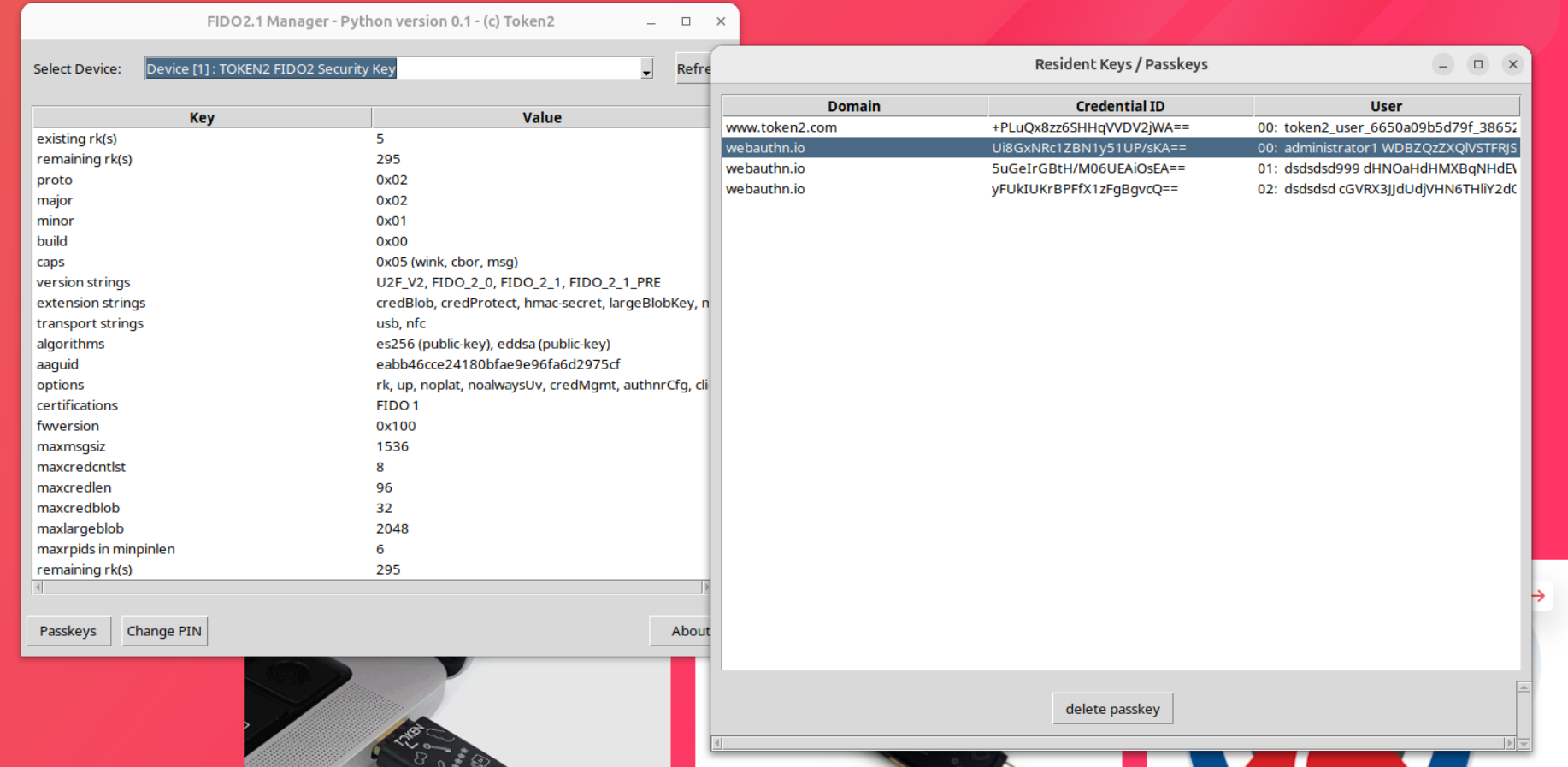
The GUI wrapper (gui.py) created with Python3 is included in the package and should be ready for use on the latest Ubuntu releases. The only requirement is the tkinter module that can be installed as follows:
sudo apt install -y python3-tk
The steps above are also suitable for Debian releases. However, for the GUI on Debian, the python3-pexpect module must also be installed.
sudo apt install -y python3-pexpect
To run the script, execute it using Python from the same folder:
python3 gui.py
Automated installation script
You can download the installer bash script to run all commands in one go
wget https://raw.githubusercontent.com/token2/fido2-manage/main/install-fido2-manage.sh
chmod +x ./install-fido2-manage.sh
./install-fido2-manage.sh
If no errors are shown, then you can launch the GUI:
cd fido2-manage
python3 gui.py
Usage
The syntax and command line parameters are similar to our fido2-manage.exe tool for Windows.
For example, the following command should be used to set a PIN on a new device:
./fido2-manage.sh -setPIN -device 1
Security Limitations of Command-Line PIN parameter
Due to limitations of command-line applications, sensitive parameters such as PINs may be exposed to other local users through process inspection mechanisms. Use fido2-manage only on systems where you have exclusive access and do not run it on shared or multi-user environments.
Changes
The changes implemented in our fork differ from the original code in the following ways:
- Human-readable command line arguments, consistent with our Windows command line tool
- The ability to send the PIN as a command line parameter
- Displaying the Username (UPN) in the credential output list.
To allow coexistence with the original tool, our version will be compiled and installed under the name 'fido2-token2'.
Installation instructions for other platforms
ArchLinux
git clone https://github.com/Token2/fido2-manage.git

sudo pacman -S libfido2 cmake libcbor tk python-pexpect

cd fido2-manage

rm -rf build && mkdir build && cd build && cmake -USE_PCSC=ON ..

cd ..

make -C build

sudo make -C build install

sudo ldconfig

chmod 755 fido2-manage.sh

python3 gui.py
Fedora
The below installation instructions were written for Fedora 43, but might also work on other versions of the operating system.
git clone https://github.com/Token2/fido2-manage.git

cd fido2-manage

sudo dnf install -y zlib-devel pkg-config cmake libcbor-devel pcsc-lite-devel openssl-devel systemd-devel

rm -rf build && mkdir build && cd build && cmake -USE_PCSC=ON ..

cd ..

make -C build

sudo make -C build install

sudo ldconfig

chmod 755 fido2-manage.sh

python3 gui.py