
 Yongsul KimandCopybara-Service
cf5d7016a0
Yongsul KimandCopybara-Service
cf5d7016a0
Merge https://github.com/google/adk-python/pull/1211 ### Description When using the Google.GenAI backend (GEMINI_API), file uploads fail if the `file_data` or `inline_data` parts of the request contain a `display_name`. The Gemini API (non-Vertex) does not support this attribute, causing a `ValueError`. This commit updates the `_preprocess_request` method in the `Gemini` class to sanitize the request. It now iterates through all content parts and sets `display_name` to `None` if the determined backend is `GEMINI_API`. This ensures compatibility, similar to the existing handling of the `labels` attribute. Fixes #1182 ### Testing Plan **1. Unit Tests** - Added a new parameterized test `test_preprocess_request_handles_backend_specific_fields` to `tests/unittests/models/test_google_llm.py`. - This test verifies: - When the backend is `GEMINI_API`, `display_name` in `file_data` and `inline_data` is correctly set to `None`. - When the backend is `VERTEX_AI`, `display_name` remains unchanged. - All unit tests passed successfully. ```shell pytest ./tests/unittests/models/test_google_llm.py ░▒▓ ✔ adk-python base system 21:14:02 ============================================================================================ test session starts ============================================================================================ platform darwin -- Python 3.12.10, pytest-8.3.5, pluggy-1.6.0 rootdir: /Users/leo/PycharmProjects/adk-python configfile: pyproject.toml plugins: anyio-4.9.0, langsmith-0.3.42, asyncio-0.26.0, mock-3.14.0, xdist-3.6.1 asyncio: mode=Mode.AUTO, asyncio_default_fixture_loop_scope=function, asyncio_default_test_loop_scope=function collected 20 items tests/unittests/models/test_google_llm.py .................... [100%] ============================================================================================ 20 passed in 3.19s ============================================================================================= ``` **2. Manual End-to-End (E2E) Test** I manually verified the fix using `adk web`. The test was configured to use a **Google AI Studio API key**, which is the scenario where the bug occurs. - **Before the fix:** When uploading a file, the request failed with the error: `{"error": "display_name parameter is not supported in Gemini API."}`. This confirms the bug. <img width="968" alt="Screenshot 2025-06-06 at 21 22 35" src="https://github.com/user-attachments/assets/f1ab2db2-d5ec-40fc-a182-9932562b21e1" /> - **After the fix:** With the patch applied, the same file upload was processed successfully. The agent correctly analyzed the file and responded without errors. <img width="973" alt="Screenshot 2025-06-06 at 21 23 24" src="https://github.com/user-attachments/assets/e03228f6-0b7d-4bf9-955a-ac24efb4fb72" /> COPYBARA_INTEGRATE_REVIEW=https://github.com/google/adk-python/pull/1211 from ystory:fix/display-name d3efebe74aca635a7a255063e64f07cc44016f05 PiperOrigin-RevId: 769278445
Agent Development Kit (ADK)




An open-source, code-first Python toolkit for building, evaluating, and deploying sophisticated AI agents with flexibility and control.
Important Links: Docs, Samples, Java ADK & ADK Web.
</html>Agent Development Kit (ADK) is a flexible and modular framework for developing and deploying AI agents. While optimized for Gemini and the Google ecosystem, ADK is model-agnostic, deployment-agnostic, and is built for compatibility with other frameworks. ADK was designed to make agent development feel more like software development, to make it easier for developers to create, deploy, and orchestrate agentic architectures that range from simple tasks to complex workflows.
✨ Key Features
-
Rich Tool Ecosystem: Utilize pre-built tools, custom functions, OpenAPI specs, or integrate existing tools to give agents diverse capabilities, all for tight integration with the Google ecosystem.
-
Code-First Development: Define agent logic, tools, and orchestration directly in Python for ultimate flexibility, testability, and versioning.
-
Modular Multi-Agent Systems: Design scalable applications by composing multiple specialized agents into flexible hierarchies.
-
Deploy Anywhere: Easily containerize and deploy agents on Cloud Run or scale seamlessly with Vertex AI Agent Engine.
🤖 Agent2Agent (A2A) Protocol and ADK Integration
For remote agent-to-agent communication, ADK integrates with the A2A protocol. See this example for how they can work together.
🚀 Installation
Stable Release (Recommended)
You can install the latest stable version of ADK using pip:
pip install google-adk
The release cadence is weekly.
This version is recommended for most users as it represents the most recent official release.
Development Version
Bug fixes and new features are merged into the main branch on GitHub first. If you need access to changes that haven't been included in an official PyPI release yet, you can install directly from the main branch:
pip install git+https://github.com/google/adk-python.git@main
Note: The development version is built directly from the latest code commits. While it includes the newest fixes and features, it may also contain experimental changes or bugs not present in the stable release. Use it primarily for testing upcoming changes or accessing critical fixes before they are officially released.
📚 Documentation
Explore the full documentation for detailed guides on building, evaluating, and deploying agents:
🏁 Feature Highlight
Define a single agent:
from google.adk.agents import Agent
from google.adk.tools import google_search

root_agent = Agent(
    name="search_assistant",
    model="gemini-2.0-flash", # Or your preferred Gemini model
    instruction="You are a helpful assistant. Answer user questions using Google Search when needed.",
    description="An assistant that can search the web.",
    tools=[google_search]
)
Define a multi-agent system:
Define a multi-agent system with coordinator agent, greeter agent, and task execution agent. Then ADK engine and the model will guide the agents works together to accomplish the task.
from google.adk.agents import LlmAgent, BaseAgent

# Define individual agents
greeter = LlmAgent(name="greeter", model="gemini-2.0-flash", ...)
task_executor = LlmAgent(name="task_executor", model="gemini-2.0-flash", ...)

# Create parent agent and assign children via sub_agents
coordinator = LlmAgent(
    name="Coordinator",
    model="gemini-2.0-flash",
    description="I coordinate greetings and tasks.",
    sub_agents=[ # Assign sub_agents here
        greeter,
        task_executor
    ]
)
Development UI
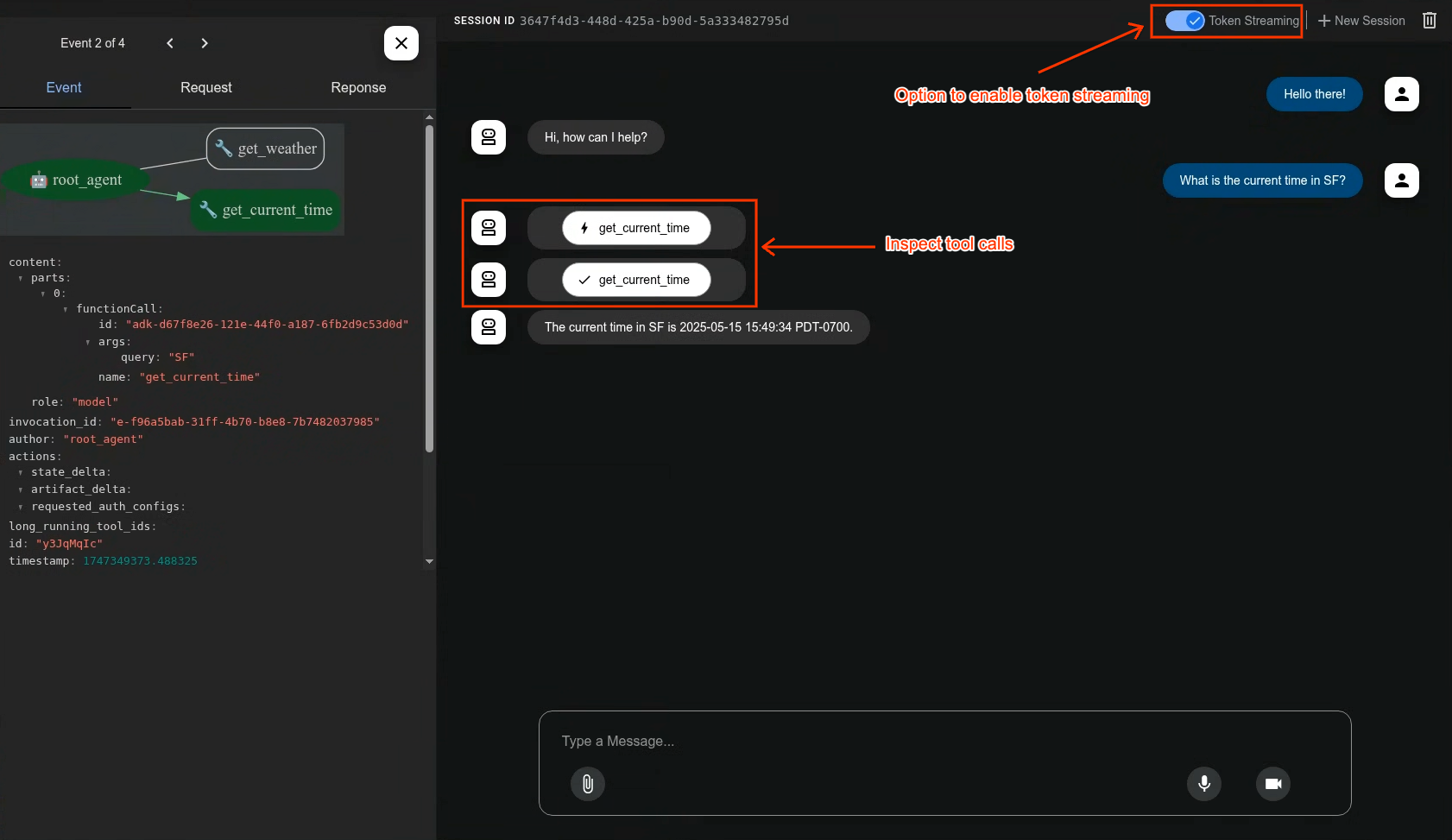
A built-in development UI to help you test, evaluate, debug, and showcase your agent(s).
Evaluate Agents
adk eval \
    samples_for_testing/hello_world \
    samples_for_testing/hello_world/hello_world_eval_set_001.evalset.json
🤝 Contributing
We welcome contributions from the community! Whether it's bug reports, feature requests, documentation improvements, or code contributions, please see our
- General contribution guideline and flow.
- Then if you want to contribute code, please read Code Contributing Guidelines to get started.
📄 License
This project is licensed under the Apache 2.0 License - see the LICENSE file for details.
Happy Agent Building!