
 Hangfei LinandCopybara-Service
b5f5df9fa8
Hangfei LinandCopybara-Service
b5f5df9fa8
Fixes https://github.com/google/adk-python/issues/3174

The event compaction process, configured via `EventsCompactionConfig`, was
previously scheduled as a background task using `asyncio.create_task`.
Because Python's `asyncio.create_task` only holds a weak reference to
the created task and no strong reference was maintained by ADK, the
compaction task could be garbage-collected before it finished executing.
This resulted in event compaction failing silently or only partially
running, preventing session history from being summarized.

### Approaches Considered

Two approaches were considered to fix this:

1.  **`asyncio.create_task` + Reference:** Create the task with `create_task` and store a strong reference to it (e.g., in a `set` on the [Runner](http://_vscodecontentref_/0) instance), removing it only when complete via `task.add_done_callback()`.
    *   **Pros:** The [run_async](http://_vscodecontentref_/1) async generator finishes immediately after yielding the last agent event.
    *   **Cons:** Adds complexity to the Runner state; background task failures are silent to the [run_async](http://_vscodecontentref_/2) caller; requires enhancement to `runner.close()` to correctly manage pending tasks on shutdown.
2.  **`await`:** Directly `await` the compaction coroutine at the end of [run_async](http://_vscodecontentref_/3) after all agent events have been yielded.
    *   **Pros:** Simple to implement; ensures compaction runs to completion; failures during compaction propagate immediately to the [run_async](http://_vscodecontentref_/4) caller, making them visible and easier to debug.
    *   **Cons:** The `async for` loop iterating over [run_async](http://_vscodecontentref_/5) will not terminate until compaction finishes.

### Decision

This change implements the `await` approach. Although it means the `async for` loop takes longer to terminate when compaction occurs, it was chosen for its **simplicity and robustness**. Ensuring that compaction either succeeds or fails visibly is preferable to silent background failures.

All agent response events are yielded *before* compaction starts, so there is **no user-perceived delay in receiving the agent's answer** for the current turn.

### Integration Note for Users

Because compaction is now awaited, code consuming events via `async for event in runner.run_async(...)` will only finish iterating *after* compaction is complete (if compaction is triggered for that invocation).

If your application only needs the agent's response to proceed (e.g., displaying a message in a UI and allowing the user to reply), you can process events as they arrive and initiate the next turn without waiting for the `async for` loop to fully terminate. A new call to [run_async](http://_vscodecontentref_/6) for the next user query can be made immediately and will execute concurrently.

**Example:**

```python
async def handle_agent_turn(runner, message):
    print("Agent is thinking...")
    async for event in runner.run_async(user_id='...', session_id='...', new_message=message):
        # Stream events to UI, log, etc.
        if event.author == 'model' and event.content and event.content.parts[0].text:
            print(f"Agent response: {event.content.parts[0].text}")
            # The agent has provided a text response.
            # The application can now enable user input for the next turn,
            # even though this async for loop might not finish immediately
            # if compaction is running.
    print("Invocation complete (including compaction if any).")

# In your application:
# A new call to handle_agent_turn(runner, next_message) can be made
# as soon as the user provides the next input, without waiting for
# the previous call's generator to be exhausted.

Co-authored-by: Hangfei Lin <hangfei@google.com>
PiperOrigin-RevId: 833885375
Agent Development Kit (ADK)





An open-source, code-first Python framework for building, evaluating, and deploying sophisticated AI agents with flexibility and control.
Important Links: Docs, Samples, Java ADK, Go ADK & ADK Web.
</html>Agent Development Kit (ADK) is a flexible and modular framework that applies software development principles to AI agent creation. It is designed to simplify building, deploying, and orchestrating agent workflows, from simple tasks to complex systems. While optimized for Gemini, ADK is model-agnostic, deployment-agnostic, and compatible with other frameworks.
🔥 What's new
-
Custom Service Registration: Add a service registry to provide a generic way to register custom service implementations to be used in FastAPI server. See short instruction. (391628f)
-
Rewind: Add the ability to rewind a session to before a previous invocation (9dce06f).
-
New CodeExecutor: Introduces a new AgentEngineSandboxCodeExecutor class that supports executing agent-generated code using the Vertex AI Code Execution Sandbox API (ee39a89)
✨ Key Features
-
Rich Tool Ecosystem: Utilize pre-built tools, custom functions, OpenAPI specs, MCP tools or integrate existing tools to give agents diverse capabilities, all for tight integration with the Google ecosystem.
-
Code-First Development: Define agent logic, tools, and orchestration directly in Python for ultimate flexibility, testability, and versioning.
-
Agent Config: Build agents without code. Check out the Agent Config feature.
-
Tool Confirmation: A tool confirmation flow(HITL) that can guard tool execution with explicit confirmation and custom input.
-
Modular Multi-Agent Systems: Design scalable applications by composing multiple specialized agents into flexible hierarchies.
-
Deploy Anywhere: Easily containerize and deploy agents on Cloud Run or scale seamlessly with Vertex AI Agent Engine.
🚀 Installation
Stable Release (Recommended)
You can install the latest stable version of ADK using pip:
pip install google-adk
The release cadence is roughly bi-weekly.
This version is recommended for most users as it represents the most recent official release.
Development Version
Bug fixes and new features are merged into the main branch on GitHub first. If you need access to changes that haven't been included in an official PyPI release yet, you can install directly from the main branch:
pip install git+https://github.com/google/adk-python.git@main
Note: The development version is built directly from the latest code commits. While it includes the newest fixes and features, it may also contain experimental changes or bugs not present in the stable release. Use it primarily for testing upcoming changes or accessing critical fixes before they are officially released.
🤖 Agent2Agent (A2A) Protocol and ADK Integration
For remote agent-to-agent communication, ADK integrates with the A2A protocol. See this example for how they can work together.
📚 Documentation
Explore the full documentation for detailed guides on building, evaluating, and deploying agents:
🏁 Feature Highlight
Define a single agent:
from google.adk.agents import Agent
from google.adk.tools import google_search

root_agent = Agent(
    name="search_assistant",
    model="gemini-2.5-flash", # Or your preferred Gemini model
    instruction="You are a helpful assistant. Answer user questions using Google Search when needed.",
    description="An assistant that can search the web.",
    tools=[google_search]
)
Define a multi-agent system:
Define a multi-agent system with coordinator agent, greeter agent, and task execution agent. Then ADK engine and the model will guide the agents works together to accomplish the task.
from google.adk.agents import LlmAgent, BaseAgent

# Define individual agents
greeter = LlmAgent(name="greeter", model="gemini-2.5-flash", ...)
task_executor = LlmAgent(name="task_executor", model="gemini-2.5-flash", ...)

# Create parent agent and assign children via sub_agents
coordinator = LlmAgent(
    name="Coordinator",
    model="gemini-2.5-flash",
    description="I coordinate greetings and tasks.",
    sub_agents=[ # Assign sub_agents here
        greeter,
        task_executor
    ]
)
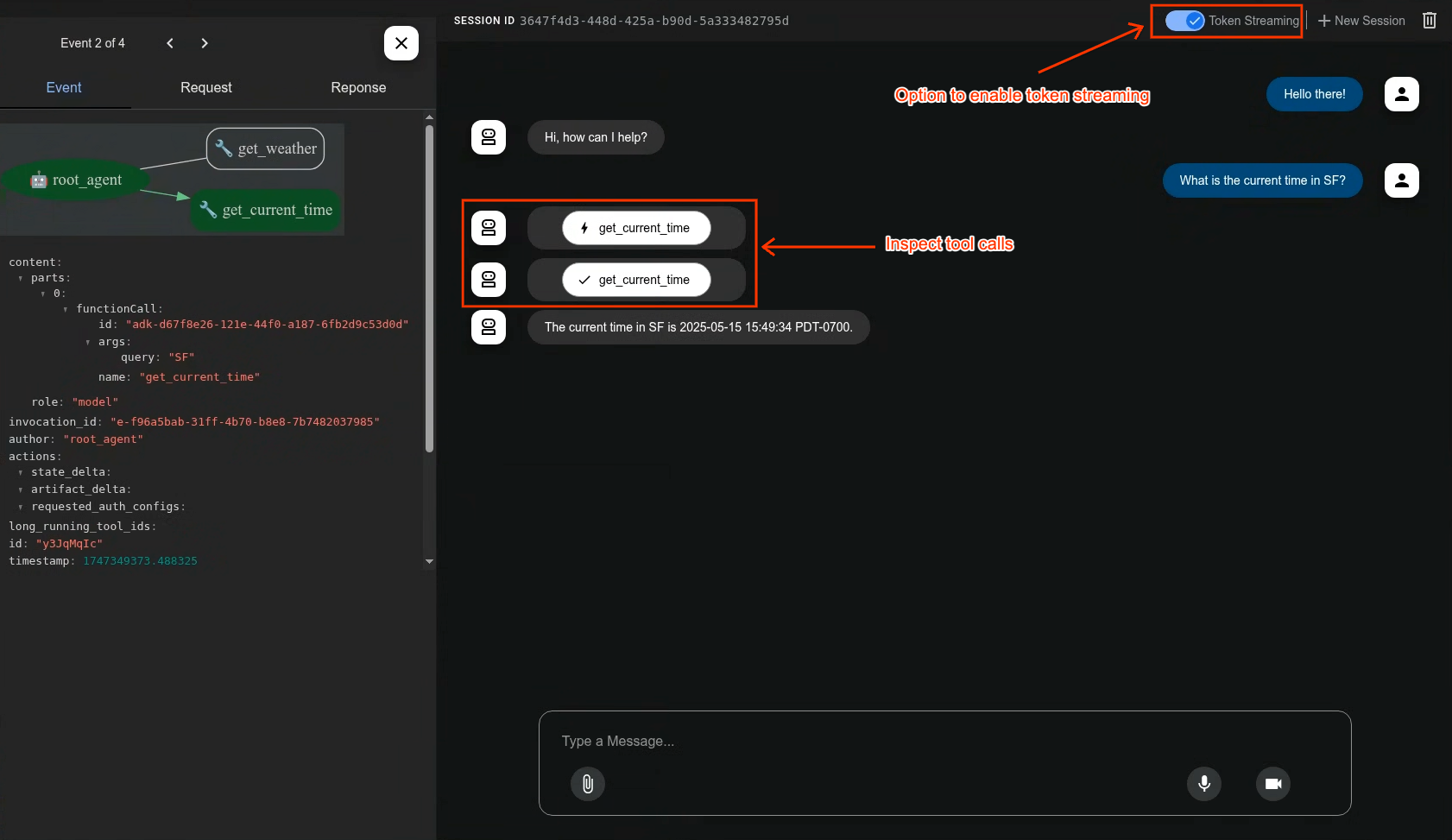
Development UI
A built-in development UI to help you test, evaluate, debug, and showcase your agent(s).
Evaluate Agents
adk eval \
    samples_for_testing/hello_world \
    samples_for_testing/hello_world/hello_world_eval_set_001.evalset.json
🤝 Contributing
We welcome contributions from the community! Whether it's bug reports, feature requests, documentation improvements, or code contributions, please see our
- General contribution guideline and flow.
- Then if you want to contribute code, please read Code Contributing Guidelines to get started.
Community Repo
We have adk-python-community repothat is home to a growing ecosystem of community-contributed tools, third-party service integrations, and deployment scripts that extend the core capabilities of the ADK.
Vibe Coding
If you are to develop agent via vibe coding the llms.txt and the llms-full.txt can be used as context to LLM. While the former one is a summarized one and the later one has the full information in case your LLM has big enough context window.
Community Events
- [Completed] ADK's 1st community meeting on Wednesday, October 15, 2025. Remember to join our group to get access to the recording, and deck.
📄 License
This project is licensed under the Apache 2.0 License - see the LICENSE file for details.
Happy Agent Building!