
 LorenzoandCopybara-Service
63b69fbc0f
LorenzoandCopybara-Service
63b69fbc0f
Merge https://github.com/google/adk-python/pull/2582

Relate to #3306

## Description
Fixes issues #6 and #1785 where ADK commands crash on Windows due to symlink creation requiring admin privileges.

## Problem
On Windows, running ADK commands (like `adk run`) fails with `OSError: [WinError 1314] A required privilege is not held by the client: ...` because the logging system attempts to create a symlink for the latest log file. Windows requires administrator privileges for symlink creation by default (unless Developer Mode is enabled), causing crashes for non-admin users.

## Root Cause
The issue was in [`logs.py`](https://github.com/google/adk-python/blob/main/src/google/adk/cli/utils/logs.py#L72) where `os.symlink()` was called unconditionally without error handling, causing the entire CLI to crash when symlink creation failed.

## Solution
This PR implements graceful symlink handling. Changes made:
- Extracted symlink creation into separate function with error handling
- Added graceful fallback when symlink creation fails
- Replaced crashes with warnings to keep CLI functional
- Improved user messaging about log file locations

This solution follows a similar pattern to the one used in [ROS2](https://github.com/ros2) in its [logging module](https://github.com/ros2/launch/blob/rolling/launch/launch/logging/__init__.py#L93).

## Testing
### Before (broken)
```bash
> adk run my_agent
Log setup complete: C:\Users\username\AppData\Local\Temp\agents_log\agent.20250817_215119.log
Traceback (most recent call last):
  File "google\adk\cli\utils\logs.py", line 72, in log_to_tmp_folder
    os.symlink(log_filepath, latest_log_link)
OSError: [WinError 1314] A required privilege is not held by the client
```

### After (fixed)
```bash
> adk run my_agent
Log setup complete: C:\Users\username\AppData\Local\Temp\agents_log\agent.20250817_215319.log
UserWarning: Cannot create symlink for latest log file: [WinError 1314] A required privilege is not held by the client
To access latest log: tail -F C:\Users\username\AppData\Local\Temp\agents_log\agent.20250817_215319.log
Running agent my_agent, type exit to exit.
```

Co-authored-by: Wei Sun (Jack) <weisun@google.com>
COPYBARA_INTEGRATE_REVIEW=https://github.com/google/adk-python/pull/2582 from lorenzofavaro:fix/windows-symlink-permissions 1e99a6287994f1bfd9ac11550d3dc06205998df5
PiperOrigin-RevId: 828690483
Agent Development Kit (ADK)





An open-source, code-first Python framework for building, evaluating, and deploying sophisticated AI agents with flexibility and control.
Important Links: Docs, Samples, Java ADK & ADK Web.
</html>Agent Development Kit (ADK) is a flexible and modular framework that applies software development principles to AI agent creation. It is designed to simplify building, deploying, and orchestrating agent workflows, from simple tasks to complex systems. While optimized for Gemini, ADK is model-agnostic, deployment-agnostic, and compatible with other frameworks.
🔥 What's new
-
Custom Service Registration: Add a service registry to provide a generic way to register custom service implementations to be used in FastAPI server. See short instruction here. (391628f)
-
Rewind: Add the ability to rewind a session to before a previous invocation (9dce06f).
-
New CodeExecutor: Introduces a new AgentEngineSandboxCodeExecutor class that supports executing agent-generated code using the Vertex AI Code Execution Sandbox API (ee39a89)
✨ Key Features
-
Rich Tool Ecosystem: Utilize pre-built tools, custom functions, OpenAPI specs, MCP tools or integrate existing tools to give agents diverse capabilities, all for tight integration with the Google ecosystem.
-
Code-First Development: Define agent logic, tools, and orchestration directly in Python for ultimate flexibility, testability, and versioning.
-
Agent Config: Build agents without code. Check out the Agent Config feature.
-
Tool Confirmation: A tool confirmation flow(HITL) that can guard tool execution with explicit confirmation and custom input.
-
Modular Multi-Agent Systems: Design scalable applications by composing multiple specialized agents into flexible hierarchies.
-
Deploy Anywhere: Easily containerize and deploy agents on Cloud Run or scale seamlessly with Vertex AI Agent Engine.
🚀 Installation
Stable Release (Recommended)
You can install the latest stable version of ADK using pip:
pip install google-adk
The release cadence is roughly bi-weekly.
This version is recommended for most users as it represents the most recent official release.
Development Version
Bug fixes and new features are merged into the main branch on GitHub first. If you need access to changes that haven't been included in an official PyPI release yet, you can install directly from the main branch:
pip install git+https://github.com/google/adk-python.git@main
Note: The development version is built directly from the latest code commits. While it includes the newest fixes and features, it may also contain experimental changes or bugs not present in the stable release. Use it primarily for testing upcoming changes or accessing critical fixes before they are officially released.
🤖 Agent2Agent (A2A) Protocol and ADK Integration
For remote agent-to-agent communication, ADK integrates with the A2A protocol. See this example for how they can work together.
📚 Documentation
Explore the full documentation for detailed guides on building, evaluating, and deploying agents:
🏁 Feature Highlight
Define a single agent:
from google.adk.agents import Agent
from google.adk.tools import google_search

root_agent = Agent(
    name="search_assistant",
    model="gemini-2.5-flash", # Or your preferred Gemini model
    instruction="You are a helpful assistant. Answer user questions using Google Search when needed.",
    description="An assistant that can search the web.",
    tools=[google_search]
)
Define a multi-agent system:
Define a multi-agent system with coordinator agent, greeter agent, and task execution agent. Then ADK engine and the model will guide the agents works together to accomplish the task.
from google.adk.agents import LlmAgent, BaseAgent

# Define individual agents
greeter = LlmAgent(name="greeter", model="gemini-2.5-flash", ...)
task_executor = LlmAgent(name="task_executor", model="gemini-2.5-flash", ...)

# Create parent agent and assign children via sub_agents
coordinator = LlmAgent(
    name="Coordinator",
    model="gemini-2.5-flash",
    description="I coordinate greetings and tasks.",
    sub_agents=[ # Assign sub_agents here
        greeter,
        task_executor
    ]
)
Development UI
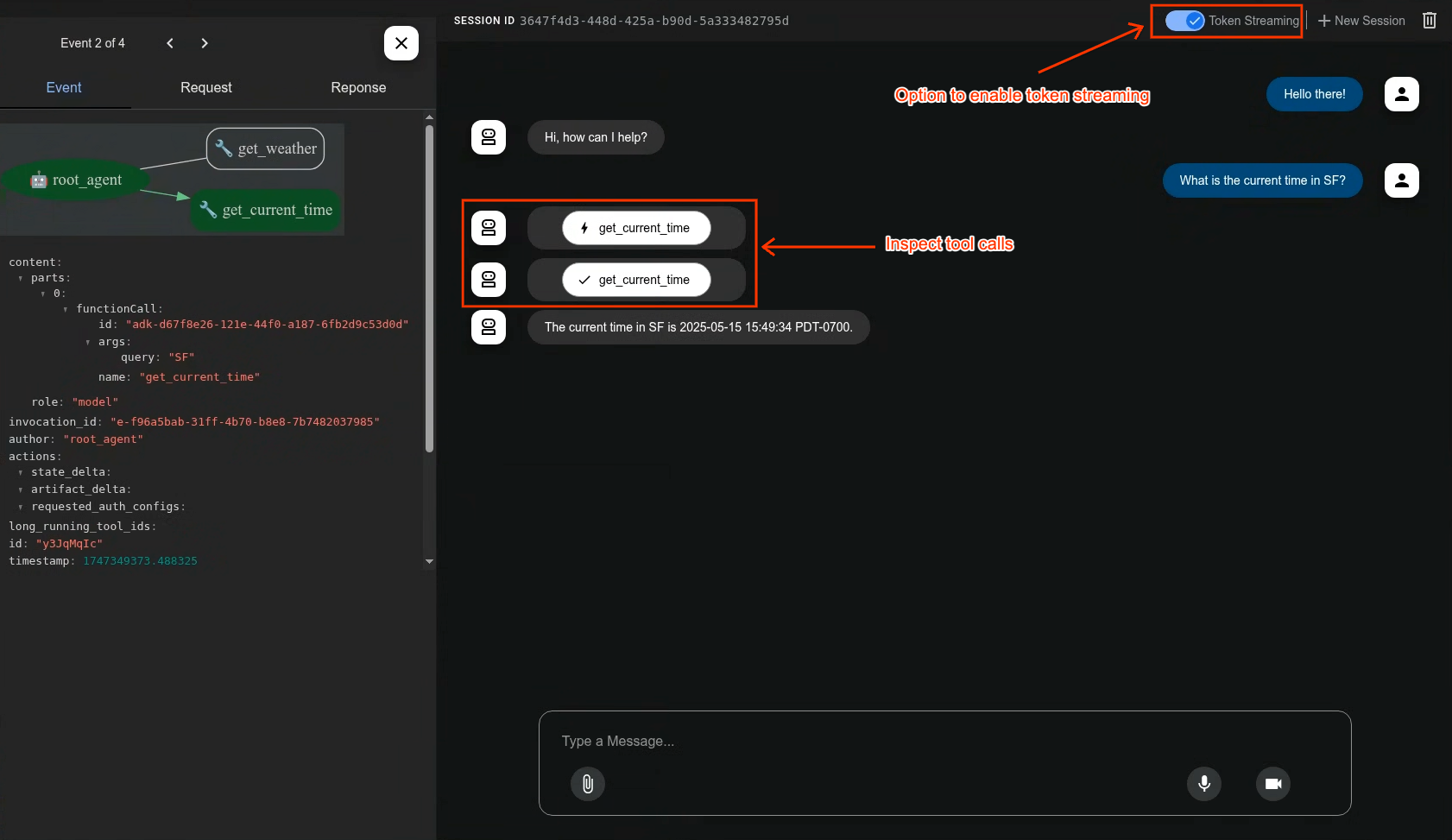
A built-in development UI to help you test, evaluate, debug, and showcase your agent(s).
Evaluate Agents
adk eval \
    samples_for_testing/hello_world \
    samples_for_testing/hello_world/hello_world_eval_set_001.evalset.json
🤝 Contributing
We welcome contributions from the community! Whether it's bug reports, feature requests, documentation improvements, or code contributions, please see our
- General contribution guideline and flow.
- Then if you want to contribute code, please read Code Contributing Guidelines to get started.
Community Repo
We have adk-python-community repothat is home to a growing ecosystem of community-contributed tools, third-party service integrations, and deployment scripts that extend the core capabilities of the ADK.
Vibe Coding
If you are to develop agent via vibe coding the llms.txt and the llms-full.txt can be used as context to LLM. While the former one is a summarized one and the later one has the full information in case your LLM has big enough context window.
Community Events
- [Completed] ADK's 1st community meeting on Wednesday, October 15, 2025. Remember to join our group to get access to the recording, and deck.
📄 License
This project is licensed under the Apache 2.0 License - see the LICENSE file for details.
Happy Agent Building!