
 Hangfei LinandCopybara-Service
13f98c396a
Hangfei LinandCopybara-Service
13f98c396a
Merge https://github.com/google/adk-python/pull/1250

The `Args:` section in the docstring of the `cli_deploy_agent_engine` function was causing formatting issues in the help output, with line breaks not being rendered correctly.

This commit removes the redundant `Args:` section from the docstring. The help text for options is already comprehensively covered by the `help` attributes in the `@click.option` decorators, and `click` automatically lists the command's arguments.

This change ensures that the help output for
`adk deploy agent_engine --help` is clean, readable, and correctly formatted, relying on `click`'s standard help generation mechanisms.

After the fix:

(adk_test234) (base) hangfeilin@Hangfeis-MBP adk-python % adk deploy agent_engine --help
Usage: adk deploy agent_engine [OPTIONS] AGENT

  Deploys an agent to Agent Engine.

  Args:   agent (str): Required. The path to the agent to be deloyed.

  Example:

    adk deploy agent_engine --project=[project] --region=[region]     --staging_bucket=[staging_bucket] path/to/my_agent

Options:
  --project TEXT            Required. Google Cloud project to deploy the agent.
  --region TEXT             Required. Google Cloud region to deploy the agent.
  --staging_bucket TEXT     Required. GCS bucket for staging the deployment artifacts.
  --trace_to_cloud          Optional. Whether to enable Cloud Trace for Agent Engine.
  --adk_app TEXT            Optional. Python file for defining the ADK application (default: a file named agent_engine_app.py)
  --temp_folder TEXT        Optional. Temp folder for the generated Agent Engine source files. If the folder already exists, its
                            contents will be removed. (default: a timestamped folder in the system temp directory).
  --env_file TEXT           Optional. The filepath to the `.env` file for environment variables. (default: the `.env` file in
                            the `agent` directory, if any.)
  --requirements_file TEXT  Optional. The filepath to the `requirements.txt` file to use. (default: the `requirements.txt` file
                            in the `agent` directory, if any.)
  --help                    Show this message and exit.
COPYBARA_INTEGRATE_REVIEW=https://github.com/google/adk-python/pull/1250 from google:fix-1191-agent-engine-help d2d0e89ed1af6ace11abe4e3bed89335dbcf9be5
PiperOrigin-RevId: 769182740
Agent Development Kit (ADK)




An open-source, code-first Python toolkit for building, evaluating, and deploying sophisticated AI agents with flexibility and control.
Important Links: Docs, Samples, Java ADK & ADK Web.
</html>Agent Development Kit (ADK) is a flexible and modular framework for developing and deploying AI agents. While optimized for Gemini and the Google ecosystem, ADK is model-agnostic, deployment-agnostic, and is built for compatibility with other frameworks. ADK was designed to make agent development feel more like software development, to make it easier for developers to create, deploy, and orchestrate agentic architectures that range from simple tasks to complex workflows.
✨ Key Features
-
Rich Tool Ecosystem: Utilize pre-built tools, custom functions, OpenAPI specs, or integrate existing tools to give agents diverse capabilities, all for tight integration with the Google ecosystem.
-
Code-First Development: Define agent logic, tools, and orchestration directly in Python for ultimate flexibility, testability, and versioning.
-
Modular Multi-Agent Systems: Design scalable applications by composing multiple specialized agents into flexible hierarchies.
-
Deploy Anywhere: Easily containerize and deploy agents on Cloud Run or scale seamlessly with Vertex AI Agent Engine.
🤖 Agent2Agent (A2A) Protocol and ADK Integration
For remote agent-to-agent communication, ADK integrates with the A2A protocol. See this example for how they can work together.
🚀 Installation
Stable Release (Recommended)
You can install the latest stable version of ADK using pip:
pip install google-adk
The release cadence is weekly.
This version is recommended for most users as it represents the most recent official release.
Development Version
Bug fixes and new features are merged into the main branch on GitHub first. If you need access to changes that haven't been included in an official PyPI release yet, you can install directly from the main branch:
pip install git+https://github.com/google/adk-python.git@main
Note: The development version is built directly from the latest code commits. While it includes the newest fixes and features, it may also contain experimental changes or bugs not present in the stable release. Use it primarily for testing upcoming changes or accessing critical fixes before they are officially released.
📚 Documentation
Explore the full documentation for detailed guides on building, evaluating, and deploying agents:
🏁 Feature Highlight
Define a single agent:
from google.adk.agents import Agent
from google.adk.tools import google_search

root_agent = Agent(
    name="search_assistant",
    model="gemini-2.0-flash", # Or your preferred Gemini model
    instruction="You are a helpful assistant. Answer user questions using Google Search when needed.",
    description="An assistant that can search the web.",
    tools=[google_search]
)
Define a multi-agent system:
Define a multi-agent system with coordinator agent, greeter agent, and task execution agent. Then ADK engine and the model will guide the agents works together to accomplish the task.
from google.adk.agents import LlmAgent, BaseAgent

# Define individual agents
greeter = LlmAgent(name="greeter", model="gemini-2.0-flash", ...)
task_executor = LlmAgent(name="task_executor", model="gemini-2.0-flash", ...)

# Create parent agent and assign children via sub_agents
coordinator = LlmAgent(
    name="Coordinator",
    model="gemini-2.0-flash",
    description="I coordinate greetings and tasks.",
    sub_agents=[ # Assign sub_agents here
        greeter,
        task_executor
    ]
)
Development UI
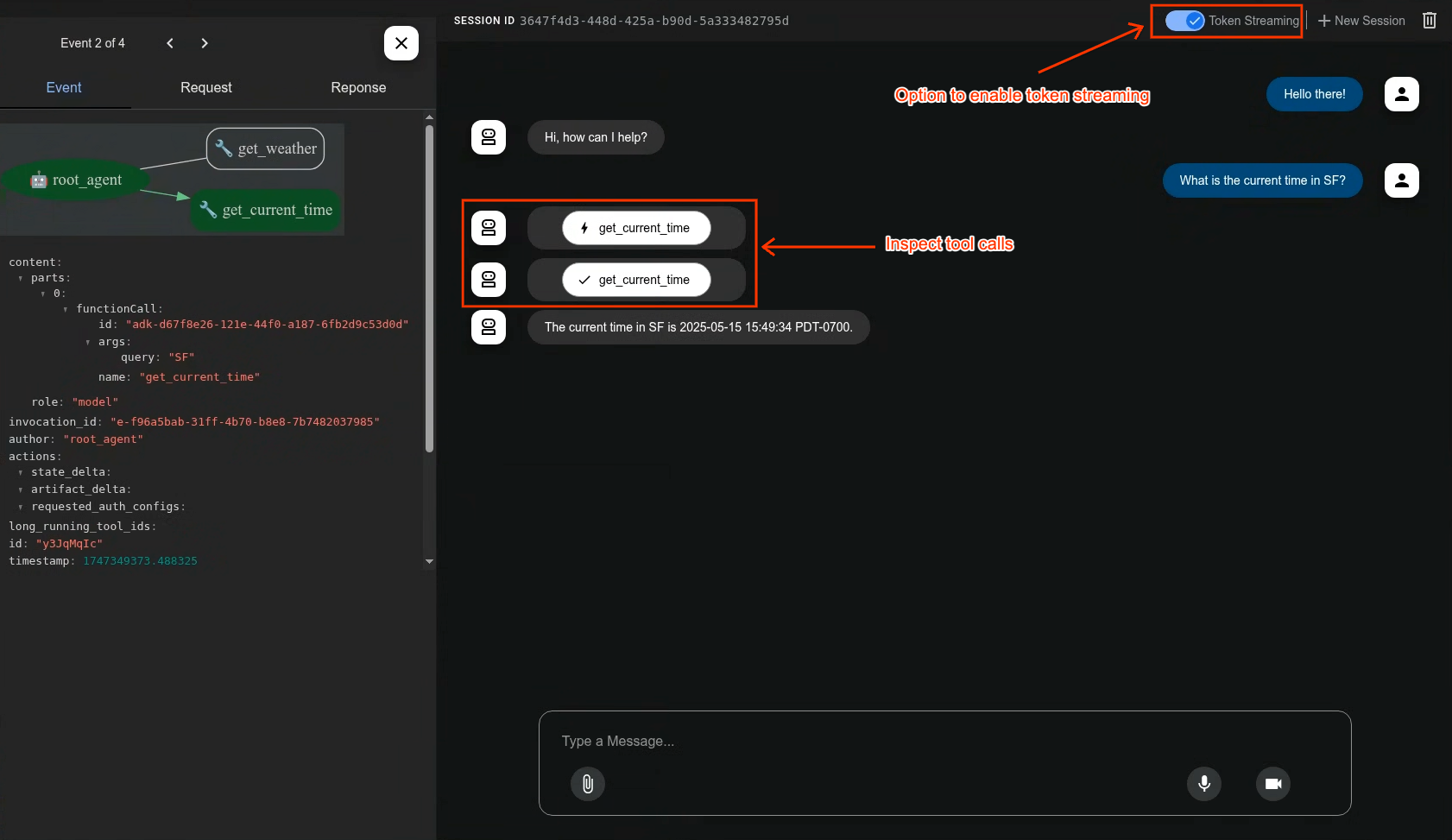
A built-in development UI to help you test, evaluate, debug, and showcase your agent(s).
Evaluate Agents
adk eval \
    samples_for_testing/hello_world \
    samples_for_testing/hello_world/hello_world_eval_set_001.evalset.json
🤝 Contributing
We welcome contributions from the community! Whether it's bug reports, feature requests, documentation improvements, or code contributions, please see our
- General contribution guideline and flow.
- Then if you want to contribute code, please read Code Contributing Guidelines to get started.
📄 License
This project is licensed under the Apache 2.0 License - see the LICENSE file for details.
Happy Agent Building!