# MicroPython for ESP32
# with support for 4MB of psRAM
---
**This repository can be used to build MicroPython for modules with psRAM as well as for regular ESP32 modules without psRAM.**
**As of Sep 18, 2017 full support for psRAM is included into esp-idf and xtensa toolchain**
*Building on* **Linux**, **MacOS** *and* **Windows** *is supported*
---
MicroPython works great on ESP32, but the most serious issue is still (as on most other MicroPython boards) limited amount of free memory.
ESP32 can use external **SPIRAM** (psRAM) to expand available RAM up to 16MB.
Currently, there are several modules & development boards which incorporates **4MB** of psRAM:
* **ESP-WROVER-KIT boards** from Espressif or [AnalogLamb](https://www.analoglamb.com/product/esp-wrover-kit-esp32-wrover-module/).
* **Lolin32 Pro board** from [Wemos](https://wiki.wemos.cc/products:lolin32:lolin32_pro) - **recommended**.
* **WiPy 3.0 board** from [Pycom](https://pycom.io/product/wipy-3/).
* **ESP-WROVER** from Espressif or [ElecrtoDragon](http://www.electrodragon.com/product/esp32-wrover-v4-module-based-esp32/).
* **ALB32-WROVER** (4 MB SPIRAM & 4/8/16 MB Flash) from [AnalogLamb](https://www.analoglamb.com/product/alb32-wrover-esp32-module-with-64mb-flash-and-32mb-psram/).
* **S01**, **L01** and G01 OEM modules from [Pycom](https://pycom.io/webshop#oem-products).
---
Some basic [documentation](https://github.com/loboris/MicroPython_ESP32_psRAM_LoBo/wiki) specific to this **MicroPython** port is available.
Some examples can be found in [modules_examples](https://github.com/loboris/MicroPython_ESP32_psRAM_LoBo/tree/master/MicroPython_BUILD/components/micropython/esp32/modules_examples) directory.
---
This repository contains all the tools and sources necessary to **build working MicroPython firmware** which can fully use the advantages of **4MB** (or more) of **psRAM**
It is **huge difference** between MicroPython running with **less than 100KB** of free memory and running with **4MB** of free memory.
---
## **The MicroPython firmware is built as esp-idf component**
This means the regular esp-idf **menuconfig** system can be used for configuration. Besides the ESP32 configuration itself, many MicroPython options can also be configured via **menuconfig**.
This way many features not available in standard ESP32 MicroPython are enabled, like unicore/dualcore, all Flash speed/mode options etc. No manual *sdkconfig.h* editing and tweaking is necessary.
---
### Features
* MicroPython core based on latest build from [main Micropython repository](https://github.com/micropython/micropython)
* added changes needed to build on ESP32 with psRAM
* Default configuration has **2MB** of MicroPython heap, **20KB** of MicroPython stack, **~200KB** of free DRAM heap for C modules and functions
* MicroPython can be built in **unicore** (FreeRTOS & MicroPython task running only on the first ESP32 core, or **dualcore** configuration (MicroPython task running on ESP32 **App** core)
* ESP32 Flash can be configured in any mode, **QIO**, **QOUT**, **DIO**, **DOUT**
* **BUILD.sh** script is provided to make **building** MicroPython firmware as **easy** as possible
* Internal filesystem is built with esp-idf **wear leveling** driver, so there is less danger of damaging the flash with frequent writes. File system parameters (start address, size, ...) can be set via **menuconfig**.
* **SPIFFS** filesystem is supported and can be used instead of FatFS in SPI Flash. Configurable via **menuconfig**
* **sdcard** support is included which uses esp-idf **sdmmc** driver and can work in **SD mode** (*1-bit* and *4-bit*) or in **SPI mode** (sd card can be connected to any pins). For imformation on how to connect sdcard see the documentation.
* Files **timestamp** is correctly set to system time both on internal fat filesysten and on sdcard
* **Native ESP32 VFS** support for spi Flash & sdcard filesystems.
* **RTC Class** is added to machine module, including methods for synchronization of system time to **ntp** server, **deepsleep**, **wakeup** from deepsleep **on external pin** level, ...
* **Time zone** can be configured via **menuconfig** and is used when syncronizing time from NTP server
* Built-in **ymodem module** for fast transfer of text/binary files to/from host
* Some additional frozen modules are added, like **pye** editor, **urequests**, **functools**, **logging**, ...
* **Btree** module included, can be Enabled/Disabled via **menuconfig**
* **_threads** module greatly improved, inter-thread **notifications** and **messaging** included
* **Neopixel** module using ESP32 **RMT** peripheral with many new features
* **DHT** module implemented using ESP32 RMT peripheral
* **1-wire** module implemented using ESP32 RMT peripheral
* **i2c** module uses ESP32 hardware i2c driver
* **spi** module uses ESP32 hardware spi driver
* **adc** module improved, new functions added
* **curl** module added, many client protocols including FTP and eMAIL
* **ssh** module added with sftp support
* **display** module added with full support for spi TFT displays
* **mqtt** module added, implemented in C, runs in separate task
* **mDNS** module added, implemented in C, runs in separate task
* **telnet** module added, connect to **REPL via WiFi** using telnet protocol
* **ftp** server module added, runs as separate ESP32 task
* **GSM/PPPoS** support, connect to the Internet via GSM module
* **OTA Update** supported
* **Eclipse** project files included. To include it into Eclipse goto File->Import->Existing Projects into Workspace->Select root directory->[select *MicroPython_BUILD* directory]->Finish. **Rebuild index**.
---
### How to Build
---
Detailed instructions on **MicroPython** building process are available in the [Wiki](https://github.com/loboris/MicroPython_ESP32_psRAM_LoBo/wiki/build).
---
#### Using file systems
Detailed information about using MicroPython file systems are available in the [Wiki](https://github.com/loboris/MicroPython_ESP32_psRAM_LoBo/wiki/filesystems).
---
### Some examples
Using new machine methods and RTC:
```python
import machine
rtc = machine.RTC()
rtc.init((2017, 6, 12, 14, 35, 20))
rtc.now()
rtc.ntp_sync(server="" [,update_period=])
# can be empty string, then the default server is used ("pool.ntp.org")
rtc.synced()
# returns True if time synchronized to NTP server
rtc.wake_on_ext0(Pin, level)
rtc.wake_on_ext1(Pin, level)
# wake up from deepsleep on pin level
machine.deepsleep(10000)
ESP32: DEEP SLEEP
# ...
# ...
Reset reason: Deepsleep wake-up
Wakeup source: RTC wake-up
uPY stack: 19456 bytes
uPY heap: 3073664/5664/3068000 bytes (in SPIRAM using malloc)
MicroPython ESP32_LoBo_v3.1.0 - 2017-01-03 on ESP32 board with ESP32
Type "help()" for more information.
machine.wake_reason()
# returns tuple with reset & wakeup reasons
machine.wake_description()
# returns tuple with strings describing reset & wakeup reasons
```
Using sdcard module:
```python
import uos
uos.mountsd()
uos.listdir('/sd')
```
Working directory can be changed to root of the sd card automatically on mount:
```python
>>> import uos
>>> uos.mountsd(True)
---------------------
Mode: SD (4bit)
Name: NCard
Type: SDHC/SDXC
Speed: default speed (25 MHz)
Size: 15079 MB
CSD: ver=1, sector_size=512, capacity=30881792 read_bl_len=9
SCR: sd_spec=2, bus_width=5
>>> uos.listdir()
['overlays', 'bcm2708-rpi-0-w.dtb', ......
>>>
```
---
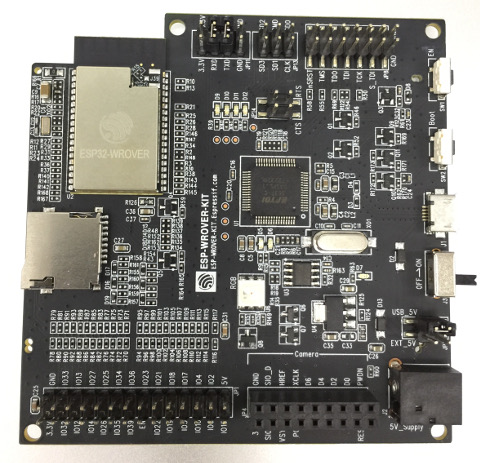
Tested on **ESP-WROVER-KIT v3**
---
### Example terminal session
```
I (0) cpu_start: App cpu up.
I (1569) spiram: SPI SRAM memory test OK
I (1570) heap_init: Initializing. RAM available for dynamic allocation:
D (1570) heap_init: New heap initialised at 0x3ffae6e0
I (1575) heap_init: At 3FFAE6E0 len 00001920 (6 KiB): DRAM
D (1581) heap_init: New heap initialised at 0x3ffc1a00
I (1586) heap_init: At 3FFC1A00 len 0001E600 (121 KiB): DRAM
I (1593) heap_init: At 3FFE0440 len 00003BC0 (14 KiB): D/IRAM
I (1599) heap_init: At 3FFE4350 len 0001BCB0 (111 KiB): D/IRAM
D (1606) heap_init: New heap initialised at 0x4009d70c
I (1611) heap_init: At 4009D70C len 000028F4 (10 KiB): IRAM
I (1617) cpu_start: Pro cpu start user code
I (1622) spiram: Adding pool of 4096K of external SPI memory to heap allocator
I (1630) spiram: Reserving pool of 32K of internal memory for DMA/internal allocations
D (1646) clk: RTC_SLOW_CLK calibration value: 3305242
D (89) intr_alloc: Connected src 46 to int 2 (cpu 0)
D (90) intr_alloc: Connected src 57 to int 3 (cpu 0)
D (90) intr_alloc: Connected src 24 to int 9 (cpu 0)
I (95) cpu_start: Starting scheduler on PRO CPU.
D (0) intr_alloc: Connected src 25 to int 2 (cpu 1)
I (4) cpu_start: Starting scheduler on APP CPU.
D (119) heap_init: New heap initialised at 0x3ffe0440
D (125) heap_init: New heap initialised at 0x3ffe4350
D (130) intr_alloc: Connected src 16 to int 12 (cpu 0)
D (145) nvs: nvs_flash_init_custom partition=nvs start=9 count=4
D (178) intr_alloc: Connected src 34 to int 3 (cpu 1)
D (187) intr_alloc: Connected src 22 to int 4 (cpu 1)
Internal FS (SPIFFS): Mounted on partition 'internalfs' [size: 1048576; Flash address: 0x2D0000]
----------------
Filesystem size: 956416 B
Used: 512 B
Free: 955904 B
----------------
FreeRTOS running on BOTH CORES, MicroPython task running on both cores.
Running from partition at 10000, type 10 [MicroPython_1].
Reset reason: Power on reset
uPY stack: 19456 bytes
uPY heap: 3073664/5664/3068000 bytes (in SPIRAM using malloc)
MicroPython ESP32_LoBo_v3.1.0 - 2017-01-03 on ESP32 board with ESP32
Type "help()" for more information.
>>>
>>> import micropython, machine
>>>
>>> micropython.mem_info()
stack: 752 out of 19456
GC: total: 3073664, used: 5904, free: 3067760
No. of 1-blocks: 19, 2-blocks: 7, max blk sz: 325, max free sz: 191725
>>>
>>> machine.heap_info()
Heap outside of MicroPython heap:
---------------------------------
Free: 239920
Allocated: 52328
Minimum free: 233100
Total blocks: 85
Largest free block: 113804
Allocated blocks: 79
Free blocks: 6
SPIRAM info:
------------
Free: 1048532
Allocated: 3145728
Minimum free: 1048532
Total blocks: 2
Largest free block: 1048532
Allocated blocks: 1
Free blocks: 1
>>>
```