 Dave Alden
cordova-check-plugins
A CLI tool to check for updates / manage updating plugins in Cordova/Phonegap projects.
Purpose
This tool intends to provide a convenient way to check if the plugins contained within a Cordova project are up-to-date with their remote source and to optionally update them, either automatically or interactively.
Supported plugin sources
- Plugins installed via the npm registry (with optionally specified versions)
- Plugins installed directly from GitHub repos (with optionally specified branches/tags)
- Plugins installed from local sources (on the local machine)
For example:
cordova-plugin-camera
cordova-plugin-geolocation@*
cordova-plugin-whitelist@1
cordova-plugin-file@4.0.0
cordova-plugin-inappbrowser@~1.1.1
https://github.com/dpa99c/cordova-custom-config
https://github.com/apache/cordova-plugin-battery-status#r1.0.0
git://github.com/apache/cordova-plugin-battery-status.git#r1.0.0
/some/local/path/to/a/plugin
Installation
npm install -g cordova-check-plugins
Usage
Once cordova-check-plugins is installed globally, it can be run from the root of any Cordova/Phonegap project:
$ cordova-check-plugins
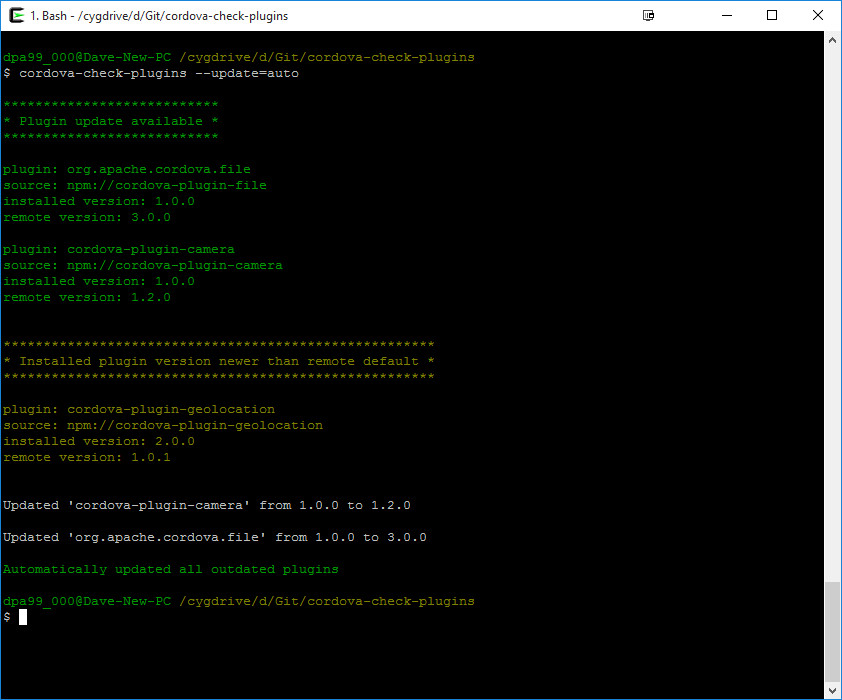
By default, it will display lists of plugins under the following categories:
- "Plugin update available" - installed plugins for which a new remote version is available (displayed in green)
- "Installed plugin version newer than remote default" - installed plugins for which the installed version is newer than the default remote version (displayed in yellow)
- "Unknown plugin version mismatch" - installed plugins for which the remote version could not be determined as older/newer (displayed in yellow)
- "Error checking plugin version" - installed plugins for which an error occurred while checking the plugin versions (displayed in red)
- "Up-to-date plugins" - installed plugins which are up-to-date with the detected remote version (displayed in grey)
Plugins for which updates are available can optionally be updated either interactively or automatically via the --update command-line option.
Command-line options
-h or --help
$ cordova-check-plugins -h
$ cordova-check-plugins --help
Displays usage information.
-v or --version
$ cordova-check-plugins -v
$ cordova-check-plugins --version
Displays currently installed version of this module.
--verbose
Displays detailed log output.
$ cordova-check-plugins --verbose
--update={mode}
Specifies update mode for plugins which have updates available. Valid modes are:
none- (default) don't update pluginsinteractive- using interactive CLI to choose which plugins to update manuallyauto- automatically update any plugins for which an update is available
i.e.
$ cordova-check-plugins --update=none
    same as:  $ cordova-check-plugins
$ cordova-check-plugins --update=interactive
$ cordova-check-plugins --update=auto
--unconstrain-versions
$ cordova-check-plugins --unconstrain-versions
Unconstrains checking of remote version so the highest remote version will be displayed regardless of specified version.
By default, if the version was specified when the plugin was installed, the specified version number will be used to constrain which remote versions are returned.
For example, let's say cordova-plugin-foo has remote versions 1.0.1, 1.0.2, 1.1.0, 2.0.0:
- If
cordova plugin install cordova-plugin-foowas used to install the plugin, thencordova-check-pluginswill return the highest remote version as2.0.0 - If
cordova plugin install cordova-plugin-foo@1was used to install the plugin, thencordova-check-pluginswill return the highest remote version as1.1.0 - If
cordova plugin install cordova-plugin-foo@1.0was used to install the plugin, thencordova-check-pluginswill return the highest remote version as1.0.2 - If
cordova plugin install cordova-plugin-foo@1.0.1was used to install the plugin, thencordova-check-pluginswill return the highest remote version as1.0.1 - If
cordova plugin install cordova-plugin-foo@~1.0.1was used to install the plugin, thencordova-check-pluginswill return the highest remote version as1.0.2
Calling cordova-check-plugins --unconstrain-versions will ignore the specified version, so in the example above, all cases would return 2.0.0.
Note that this only option affects plugins whose source is npm.
It will have no effect on plugins installed directly from github repos.
This is because it's not possible to distinguish if github URLs contain a branch or a tag reference. Both are specified using #.
So it's not possible to distinguish a tag URL (e.g. http://github.com/some/repo#r1.2.3) from a branch URL (e.g. http://github.com/some/repo#some_branch).
--force-update
Forces the update of dependent plugins.
By default, Cordova/Phonegap will not allow the removal of plugins on which other plugins are dependent, and therefore will not allow them to be updated.
For example, cordova-plugin-file-transfer depends on cordova-plugin-file.
By setting this option, both plugins will be updated (if updates are available).
Without it, only the "parent" plugin - in this case cordova-plugin-file-transfer - will be updated.
$ cordova-check-plugins --update=auto --force-update
--save
Save changes to the config.xml
$ cordova-check-plugins --update=auto --force-update --save
--github-username and --github-password
Allows specification of user credentials for GitHub, increasing API request limit to 5000 requests/hour.
When checking remote versions for that are hosted on GitHub, by default unauthenticated access to the GitHub API is used. This is rate limited to 60 requests/hour. For most users, this should be sufficient, but if this module is used in a Continuous Integration environment with a project using multiple GitHub-hosted plugins, that rate can be exceeded. By specifying valid GitHub user credentials, these will be used when communicating with the GitHub API, which increases the number of allowed requests to 5000 requests/hour.
License
The MIT License
Copyright (c) 2015 Dave Alden / Working Edge Ltd.
Permission is hereby granted, free of charge, to any person obtaining a copy of this software and associated documentation files (the "Software"), to deal in the Software without restriction, including without limitation the rights to use, copy, modify, merge, publish, distribute, sublicense, and/or sell copies of the Software, and to permit persons to whom the Software is furnished to do so, subject to the following conditions:
The above copyright notice and this permission notice shall be included in all copies or substantial portions of the Software.
THE SOFTWARE IS PROVIDED "AS IS", WITHOUT WARRANTY OF ANY KIND, EXPRESS OR IMPLIED, INCLUDING BUT NOT LIMITED TO THE WARRANTIES OF MERCHANTABILITY, FITNESS FOR A PARTICULAR PURPOSE AND NONINFRINGEMENT. IN NO EVENT SHALL THE AUTHORS OR COPYRIGHT HOLDERS BE LIABLE FOR ANY CLAIM, DAMAGES OR OTHER LIABILITY, WHETHER IN AN ACTION OF CONTRACT, TORT OR OTHERWISE, ARISING FROM, OUT OF OR IN CONNECTION WITH THE SOFTWARE OR THE USE OR OTHER DEALINGS IN THE SOFTWARE.